Macro Guitar Nut/it
|
|
| Description |
|---|
| Create guitar nuts. Macro di FreeCAD per creare forme complesse di capotasti per chitarra. In particolare, può creare un capotasto con la parte inferiore delle fessure delle corde all'altezza desiderata sopra una tastiera col raggio desiderato. Il diametro di ciascuna corda è configurabile e le fessure possono essere adattate per tenere conto della larghezza necessaria per evitare legature. Consulta la sezione Utilizzo per ulteriori dettagli. Macro version: 0.1 Last modified: 2020-01-27 FreeCAD version: All Download: ToolBar Icon Author: jsiddall |
| Author |
| jsiddall |
| Download |
| ToolBar Icon |
| Links |
| Macros recipes How to install macros How to customize toolbars |
| Macro Version |
| 0.1 |
| Date last modified |
| 2020-01-27 |
| FreeCAD Version(s) |
| All |
| Default shortcut |
| None |
| See also |
| Macro_Guitar_fretboard |
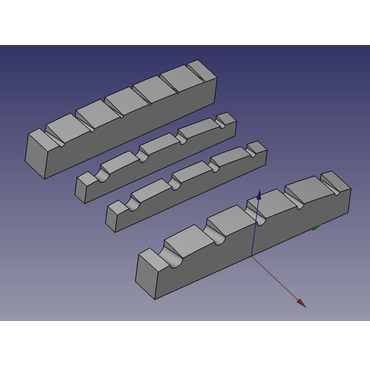
Descrizione
Guitar Nut Maker è uno script macro di FreeCAD che crea forme complesse di capotasti per chitarra.
Questa macro crea un capotasto con la parte inferiore delle fessure delle corde all'altezza desiderata sopra una tastiera col raggio desiderato.
Le fessure possono essere allargate nella parte posteriore del capotasto rispetto alla faccia e le fessure possono essere create con l'angolo di interruzione desiderato. Gli slot possono trovarsi su centri uguali o avere la stessa spaziatura tra loro.
Il diametro di ciascuna corda è configurabile e le fessure possono essere rese più larghe di una quantità configurabile rispetto alla corda per evitare che si inceppino. La parte superiore del capotasto è sferica e può essere configurata sopra/sotto il punto centrale delle corde. I bordi del capotasto non sono sagomati, né la parte superiore è sagomata dalla faccia alla parte posteriore, ma queste trasformazioni possono essere applicate manualmente in FreeCAD, o addirittura dopo che la parte è stata fresata.
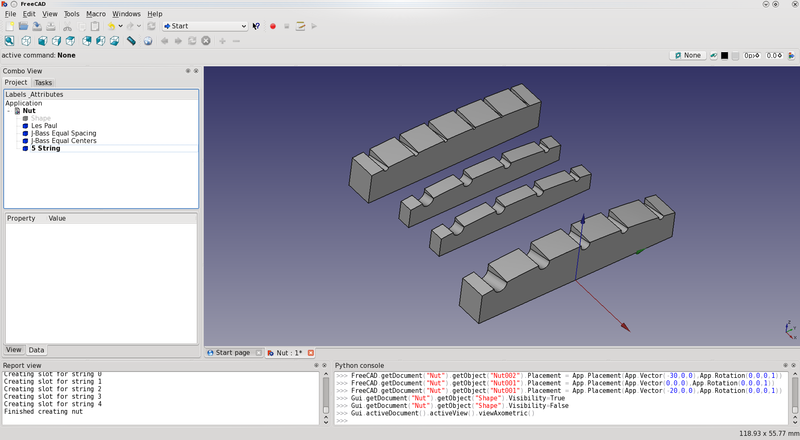
Risultati usando la macro Guitar Nut Maker
Utilizzo
- Scaricare la macro dal Addon Manager
- Eseguire la macro
Limitativo
- Il file macro deve essere modificato con i parametri del dado desiderati prima dell'uso.
Script
Icona della barra degli strumenti 
GuitarNut.FCMacro
# FreeCAD Guitar Nut Macro
# This macro creates a guitar/bass nut with conical slots at the
# desired spacing and diameter to export to CAM software

__Name__ = 'Guitar Nut'
__Comment__ = 'This macro creates a guitar/bass nut'
__Author__ = 'Jeff Siddall'
__Version__ = '0.1'
__Date__ = '2020-01-27'
__License__ = 'GPL-3.0-or-later'
__Web__ = ''
__Wiki__ = ''
__Icon__ = 'https://wiki.freecad.org/images/9/94/Macro_Guitar_Nut.png'
__Help__ = 'Macro file must be edited with the desired nut parameters before use'
__Status__ = 'Beta'
__Requires__ = ''
__Communication__ = ''
__Files__ = ''

import FreeCAD, Part, math
from FreeCAD import Base, Vector

class Nut():
    if App.ActiveDocument is None:
        # Create new document called "Nut" if there is no open document
        doc = App.newDocument("Nut")

# Enter desired values below
# Unless specified, units are mm
equalcenters = 0 # If equalcenters = 1 then the spacing of the strings is equal; if 0 then the space between the strings is equal
strings = 5 # Number of strings

# Always enter values below with a decimal point, even if that means adding ".0" on the end!
length = 49.0 # Nut length (neck width); 38.1 mm = 1.5", 41.275 = 1-5/8"
width = 6.350 # Nut width; 3.175 mm = 1/8"; 6.35 mm = 1/4"
fretboardmaxheight = 6.350 # Maximum fretboard height above the bottom of the nut slot; 6.35 mm = 1/4"
radius = 184.15 # Fretboard radius; 184.15 mm = 7.25"; 304.8 = 12"; 406.4 mm = 16"
# List of string thicknesses, starting at bottom string, separated by commas, enclosed in square brackets
# Bottom string 1.143 mm = 0.045"
# 1.651 mm = 0.065"
# 2.159 mm = 0.085"
# Top string on a 4 string 2.667 mm = 0.105"
# Top string on a 5 string 3.175 mm = 0.125"
stringthickness = [1.143, 1.651, 2.159, 2.667, 3.175] # 5 string bass, 45-125/ 4 string bass 45-105
#stringthickness = [3.175, 2.667, 2.159, 1.651, 1.143] # Reverse string, 5 string bass, 45-125/ 4 string bass 45-105
#stringthickness = [0.254, 0.3302, 0.4318, 0.6604, 0.9144, 1.1684] # 6 string guitar, 10-46
stringheight = 1.1938 # Height of bottom of strings above fretboard; 1.1938 mm = 0.047" or the height of a typical medium/jumbo fret
slotmargin = 0.05 # extra slot width on each side of the string; 0.05 mm = 0.00197"
overhang = 3.0 # Distance from edge of each outside string to end of nut
breakangle = 14.0 # Angle of the nut slot in degrees; this should be greater than the actual string angle to ensure the string only contacts at the leading edge of the nut
slotradincrease = 0.2 # How much bigger the radius of the end of the slot is than the face
slotdepthfactor = 1.3 # Factor to control how deep the slots should be.  Values greater than 1 create deeper slots than default.
toparcoffsetfactor = 1.8 # Factor to control how far off-center the nut top arc is.  Adjust as required.
# End of user configuration variables
# Do not make any changes below this line!

stringindex = 0 # Start at the bottom string
stringspacing = 0

# Find the centers of the outside strings
# Bottom string
center1 = (length / 2) - overhang - (stringthickness[0] / 2)

# Top string
center2 = -((length / 2) - overhang - (stringthickness[strings - 1] / 2))

# Outside string values
outsidestringradiusdiff = (stringthickness[strings - 1] - stringthickness[0]) / 2
outsidestringavgradius = (stringthickness[strings - 1] + stringthickness[0]) / 2 / 2
centerspacing = center1 - center2

# Find the string spacings for both spacing models
if equalcenters:
    # Calculate the correct spacing for equal spaced strings
    stringspacing = centerspacing / (strings - 1)

else:
    # Calculate the space between strings
    totalstringwidth = 0
    stringindex1 = 0
    while (stringindex1 < strings):
        totalstringwidth = totalstringwidth + stringthickness[stringindex1]
        stringindex1 = stringindex1 + 1

    stringspacing = (centerspacing - totalstringwidth + (2 * outsidestringavgradius)) / (strings - 1)

print("Creating nut blank")
# Height is much larger than needed but will be cut down with the "common" operation later
nutshape = Part.makeBox(width, length, ((fretboardmaxheight + stringheight) * 2), Vector(-width, -(length / 2), 0))

print("Creating nut top surface")
# Make a sphere to shape the top of the nut, which should pass through  each string center
# Because the thickness of the strings varies, the Y-position of the sphere needs to be compensated
# The fretboard "z" portion is:
fretboardz = radius - (((radius ** 2) - ((centerspacing / 2) ** 2)) ** 0.5)

# The formula to calculate the effective radius of the center of outside strings is:
# r^2 = z^2 + y^2
# r^2 = ((r - (outsidestringradiusdiff + fretboardz))^2) + ((centerspacing/2)^2)
# r^2 = r^2 - 2r*(outsidestringradiusdiff + fretboardz) + ((outsidestringradiusdiff + fretboardz)^2) + (centerspacing^2)
# 2r*(outsidestringradiusdiff + fretboardz) = ((outsidestringradiusdiff + fretboardz)^2) + (centerspacing^2)
# r  = ((outsidestringradiusdiff + fretboardz)/2) + ((centerspacing^2)/(2*(outsidestringradiusdiff + fretboardz)))
nutradius = ((abs(outsidestringradiusdiff / 4) + fretboardz) / 2) + (((centerspacing / 2) ** 2) / (2 * (abs(outsidestringradiusdiff / 4) + fretboardz)))

# The center of the arc of the nut radius must also be offset
# This formula was derived empirically so might nead adjusting
yoffset = -centerspacing / 2 * toparcoffsetfactor * (outsidestringradiusdiff / (2 * outsidestringavgradius)) * (1 - (nutradius / radius))

top = Part.makeSphere(nutradius, Vector(0, yoffset, (-nutradius + fretboardmaxheight + stringheight + (outsidestringavgradius * slotdepthfactor) + slotmargin)))

nutshape = nutshape.common(top)

cumulativestringwidth = 0 # Add up the amount of string thickness for equal spacing

# Build the slots
while (stringindex < strings):
    print("Creating slot for string " + str(stringindex))
    ypos = 0

    if equalcenters:
        # For equal centers move each string over by the fixed amount of stringspacing
        ypos = center1 - (stringindex * stringspacing)

    else:
        # For equal spacing adjust for the thickness of each string

        # Add up the cumulative string thickness
        if stringindex == 0:
            # For the first string the thickness is already included in center1 so don't add anything
            cumulativestringwidth = 0

        else:
            # Add half the previous string and half this string
            cumulativestringwidth = cumulativestringwidth + (stringthickness[stringindex] / 2) + (stringthickness[stringindex - 1] / 2)

        ypos = center1 - (stringindex * stringspacing) - cumulativestringwidth

    zstartpos = (((radius ** 2) - (ypos ** 2)) ** 0.5) - radius + fretboardmaxheight + stringheight + (stringthickness[stringindex] / 2) + slotmargin # Cartesian coordinate formula: z = sqrt(r^2 - y^2)
    # calculate the end of the slot based on the string break angle
    zendpos = zstartpos - (math.tan(math.radians(breakangle)) * width)

    slotstartrad = (stringthickness[stringindex] / 2) + slotmargin
    slotendrad = slotstartrad + slotradincrease

    # Make the string slot as 2 circles offset in the Z axis to create the break angle, then made into a face, then extruded up to allow the slot to protrude to the nut surface
    slotstart = Part.makeCircle(slotstartrad, Vector(0, ypos, zstartpos), Vector(1, 0, 0), 180, 360)
    slotend = Part.makeCircle(slotendrad, Vector(-width, ypos, zendpos), Vector(1, 0, 0), 180, 360)
    slotbottom = Part.makeRuledSurface(slotstart, slotend)
    slotextrude = slotbottom.extrude(Vector(0, 0, ((fretboardmaxheight + stringheight) * 2)))

    nutshape = nutshape.cut(slotextrude)
    stringindex = stringindex + 1

nut = App.ActiveDocument.addObject("Part::Feature","Nut")
nut.Shape = nutshape
print("Finished creating nut")
Link
Forum discussion Guitar fretboard macro / guitar body