Macro TNP Solution/it
|
|
| Description |
|---|
| Questa è una soluzione al problema della denominazione topologica. Macro version: 1.0 Last modified: 16-08-2022 Download: ToolBar Icon Author: Dprojects |
| Author |
| Dprojects |
| Download |
| ToolBar Icon |
| Links |
| Macros recipes How to install macros How to customize toolbars |
| Macro Version |
| 1.0 |
| Date last modified |
| 16-08-2022 |
| FreeCAD Version(s) |
| None |
| Default shortcut |
| None |
| See also |
| None |

Descrizione

Questa è una soluzione al problema della denominazione topologica, descritta in modo esemplificativo nella pagina: Problema della denominazione topologica
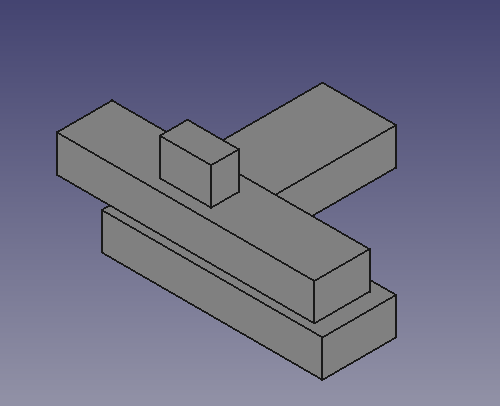
Se si costruisce un oggetto su un altro oggetto, anche con uno schizzo, è facile da risolvere, perché si conoscono due cose:
- I punti di uno schizzo fanno sempre parte della faccia sottostante.
- Lo schizzo e la faccia sottostante si trovano sullo stesso piano.
Per risolvere il problema della denominazione topologica si può:
Conservare la chiave prima di qualsiasi operazione:
È necessario memorizzare solo la chiave prima di qualsiasi operazione. Per l'esempio descritto nella pagina Problema della denominazione topologica, l'oggetto si trova sul piano XY. Quindi, utilizzo il valore dell'asse Z dal centro del riquadro di delimitazione dello schizzo:
ad = FreeCAD.ActiveDocument
p2 = ad.Pad002
s2 = p2.Profile[0]
key = round(s2.Shape.BoundBox.Center[2], precision)
Successivamente, cercare su tutte le facce la chiave memorizzata:
Dopo il ridimensionamento, cercare su tutte le facce la chiave memorizzata. Perché se lo schizzo e la faccia si trovassero sullo stesso piano XY, il valore dell'asse Z sarebbe lo stesso per entrambi. In Ambiente PartDesign, non è possibile spostare il terzo pad sopra il secondo pad, per creare uno spazio tra di essi; si tratta di un singolo oggetto, il pad successivo con lo schizzo toccherà sempre la faccia. Sulla nuova faccia il valore dell'asse Z sarà sempre lo stesso della chiave memorizzata. Quindi, si restituisce l'indice della faccia. Non c'è altro da fare.
def getFaceIndex(iObj, iBB):

	index = 0

	for f in iObj.Shape.Faces:

		index += 1
		bb = round(f.BoundBox.Center[2], precision)
		if bb == iBB:
			return index

	return -1
Passi finali
Alla fine, si assegna la nuova faccia allo Sketch e si ricalcola. A dire il vero, la parte più difficile è stata assegnare la faccia a Sketch.Support, in quanto la sintassi è davvero complicata ;-)
Codice per l'esempio
Il file per i test è stato caricato sul forum di FreeCAD: TNP.FCStd.
__Title__="TNP_solution"
__Author__ = "Dprojects"
__Version__ = "1.0"
__Date__    = "2022-08-16"
__Comment__ = ""
__Web__ = "https://github.com/dprojects/Woodworking"
__Wiki__ = "https://wiki.freecad.org/TNP_solution"
__Icon__  = "https://wiki.freecad.org/images/e/e4/TNP_solution.png"
__IconW__  = "https://wiki.freecad.org/images/e/e4/TNP_solution.png"
__Help__ = "solution for Topological Naming Problem"
__Status__ = "stable"
__Requires__ = ""
__Communication__ = "https://wiki.freecad.org/index.php?title=User:Dprojects"

# ####################################################################
#
# This is solution for Topological Naming Problem described at
# https://wiki.freecad.org/Topological_naming_problem
#
# MIT License
#
# Copyright (c) 2022 Darek L github.com/dprojects
#
# Permission is hereby granted, free of charge, to any
# person obtaining a copy of this software and associated
# documentation files (the "Software"), to deal in the
# Software without restriction, including without limitation
# the rights to use, copy, modify, merge, publish, distribute,
# sublicense, and/or sell copies of the Software, and to permit
# persons to whom the Software is furnished to do so, subject
# to the following conditions:
#
# The above copyright notice and this permission notice shall
# be included in all copies or substantial portions of the Software.
#
# THE SOFTWARE IS PROVIDED "AS IS", WITHOUT WARRANTY OF ANY KIND,
# EXPRESS OR IMPLIED, INCLUDING BUT NOT LIMITED TO THE WARRANTIES
# OF MERCHANTABILITY, FITNESS FOR A PARTICULAR PURPOSE AND
# NONINFRINGEMENT. IN NO EVENT SHALL THE AUTHORS OR COPYRIGHT
# HOLDERS BE LIABLE FOR ANY CLAIM, DAMAGES OR OTHER LIABILITY,
# WHETHER IN AN ACTION OF CONTRACT, TORT OR OTHERWISE, ARISING FROM,
# OUT OF OR IN CONNECTION WITH THE SOFTWARE OR THE USE OR OTHER
# DEALINGS IN THE SOFTWARE.
#
# ####################################################################

import FreeCAD

# this should be set according
# FreeCAD user GUI precision settings
precision = 5

# global settings
ad = FreeCAD.ActiveDocument

# middle object to be resized
p1 = ad.Pad001
s1 = p1.Profile[0]

# top object bottom to store key
p2 = ad.Pad002
s2 = p2.Profile[0]

# ####################################################################
def getFaceIndex(iObj, iBB):

	index = 0

	for f in iObj.Shape.Faces:

		index += 1
		bb = round(f.BoundBox.Center[2], precision)

		FreeCAD.Console.PrintMessage("\n")
		FreeCAD.Console.PrintMessage(index)
		FreeCAD.Console.PrintMessage(" ")
		FreeCAD.Console.PrintMessage(bb)

		if bb == iBB:
			FreeCAD.Console.PrintMessage(" <=== found")
			return index

	return -1

# ####################################################################
def makeTNP():

	# set key
	key = round(s2.Shape.BoundBox.Center[2], precision)

	# resize and cause TNP
	s1.setDatum(9, FreeCAD.Units.Quantity('350'))

	# recompute
	s1.recompute()
	p1.recompute()
	ad.recompute()

	FreeCAD.Console.PrintMessage("\n\n")
	FreeCAD.Console.PrintMessage("Stored key:"+str(key))
	FreeCAD.Console.PrintMessage("\n")

	# search all faces for solution
	solutionIndex = getFaceIndex(p1, key)
	solution = "Face"+str(solutionIndex)

	FreeCAD.Console.PrintMessage("\n\n")
	FreeCAD.Console.PrintMessage("Solution: "+solution)

	# set exact face to Sketch
	s2.Support = (p1, (solution,))
	ad.recompute()

# ####################################################################
def moveBack():

	s1.setDatum(9, FreeCAD.Units.Quantity('250'))
	s2.Support = (p1, ('Face13',))
	ad.recompute()

# ####################################################################
# main
# ####################################################################

# uncomment what you want
makeTNP()
#moveBack()

# ####################################################################
LA Soluzione
Il codice qui sopra mostra come risolvere l'esempio del problema di denominazione topologica descritto in: Problema di denominazione topologica, ma è possibile utilizzare esattamente le stesse regole per risolvere altri problemi. L'approccio è semplice:
- Memorizzare la chiave prima di qualsiasi operazione
- Cercare la chiave dopo l'operazione
L'implementazione specifica può essere diversa. In questo esempio il piano è XY, ma è possibile fare esattamente la stessa cosa per altri assi. È anche possibile scegliere un altro tasto. Nel progetto Woodworking [1] si eseguono molte operazioni su oggetti inesistenti, quindi si è dovuto risolvere il problema della denominazione topologica diverse volte.
Qui si convertono gli oggetti cubo in oggetti con spessore di PartDesign:

Nell'esempio seguente, si trasformano i cubi in smussi di PartDesign, quindi si è dovuto memorizzare la chiave per gli spigoli:

This example below is little bit more complicated, because as you see at the GUI screen, the references to the object and face changes automatically. But also to make a hole, I call a function defined in my library not directly in the tool. So, I had to use a small trick with selection and deselection, to get the new reference:

There are many such problems when programming in FreeCAD, but they can all be solved in a similar way. I hope, this helps.