Macro CSV2Objects
|
|
| Description |
|---|
| Generate large batches of 3D text objects from CSV files, mapped to horizontal sketch guide lines. Macro version: 0.1.0 Last modified: 2026-01-04 Author: DasLukas |
| Author |
| DasLukas |
| Download |
| None |
| Links |
| Macros recipes How to install macros How to customize toolbars |
| Macro Version |
| 0.1.0 |
| Date last modified |
| 2026-01-04 |
| FreeCAD Version(s) |
| None |
| Default shortcut |
| None |
| See also |
Description
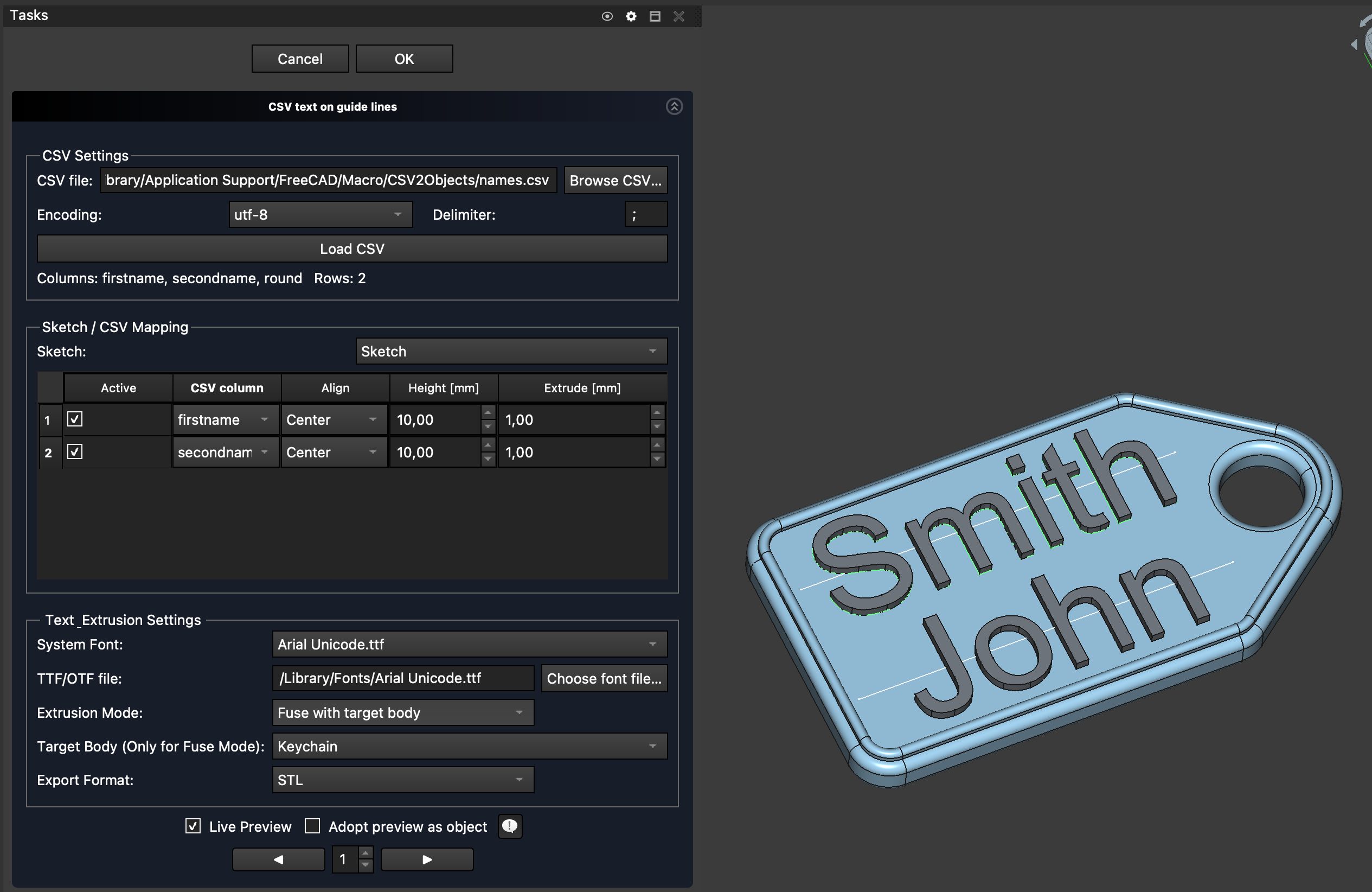
CSV2Objects is a FreeCAD macro that generates large batches of 3D text objects with CSV-driven values placed on horizontal sketch guide lines.
It maps CSV columns to guide lines, creates ShapeStrings on the sketch plane, extrudes them, optionally fuses them with a base solid, and supports batch export to STL, 3MF and STEP. The original document state is restored after the final export.
Temporary code for external macro link. Do not use this code. This code is used exclusively by Addon Manager. Link for optional manual installation: Macro
# This code is copied instead of the original macro code
# to guide the user to the online download page.
# Use it if the code of the macro is larger than 64 KB and cannot be included in the wiki
# or if the RAW code URL is somewhere else in the wiki.

from PySide import QtGui, QtCore

diag = QtGui.QMessageBox(QtGui.QMessageBox.Information,
    "Information",
    "This macro must be downloaded from this link\n"
    "\n"
    "https://raw.githubusercontent.com/DasLukas/CSV2Objects/main/CSV2Objects.FCMacro" + "\n"
    "\n"
    "Quit this window to access the download page")

diag.setWindowFlags(QtCore.Qt.WindowStaysOnTopHint)
diag.setWindowModality(QtCore.Qt.ApplicationModal)
diag.exec_()

import webbrowser
webbrowser.open("https://raw.githubusercontent.com/DasLukas/CSV2Objects/main/CSV2Objects.FCMacro")
Features
- Reads CSV files (configurable encoding and delimiter) with row/column information
- Maps CSV columns to horizontal sketch guide lines
- Per-line controls:
- Alignment (Left / Center / Right / Auto-fit)
- Text height
- Extrusion height
- Live preview with row navigator (preview any CSV row)
- Optional Adopt preview as object mode to create persistent editable objects without exporting
- Optional boolean fuse with a target body (per generated row)
- System font picker with fallback to custom TTF/OTF font files
- Export formats: STL, 3MF, STEP
- Output folder is created next to the current ``.FCStd`` file
- Filenames include the document name and used CSV values (sanitized); existing exports of the same type are replaced
- Document is reverted to its original state after export
Installation
You can install the macro in several ways:
- Via the Addon Manager (Macros tab) once this macro is indexed.
- Manually by downloading the macro file from GitHub:
https://raw.githubusercontent.com/DasLukas/CSV2Objects/main/CSV2Objects.FCMacro
and copying it into your FreeCAD macro directory.
Manual installation paths
- macOS: ``~/Library/Preferences/FreeCAD/Macro``
- Windows: ``%APPDATA%\\FreeCAD\\Macro``
- Linux: ``~/.FreeCAD/Macro`` (or ``~/.local/share/FreeCAD/Macro`` on some systems)
Usage
- Open a saved document containing a sketch with horizontal guide lines (optionally with a target solid).
- Run the macro CSV2Objects.FCMacro from the Macro menu.
- In the task panel, choose a CSV file, encoding and delimiter, then click Load CSV.
- Pick a sketch (guide lines are detected automatically) and assign CSV columns to each active line.
- Choose alignment (or Auto-fit), per-line text height, and per-line extrusion height.
- Select a font, extrusion mode and export format (STL / 3MF / STEP).
- Use the live preview to adjust your settings (optional).
- Press OK to generate and export geometry for all CSV rows.
- Press Cancel to clear preview objects and close the dialog.
Notes
- The document must be saved before export so the output folder can be determined.
- The dock overlay “X” in the Tasks panel toggles the panel visibility and does not close the dialog — use Cancel instead.
Script
Macro CSV2Objects