Macro Python Assistant Window/it
|
|
| Descrizione |
|---|
| Questa macro fornisce un ambiente di lavoro per tagliare/copiare/incollare del codice Python, segmentato in modo che possano essere selezionate differenti sezioni e che sia persistente tra le sessioni di FreeCAD. Versione macro: 1.0 Ultima modifica: 2015-01-21 Versione FreeCAD: All Download: ToolBar Icon Autore: Piffpoof |
| Autore |
| Piffpoof |
| Download |
| ToolBar Icon |
| Link |
| Raccolta di macro Come installare le macro Personalizzare la toolbar |
| Versione macro |
| 1.0 |
| Data ultima modifica |
| 2015-01-21 |
| Versioni di FreeCAD |
| All |
| Scorciatoia |
| Nessuna |
| Vedere anche |
| Nessuno |
Uno dei potenti aspetti di Python è la sua Console che serve sia come dispositivo di output che da interprete dinamico del codice sorgente. La macro Python Assistant Window (in seguito denominata 'PAW') fornisce ulteriori funzionalità alla console Python.
Temporary code for external macro link. Do not use this code. This code is used exclusively by Addon Manager. Link for optional manual installation: Macro
# This code is copied instead of the original macro code
# to guide the user to the online download page.
# Use it if the code of the macro is larger than 64 KB and cannot be included in the wiki
# or if the RAW code URL is somewhere else in the wiki.

from PySide import QtGui, QtCore

diag = QtGui.QMessageBox(QtGui.QMessageBox.Information,
    "Information",
    "This macro must be downloaded from this link\n"
    "\n"
    "https://pastebin.com/raw/2m0u94Z1" + "\n"
    "\n"
    "Quit this window to access the download page")

diag.setWindowFlags(QtCore.Qt.WindowStaysOnTopHint)
diag.setWindowModality(QtCore.Qt.ApplicationModal)
diag.exec_()

import webbrowser
webbrowser.open("https://pastebin.com/raw/2m0u94Z1")

Descrizione
Essendo un ambiente di sviluppo moderno, Python presenta diversi vantaggi rispetto ai linguaggi più vecchi e ai loro ambienti di sviluppo. Di grande utilità è la console Python in cui si può inserire il codice e ricevere i risultati in modo interattivo (REPL). I risultati possono poi essere copiati e utilizzati per costruire il codice sorgente Python (in un editor di sorgente) o incollati nella console Python in forma alterata per ottenere ulteriori output. Questo è un metodo molto potente per sviluppare un codice.
Nonostante la sua potenza, appare subito evidente che la console Python ha due inconvenienti:
- la console ha delle dimensioni limitate e per vedere i risultati del lavoro fatto poco tempo prima può essere necessario scorrere di parecchio la schermata. I risultati non sono andati persi, ma sono scomodi da recuperare
- la console si azzera ogni volta che si chiude una sessione di FreeCAD, e ad ogni avvio di FreeCAD la console è vuota (a parte il messaggio di avvio di Python)
La PAW fornisce quanto segue:
- è persistente tra le sessioni FreeCAD, da essa le cose non "scompaiono", a meno che l'utente le rimuova
- ha un menù contestuale che permette di:
- eseguire le operazioni standard di editazione: Copia & Incolla & Seleziona tutto
- copiare una selezione nella Console Python
- copiare l'intero contenuto della PAW nella Console Python
- aggiungere il contenuto della Console Python alla PAW
- inserire dei marcatori testuali che facilitano la gestione del testo
- selezionare tra qualsiasi due marcatori consecutivi
- rimuovere il prefisso ">>> " usato dalla Console Python per indicare l'output
- ridurre più righe vuote a una singola riga vuota
- personalizzare l'ambiente di lavoro, per gestire la PAW tramite un pulsante GUI (nello stesso modo della finestra principale di FreeCAD)
Installazione
Tutto il codice di pythonAssistantWindow.FCMacro è contenuto in una macro, quindi per installarla basta copiare il suo codice nella appropriata directory delle Macro. Dopo, si può invocare pythonAssistantWindow dal menu Macro, dalla console Python o da un pulsante della barra degli strumenti (il metodo preferito).
- per informazioni su come installare il codice delle macro vedere la pagina Come installare le macro
- per informazioni su come installarla abbinata a un pulsante in una barra degli strumenti vedere la pagina Personalizzare la barra degli strumenti
Nota: Per coordinare la memoria persistente all'interno di FreeCAD viene utilizzata una variabile globale.
Nota: Nella directory "UserAppData" viene usato un file di testo per memorizzare il contenuto testuale della PAW tra le sessioni di FreeCAD.
Utilizzo
La PAW si utilizza meglio se ha un pulsante su una barra degli strumenti. Può anche essere eseguita dal menu Macro o incollando il codice nella Console Python, ma queste ultime due opzioni riducono notevolmente la sua facilità d'uso.
Quando si avvia FreeCAD l'unica traccia della PAW è un pulsante sulla barra degli strumenti. Cliccando sul pulsante:
- si apre la PAW nell'angolo in basso a destra
- secondo le impostazioni predefinite occupa circa 1/3 della larghezza e dell'altezza dello schermo, il resto può essere utilizzato dalla finestra principale FreeCAD
- nella finestra appare l'ultimo contenuto visualizzato nella PAW - non ci dovrebbe essere alcuna differenza dall'ultima volta in cui è stato utilizzata
- alla prima esecuzione la PAW è vuota
- quando la PAW è già aperta, ma è nascosta da altre finestre, viene portata in primo piano per renderla visibile
- quando si chiude la PAW il suo contenuto viene scritto nel file e la finestra scompare - non vi è alcun dialogo di conferma
- viceversa, se si esce da FreeCAD (Menu -> Esci) appare una finestra di dialogo che chiede se si vuole salvare le modifiche non salvate nella PAW
La maggior parte della funzionalità della PAW sono fornite dal menu contestuale, le opzioni sono:
- Copy
- fornisce la funzione standard di Copia - Copy selection to console
- copia la selezione corrente alla fine della Console Python - Copy contents to console
- copia tutto il contenuto della PAW alla fine della Console Python - Paste
- fornisce la funzione standard di Incolla - Append contents of Python Console to PAW
- copia il contenuto della Console Python alla fine della PAW - notare che i contenuti della Console Python possono essere una miscela di codice Python, output del codice Python, messaggi di errore, output di qualsiasi parte di FreeCAD - Select between Markers
- seleziona tra marcatori - i marcatori sono utilizzati per suddividere il testo della PAW in sezioni, e quando i contenuti sono sezionati, ogni sezione può essere selezionata individualmente e lavorata con (ad esempio copia, copia nella Console Python, Elimina). I marcatori consentono a sequenze separate e indipendenti di dichiarazioni Python di esistere nella PAW, e di essere poi gestite e lavorate singolarmente. - Select all
- fornisce la funzione standard di Seleziona tutto - Clear
- fornisce la funzione standard di Elimina che cancella tutti itest della PAW - Insert marker
- inserisce un marcatore testuale nella posizione corrente del cursore - Remove ">>> "
- dopo aver copiato l'output della Console Python nella PAW, le linee che prodotte come output dei comandi Python eseguiti hanno il prefisso ">>>", questa opzione rimuove tali prefissi in modo che l'output può essere utilizzato come contesto libero da dati - Reduce multiple blank lines to single blank lines
- compatta il testo, eliminando le righe vuote multiple - Alter GUI settings
- porta in primo piano una finestra modale con tre controlli: 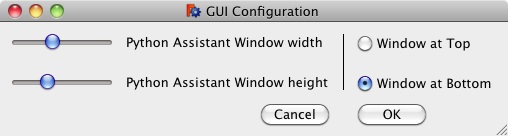
- un cursore per impostare la percentuale della larghezza dello schermo dedicata alla PAW (ricordando che c'è una larghezza limite al di sotto della quale la finestra principale di FreeCAD non scende)
- un cursore per impostare la percentuale dell'altezza dello schermo dedicata alla PAW
- una coppia di pulsanti di opzione per indicare se la PAW deve essere posizionata nella parte superiore o inferiore del lato sinistro dello schermo
- Save as file
- il contenuto della finestra PAW viene scritto in un file selezionato dall'utente - il contenuto della PAW non viene alterato - Close window
- la finestra PAW viene chiusa e il contenuto scritto in un file a memoria persistente
Nota: Non appare alcun dialogo, il salvataggio avviene automaticamente


Interfaccia utente
L'interfaccia utente è una semplice finestra di modifica di testo, c'è un pulsante per avviare la PAW e un menu contestuale delle opzioni eseguibili sul testo presente nella finestra. Le opzioni sono descritte nella sezione Utilizzo.
Esempi
Primo esempio
Nel mese di gennaio un collega ha bisogno di aiuto con il codice Python per aggiornare un file. Lo scrivete e lo mettete a punto sul vostro computer e gli inviate il codice sorgente. Avete sviluppato il codice in 3 modi diversi e non sapete quale sia il migliore, quello da conservare. Copiate tutte le 3 versioni finite in PAW e le separate con i marcatori.
All'inizio di maggio, state felicemente lavorando sul progetto di una bottiglia utilizzando FreeCAD. Avete qualche problema nel trovare l'esatto codice Python per generare quello che serve, e mentre la modellate graficamente, nella console Python viene generato il codice Python corrispondente. Utilizzando PAW copiate il contenuto della Console in PAW. Per formare la bottiglia vi spostate indietro e eseguite, poi copiate i risultati, li modificate in PAW e li ricopiate fino a quando siete soddisfatti.
Per un lavoro diverso, in altra sede, dovete assentarvi per 2 settimane. Finito il lavoro, tornate nel vostro ufficio.
Quando tornate dovete fare un pò di pulizia perchè ovviamente qualcuno ha utilizzato la vostra zona come zona da pranzo. Avviate FreeCAD e fate clic sul pulsante PAW nella barra degli strumenti, il vostro precedente lavoro è seduto lì, come se fosse stato fatto giorno prima. Capite che la soluzione al progetto della bottiglia si trova legando il codice del file che avete scritto a gennaio con quello interrotto due settimane prima. Potete selezionare e copiare rapidamente i segmenti di codice nella console di Python per eseguirli e ottimizzarli.
Quando il codice è stabile, potete salvarlo in un file Python o in un file macro di FreeCAD.
Altro esempio
Si sta cercando di capire cosa non va nei valori di rotazione di vari oggetti di un assieme. Su 27 oggetti non si riesce a individuare uno schema che indichi quali siano gli oggetti interessati. Quindi si mettono insieme alcune righe di Python per isolare gli oggetti non corretti e si incollano nel PAW. Poi si mettono insieme un paio di righe di Python per ottenere i valori di Label e Rotation e si incolla anche questo codice nel PAW. Copiate il codice per tutti gli oggetti che volete vedere elencati e ripetetelo per ogni oggetto, sempre nel PAW. La console di Python conterrà tutti i risultati (compresi gli errori di digitazione e i messaggi di errore), ma la porzione visibile della finestra sarà già stata fatta scorrere via da tempo. Ora si dispone di un insieme conciso di righe Python, lo si copia dal PAW, lo si incolla nella console Python e si ottiene l'elenco esatto degli oggetti che devono essere sottoposti a debug, insieme ai loro valori specifici. Se necessario, si possono incollare nuovamente i risultati dalla console Python nel PAW, anteponendo il carattere di commento Python ('#') se si desidera salvarli nel codice Python e mantenerli eseguibili. Infine, si può salvare questo conglomerato in un file dal PAW, in modo che sia al sicuro sul disco. Pronto per la prossima volta che dovrete rubare o adattare la logica del codice.
Opzioni
L'unica opzione per la PAW è la possibilità di modificare la sua dimensione iniziale e la forma di visualizzazione secondo la dimensione e la forma della finestra principale di FreeCAD. Nel codice Python ci sono 3 valori costanti per le dimensioni e la posizione iniziale della PAW.
Osservazioni
In questo codice c'è una semplice (proof of concept) abbozzo per un lavoro di memorizzazione persistente. Può essere usato da chi ha bisogno di tale capacità.
Link
nessuno (fino ad ora)
Script
ToolBar Icon 
Macro_Python_Assistant_Window.FCMacro
#
#
#				Python Assistant Window
#				v 0.1 initial release
#
#
#***********************************************************************************
#
# provide a text editing window with functions to aid in coding Python within FreeCAD
#
############ To Do ############
# - contextual window doesn't fire if cursor is on last position in file
# - executing "from PySide import QtGui, QtCore" on console seems to close window
# - is it possible to copy code to console and then select and execute it?
##############################
#***********************************************************************************
# The next three variables define the width and height and vertical positioning
# of the Python Assistant Window
# 'pawWidthPercent' specifies the percentage of the screen width to be assigned to the Python Assistant Window
# 'pawHeightPercent' specifies the percentage of the screen height to be assigned to the Python Assistant Window
# 'pawAtBottomFlag' specifies if the Python Assistant Window is at the top or the bottom
# The Python Assistant Window is automatically placed at the left,
# so pawWidthPercent = 26, pawHeightPercent = 41, pawAtBottomFlag = False will cause the
# following:
# 1) the main FreeCAD window will be placed in the upper left corner of the screen,
#	 it's height will be 100% of the screen height,
#	 it's width will be 74% (=100%-26%) of the screen
# 2) the Python Assistant Window will be placed in the left side of the screen,
#	 it's height will be 41% of the screen height,
#	 it's width will be 26% of the screen
#	 it will be at the top (leaving empty space below it)
# The empty space (either above or below the Python Assistant Window),
# is left for the text editor (for editing the Macros) to be placed in.
#
pawWidthPercentInitial		= 37.5 # percent of the screen width
pawHeightPercentInitial		= 32.0 # percent of the screen height
pawAtBottomFlagInitial		= True
#***********************************************************************************
# import statements
import sys, operator, os
from os.path import expanduser
from PySide import QtGui, QtCore

# UI Class definitions

class PythonAssistantWindow(QtGui.QMainWindow):
	""""""
	def __init__(self, pythonTextToEdit):
		self.textIn = pythonTextToEdit
		super(PythonAssistantWindow, self).__init__()
		self.initUI(pythonTextToEdit)
	def initUI(self, pythonTextToEdit):
		"""Constructor"""
		# set default return value and pointer to subsequent child window
		self.result			= userCancelled
		self.childWindow	= None
		self.alertWindow	= None
		# set window dimensions for Python Advisor Window from the constants at the top of Macro file
		self.pawWinWidth	= pawWidthPercentInitial/100.0 * availableWidth
		self.pawWinHeight	= pawHeightPercentInitial/100.0 * availableHeight
		self.left			= screenWidth - self.pawWinWidth
		if pawAtBottomFlagInitial:
			self.top		= screenHeight - self.pawWinHeight
		else:
			self.top		= 0
		self.editorHeight	= self.pawWinHeight
		# set dimensions for main FreeCAD window
		self.mainWinWidth	= availableWidth - (self.pawWinWidth+interWindowGap)
		self.mainWinHeight	= availableHeight
		# define main window
		FreeCADGui.getMainWindow().setGeometry(0, 0, self.mainWinWidth, self.mainWinHeight)
		# now set up this window
		self.setGeometry(self.left, self.top, self.pawWinWidth, self.pawWinHeight)
		self.setWindowTitle("Python Assistant Window")
		#
		centralWidget 		=  QtGui.QWidget(self)
		layout 				=  QtGui.QGridLayout()
		centralWidget.setLayout(layout)
		# set up text editing widget
		self.text_editor = QtGui.QPlainTextEdit(self)
		self.text_editor.move(0,0)
		self.text_editor.resize(self.pawWinWidth,self.editorHeight)
		self.text_editor.appendPlainText(self.textIn)
		self.text_editor.setSizePolicy(QtGui.QSizePolicy.Expanding,QtGui.QSizePolicy.Expanding)
		self.text_editor.textChanged.connect(self.onTextChanged)
		# set up a monospace font for the text editor to match the Python console
		font = QtGui.QFont()
		font.setFamily("Courier")
		font.setStyleHint(QtGui.QFont.Monospace)
		font.setFixedPitch(True)
		font.setPointSize(12)
		self.text_editor.setFont(font)
		#self.text_editor.cursorPositionChanged.connect(self.onCursorPosition)
		self.cursor = self.text_editor.textCursor()
		# populate layout
		layout.addWidget(self.text_editor,0,0)
		self.setCentralWidget(centralWidget)
		# set contextual menu options for text editing widget
		# menu dividers
		mnuDivider1 = QtGui.QAction(self)
		mnuDivider1.setText(menuDividerText)
		mnuDivider1.triggered.connect(self.onMenuDivider)
		mnuDivider2 = QtGui.QAction(self)
		mnuDivider2.setText(menuDividerText)
		mnuDivider2.triggered.connect(self.onMenuDivider)
		mnuDivider3 = QtGui.QAction(self)
		mnuDivider3.setText(menuDividerText)
		mnuDivider3.triggered.connect(self.onMenuDivider)
		mnuDivider4 = QtGui.QAction(self)
		mnuDivider4.setText(menuDividerText)
		mnuDivider4.triggered.connect(self.onMenuDivider)
		# clear text
		mnuClear = QtGui.QAction(self)
		mnuClear.setText("Clear")
		mnuClear.triggered.connect(self.onClear)
		# paste copy/paste buffer
		mnuPaste = QtGui.QAction(self)
		mnuPaste.setText("Paste")
		mnuPaste.triggered.connect(self.onPaste)
		# paste contents of console
		mnuAppendFromConsole = QtGui.QAction(self)
		mnuAppendFromConsole.setText("Append contents of console")
		mnuAppendFromConsole.triggered.connect(self.onAppendFromConsole)
		# select between markers
		mnuSelectMarkers = QtGui.QAction(self)
		mnuSelectMarkers.setText("Select between markers")
		mnuSelectMarkers.triggered.connect(self.onSelectMarkers)
		# select all
		mnuSelectAll = QtGui.QAction(self)
		mnuSelectAll.setText("Select all")
		mnuSelectAll.triggered.connect(self.onSelectAll)
		# insert marker
		mnuInsertMarker = QtGui.QAction(self)
		mnuInsertMarker.setText("Insert marker")
		mnuInsertMarker.triggered.connect(self.onInsertMarker)
		# remove console generated ">>> " character strings
		mnuStripPrefix = QtGui.QAction(self)
		mnuStripPrefix.setText("Remove '>>> '")
		mnuStripPrefix.triggered.connect(self.onStripPrefix)
		# remove blank lines
		mnuReduceBlankLines = QtGui.QAction(self)
		mnuReduceBlankLines.setText("Delete multiple blank lines")
		mnuReduceBlankLines.triggered.connect(self.onReduceBlankLines)
		# copy selection
		mnuCopy = QtGui.QAction(self)
		mnuCopy.setText("Copy")
		mnuCopy.triggered.connect(self.onCopy)
		# copy selection to console
		mnuCopySelectionToConsole = QtGui.QAction(self)
		mnuCopySelectionToConsole.setText("Copy selection to console")
		mnuCopySelectionToConsole.triggered.connect(self.onCopySelectionToConsole)
		# copy to console
		mnuCopyToConsole = QtGui.QAction(self)
		mnuCopyToConsole.setText("Copy contents to console")
		mnuCopyToConsole.triggered.connect(self.onCopyToConsole)
		# save as file
		mnuSaveAsFile = QtGui.QAction(self)
		mnuSaveAsFile.setText("Save contents to file")
		mnuSaveAsFile.triggered.connect(self.onSaveAsFile)
		# close window
		mnuCloseWindow = QtGui.QAction(self)
		mnuCloseWindow.setText("Close window")
		mnuCloseWindow.triggered.connect(self.onCloseWindow)
		# alter GUI settings
		mnuSettings = QtGui.QAction(self)
		mnuSettings.setText("=Alter GUI settings=")
		mnuSettings.triggered.connect(self.onSettings)
		# define menu and add options
		self.text_editor.setContextMenuPolicy(QtCore.Qt.ActionsContextMenu)
		self.text_editor.addAction(mnuCopy)
		self.text_editor.addAction(mnuCopySelectionToConsole)
		self.text_editor.addAction(mnuCopyToConsole)
		self.text_editor.addAction(mnuDivider1)
		self.text_editor.addAction(mnuPaste)
		self.text_editor.addAction(mnuAppendFromConsole)
		self.text_editor.addAction(mnuSelectMarkers)
		self.text_editor.addAction(mnuSelectAll)
		self.text_editor.addAction(mnuClear)
		self.text_editor.addAction(mnuDivider2)
		self.text_editor.addAction(mnuInsertMarker)
		self.text_editor.addAction(mnuStripPrefix)
		self.text_editor.addAction(mnuReduceBlankLines)
		self.text_editor.addAction(mnuDivider3)
		self.text_editor.addAction(mnuSaveAsFile)
		self.text_editor.addAction(mnuSettings)
		self.text_editor.addAction(mnuCloseWindow)
		#
		self.show()
	#----------------------------------------------------------------------
	def onMenuDivider(self):
		# just a divider in the menu so we don't do anything
		pass
	def onClear(self):
		# clear editing field
		self.text_editor.clear()
	def onPaste(self):
		# paste contents of system copy/paste buffer into QPlainTextEdit field
		self.text_editor.paste()
	def onAppendFromConsole(self):
		# copy text from "Python console"
		mainWindow	= FreeCADGui.getMainWindow()
		pcDW		= mainWindow.findChild(QtGui.QDockWidget, "Python console")
		pcPTE		= pcDW.findChild(QtGui.QPlainTextEdit, "Python console")
		consoleStr	= pcPTE.document().toPlainText()
		self.text_editor.appendPlainText(copyFromConsoleText)
		self.text_editor.appendPlainText("")
		self.text_editor.appendPlainText(consoleStr)
	def onCopy(self):
		# copy selected text to system copy/paste buffer
		self.text_editor.copy()
	def onCopySelectionToConsole(self):
		# copy selected text to "Python console"
		mainWindow	= FreeCADGui.getMainWindow()
		pcDW		= mainWindow.findChild(QtGui.QDockWidget, "Python console")
		pcPTE		= pcDW.findChild(QtGui.QPlainTextEdit, "Python console")
		#
		cursor		= self.text_editor.textCursor()
		cursorText	= self.text_editor.toPlainText()
		textToCopy = cursorText[cursor.selectionStart():cursor.selectionEnd()]
		if len(textToCopy)>0:
			pcPTE.appendPlainText(textToCopy)
	def onCopyToConsole(self):
		# copy text to "Python console"
		mainWindow	= FreeCADGui.getMainWindow()
		pcDW		= mainWindow.findChild(QtGui.QDockWidget, "Python console")
		pcPTE		= pcDW.findChild(QtGui.QPlainTextEdit, "Python console")
		pcPTE.appendPlainText(copyToConsoleText)
		pcPTE.appendPlainText()
	def onInsertMarker(self):
		# insert marker
		self.text_editor.insertPlainText(markerText)
	def onStripPrefix(self):
		# strip out ">>> " from text edit window
		self.text_editor.selectAll()
		if len(self.text_editor.toPlainText())>0:
			self.text_editor.selectAll()
			tmp = self.text_editor.toPlainText()
			self.text_editor.clear()
			self.text_editor.appendPlainText(tmp.replace(">>> ",""))
	def onReduceBlankLines(self):
		# reduce multiple blank lines to single blank lines
		contents = self.text_editor.toPlainText()
		self.text_editor.clear()
		self.text_editor.appendPlainText(os.linesep.join([s for s in contents.splitlines() if s]))
	def onSelectMarkers(self):
		cursor		= self.text_editor.textCursor()
		cursorText	= self.text_editor.toPlainText()
		bNum = cursor.blockNumber(); cNum = cursor.columnNumber()
		pos = cursor.position(); cursorTextLength = len(cursorText)
		occurrences = [i for i in range(len(cursorText)) if cursorText.startswith(markerText, i)]
		if len(occurrences)==0:
			self.alertWindow = QtGui.QMessageBox()
			self.alertWindow.setText("There are no markers...")
			self.alertWindow.show()
		elif len(occurrences)==1:
			hdrStart = occurrences[0]
			hdrEnd = hdrStart + markerTextLength
			if pos<hdrStart:
				selectStart = 0; selectEnd = hdrStart
				self.cursor.setPosition(selectStart)
				self.cursor.setPosition(selectEnd, QtGui.QTextCursor.KeepAnchor)
				self.text_editor.setTextCursor(self.cursor)
			if pos>hdrEnd:
				selectStart = hdrEnd; selectEnd = cursorTextLength
				self.cursor.setPosition(selectStart)
				self.cursor.setPosition(selectEnd, QtGui.QTextCursor.KeepAnchor)
				self.text_editor.setTextCursor(self.cursor)
		else:
			startOccurrences = list(); endOccurrences = list(occurrences)
			for i in range(len(occurrences)):
				startOccurrences.append(occurrences[i] + markerTextLength + 1)
			startOccurrences.insert( 0, 0)
			endOccurrences.insert( len(occurrences), cursorTextLength)
			for i in range(len(occurrences)+1):
				if startOccurrences[i]<pos<endOccurrences[i]:
					if i==0:
						selectStart = startOccurrences[i]
					else:
						selectStart = startOccurrences[i]-1
					selectEnd = endOccurrences[i]
					self.cursor.setPosition(selectStart)
					self.cursor.setPosition(selectEnd, QtGui.QTextCursor.KeepAnchor)
					self.text_editor.setTextCursor(self.cursor)
					break
	def onSelectAll(self):
		self.text_editor.selectAll()
	def onCloseWindow(self):
		self.close()
	def onSettings(self):
		# get new width (as %), height (as %), vertical flag
		self.childWindow = GetGuiConfigParams(self)
		pass
	def onTextChanged(self):
		FreeCAD.PythonAssistantWindowStatus[1] = True
	def onCursorPosition(self):
		#print ("Line: {} | Column: {}".format(
		#	self.text_editor.textCursor().blockNumber(),
		#	self.text_editor.textCursor().columnNumber()))
		#print self.text_editor.textCursor().position()+self.text_editor.textCursor().columnNumber()
		pass
	def onSaveAsFile(self):
		filePath = QtGui.QFileDialog.getSaveFileName(parent=None,caption="Save contents as",dir=expanduser("~"),filter="*.txt")
		file = open(filePath[0],"w")
		file.write(self.text_editor.toPlainText())
		file.close()
	def closeEvent(self,event):
		# write out contents for next session
		file = open(persistenceFile,"w")
		file.write(self.text_editor.toPlainText())
		file.close()
		# clear global flag
		del FreeCAD.PythonAssistantWindowStatus
		self.close()

class GetGuiConfigParams(QtGui.QMainWindow):
	""""""
	def __init__(self, parentWindow):
		self.parentWindow = parentWindow
		super(GetGuiConfigParams, self).__init__()
		self.initUI(parentWindow)
	def initUI(self, parentWindow):
		"""Constructor"""
		self.result							= userCancelled
		# grab geometry from our parent so we can tell if user has changed values
		self.initialParentWindowX			= self.parentWindow.geometry().x()
		self.initialParentWindowY			= self.parentWindow.geometry().y()
		self.initialParentWindowH			= self.parentWindow.geometry().height()
		self.initialParentWindowW			= self.parentWindow.geometry().width()
		self.initialHeightSliderSetting		= self.initialParentWindowH/float(availableHeight)*100
		self.initialWidthSliderSetting		= self.initialParentWindowW/float(availableWidth-interWindowGap)*100
		# set some fixed GUI attributes
		width								= 450
		height								= 40
		buttonWidth							= 80
		sliderWidth							= 100
		self.setWindowTitle("GUI Configuration")
		self.setWindowFlags(QtCore.Qt.WindowStaysOnTopHint)
		self.resize(width, height)
		self.widthSlider					= self.initialWidthSliderSetting
		self.heightSlider					= self.initialHeightSliderSetting
		#
		centralWidget 						=  QtGui.QWidget(self)
		layout 								=  QtGui.QGridLayout()
		centralWidget.setLayout(layout)
		verticalLine 						=  QtGui.QFrame()
		# sliders
		widthSlider = QtGui.QSlider(QtCore.Qt.Horizontal, self)
		widthSlider.setFocusPolicy(QtCore.Qt.NoFocus)
		widthSlider.valueChanged[int].connect(self.widthSliderChangeValue)
		widthSlider.setFixedWidth(sliderWidth)
		widthSlider.setValue(self.initialWidthSliderSetting)
		heightSlider = QtGui.QSlider(QtCore.Qt.Horizontal, self)
		heightSlider.setFocusPolicy(QtCore.Qt.NoFocus)
		heightSlider.valueChanged[int].connect(self.heightSliderChangeValue)
		heightSlider.setFixedWidth(sliderWidth)
		heightSlider.setValue(self.initialHeightSliderSetting)
		# labels
		pawWidthLbl		= QtGui.QLabel("Python Assistant Window width", self)
		pawHeightLbl	= QtGui.QLabel("Python Assistant Window height", self)
		# radio buttons - window top or bottom
		self.rb1 = QtGui.QRadioButton("Window at Top",self)
		self.rb1.clicked.connect(self.onRb1)
		self.rb2 = QtGui.QRadioButton("Window at Bottom",self)
		self.rb2.toggle() # set default value
		self.rb2.clicked.connect(self.onRb2)
		if self.parentWindow.geometry().y()==0:
			self.rb1.toggle()
		# cancel button
		cancelButton = QtGui.QPushButton('Cancel', self)
		cancelButton.clicked.connect(self.onCancel)
		cancelButton.setFixedWidth(buttonWidth)
		# OK button
		okButton = QtGui.QPushButton('OK', self)
		okButton.clicked.connect(self.onOk)
		okButton.setFixedWidth(buttonWidth)
		#
		verticalLine.setFrameStyle(QtGui.QFrame.VLine)
		verticalLine.setSizePolicy(QtGui.QSizePolicy.Minimum,QtGui.QSizePolicy.Expanding)
		#
		pawWidthLbl.setSizePolicy(QtGui.QSizePolicy.Expanding,QtGui.QSizePolicy.Expanding)
		pawHeightLbl.setSizePolicy(QtGui.QSizePolicy.Expanding,QtGui.QSizePolicy.Expanding)
		self.rb1.setSizePolicy(QtGui.QSizePolicy.Expanding,QtGui.QSizePolicy.Expanding)
		self.rb2.setSizePolicy(QtGui.QSizePolicy.Expanding,QtGui.QSizePolicy.Expanding)
		# populate layout
		layout.addWidget(widthSlider,0,0)
		layout.addWidget(pawWidthLbl,0,1)
		layout.addWidget(heightSlider,2,0)
		layout.addWidget(pawHeightLbl,2,1)
		layout.addWidget(verticalLine,0,2,3,1)
		layout.addWidget(self.rb1,0,3)
		layout.addWidget(self.rb2,2,3)
		layout.addWidget(cancelButton,3,1,QtCore.Qt.AlignRight)
		layout.addWidget(okButton,3,3)
		#
		self.setCentralWidget(centralWidget)
		#
		self.show()
	def widthSliderChangeValue(self, value):
		self.widthSliderValue = value
	def heightSliderChangeValue(self, value):
		self.heightSliderValue = value
	def onRb1(self):
		pass
	def onRb2(self):
		pass
	def onCancel(self):
		self.result = userCancelled
		self.close()
	def onOk(self):
		self.result = "OK"
		# the two slider values are the width and height of the Python Assistant Window
		# resize main FreeCAD window
		freeCadMainWidth	= ((1-(self.widthSliderValue/100.0)) * availableWidth)-(3*interWindowGap)
		FreeCADGui.getMainWindow().setGeometry(0, 0, freeCadMainWidth, availableHeight)
		# resize the PAW window
		newPawWidth			= availableWidth-freeCadMainWidth
		newPawHeight		= (self.heightSliderValue/100.0) * availableHeight
		if self.rb1.isChecked():
			newPawTop		= 0
		else:
			newPawTop		= availableHeight - newPawHeight
		self.parentWindow.setGeometry(freeCadMainWidth+interWindowGap, newPawTop, newPawWidth-interWindowGap, newPawHeight)
		self.close()

#----------------------------------------------------------------------

# Class definitions

# Function definitions

def onFreeCADShutdown():
	# this will be invoked when FreeCAD is told to shut down
	#QtGui.QMessageBox.information(None,"","FreeCAD shutting down")
	if FreeCAD.PythonAssistantWindowStatus[1]:
		reply = QtGui.QMessageBox.question(None, "",
			"The Python Assistant Window has changes, do you want to save them?",
			QtGui.QMessageBox.Yes | QtGui.QMessageBox.No, QtGui.QMessageBox.No)
		if reply == QtGui.QMessageBox.Yes:
			# write out contents for next session
			file = open(persistenceFile,"w")
			file.write(FreeCAD.PythonAssistantWindowStatus[0].text_editor.toPlainText())
			file.close()
	del FreeCAD.PythonAssistantWindowStatus

# Constant definitions

userCancelled		= "Cancelled"
markerText			= "#=========== marker ===========\n"
markerTextLength	= len(markerText)
copyFromConsoleText	= "#=========== copy from console ==========="
copyToConsoleText	= "#============ copy to console ============"
menuDividerText		= "--------"
interWindowGap		= 3 # space between 2 windows for appearance sake
persistenceFile		= App.ConfigGet("UserAppData")+"PythonAssistantWindow.txt"
# code ***********************************************************************************
# put down user data saving routine for when FreeCAD exits
mw=Gui.getMainWindow()
mw.mainWindowClosed.connect(onFreeCADShutdown)
# get screen dimensions
screenWidth			= QtGui.QDesktopWidget().screenGeometry().width()
screenHeight		= QtGui.QDesktopWidget().screenGeometry().height()
# get dimensions for available space on screen
availableWidth		= QtGui.QDesktopWidget().availableGeometry().width()
availableHeight		= QtGui.QDesktopWidget().availableGeometry().height()

if not hasattr(FreeCAD,"PythonAssistantWindowStatus"):
	previousContents = ""
	if os.path.isfile(persistenceFile):
		# read contents of last session
		file = open(persistenceFile,"r")
		previousContents = file.read()
		file.close()
	# open window with contents from last session
	form = PythonAssistantWindow(previousContents)
	# save pointer to window so it can be located again and Raised when it becomes obscured
	FreeCAD.PythonAssistantWindowStatus = [None, False]
	FreeCAD.PythonAssistantWindowStatus[0] = form
else:
	# window is open so Raise it so it is visible
	FreeCAD.PythonAssistantWindowStatus[0].raise_()
	pass
#
#OS: Mac OS X
#Word size: 64-bit
#Version: 0.14.3703 (Git)
#Branch: releases/FreeCAD-0-14
#Hash: c6edd47334a3e6f209e493773093db2b9b4f0e40
#Python version: 2.7.5
#Qt version: 4.8.6
#Coin version: 3.1.3
#SoQt version: 1.5.0
#OCC version: 6.7.0
#
#thus ends the macro...