FreeCAD 1.0, 18 Kasım 2024 tarihinde yayınlanmıştır. İndirme sayfasından edinebilirsiniz. Bu sayfa tüm yeni özellikleri ve değişiklikleri listelemektedir.
Daha eski FreeCAD sürüm notlarını Özellik Listesi'nde bulabilirsiniz.
Bradley McLean anısına (bgbsww)
Bu yeni sürümü sizlere sunmaktan mutluluk duyduğumuz kadar, bu sürüm çıkmadan birkaç hafta önce arkadaşımız ve üretken FreeCAD geliştiricisi bgbsww'nun vefat ettiğini duyurmaktan da üzüntü duyuyoruz. Kendisi, topolojik adlandırma düzeltme çabasının ana mimarlarından biriydi, çok sayıda ek kod ve test yazdı ve FreeCAD'in TNP uzmanı oldu. Ayrıca neredeyse tüm diğer geliştiricilerin yeni algoritmaya uyum sağlamasına yardımcı oldu. Bu sürüm kendisine adanmıştır.
Genel
|
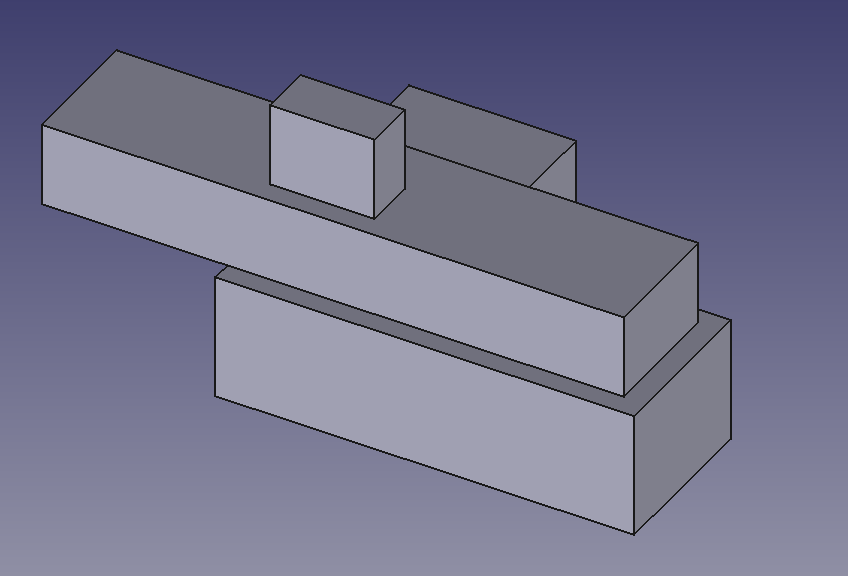
Uzun zamandır süregelen topolojik adlandırma sorunu, birkaç geliştiricinin ortak çabası ve emeği sayesinde nihayet ele alındı. Realthunder algoritması, FreeCAD ana sürümünde çalışacak şekilde özenle uygulandı ve iyileştirildi. Proje bir yıldan fazla sürdü ve ilk uygulama, iyileştirmeleri olanaklı kılan aşağıdaki çekme isteği ile sonuçlandırıldı. TNP sorunu tamamen çözülmedi ve daha fazla iyileştirme bir sonraki sürümde yer alacak.
Katkı isteği #13705
|
|
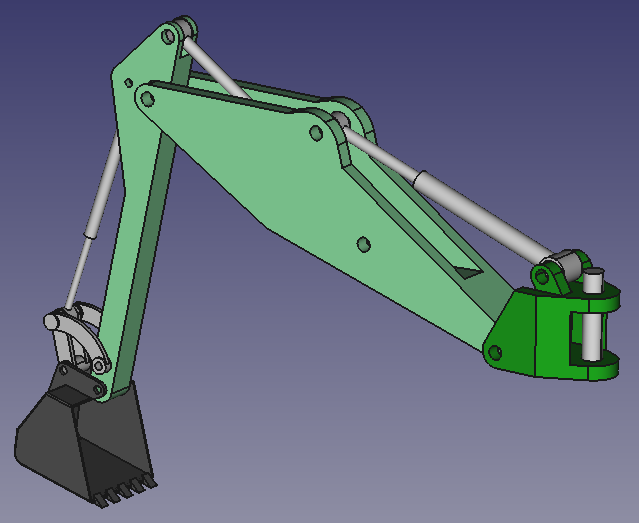
FreeCAD, yeni bir yerleşik Montaj Tezgahına sahiptir. Bu çalışma tezgahı, eskiden "diğer FreeCAD" olarak adlandırdığımız, bizimkiyle aynı anda oluşturulan, hareket benzetimi yeteneklerine sahip, yine FreeCAD adını taşıyan başka bir yazılım için yapılan özgün çalışmaya dayanmaktadır. Bu aktarımı diğer FreeCAD'in yazarı, Dr. Aik-Siong Koh, bizzat gerçekleştirmiş ve bu köklü adımla her iki FreeCAD nihayet birleşmiştir. Daha fazla bilgi için aşağıya bakınız.
Katkı isteği #10427
|
Kullanıcı arayüzü
|
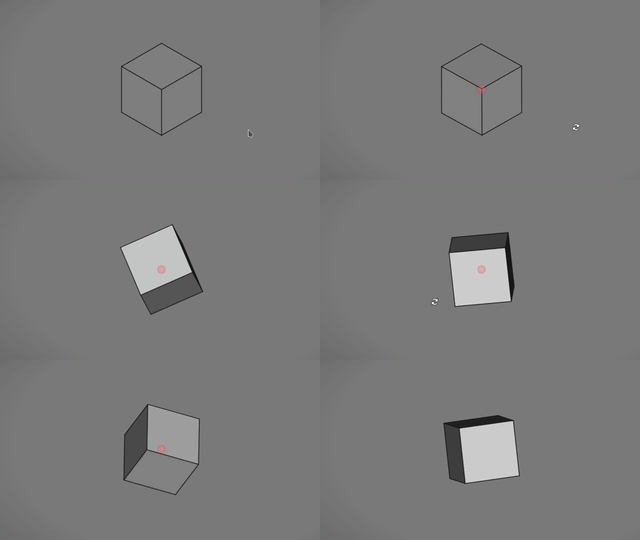
Döndürme merkezi göstergesi eklendi. Bu gösterge, fare ile sürükleyerek görünüm döndürüldüğünde gösterilir. Tercihlerde isteğe bağlı olarak devre dışı bırakılabilir. Rengi, saydamlığı ve boyutu için de ayarlar mevcuttur.
Katkı isteği #9909 ve Katkı isteği #10790
|
|
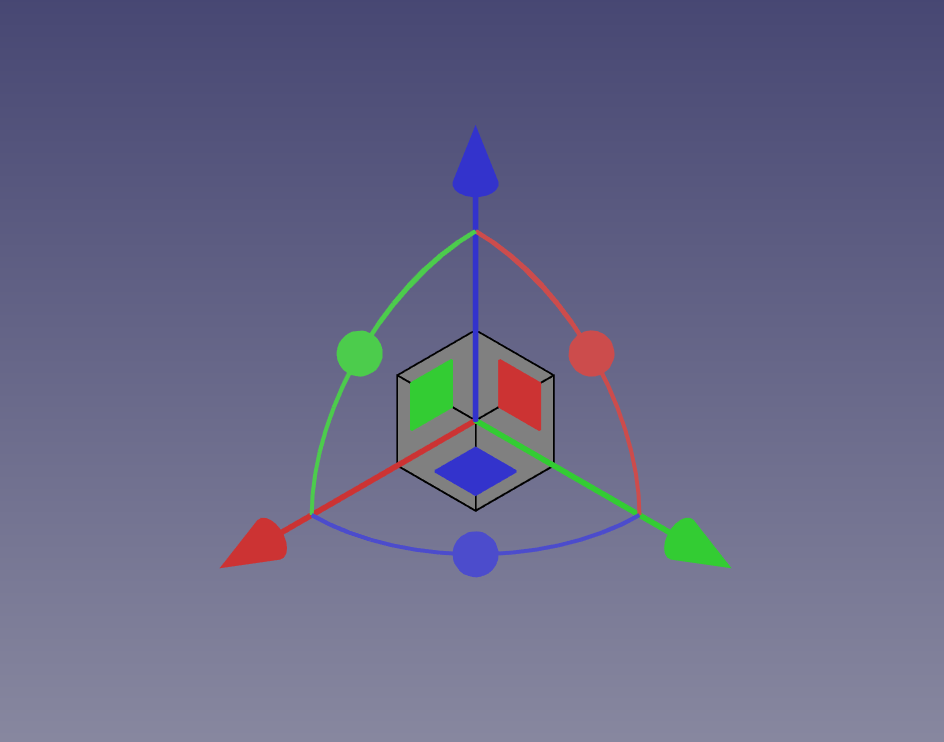
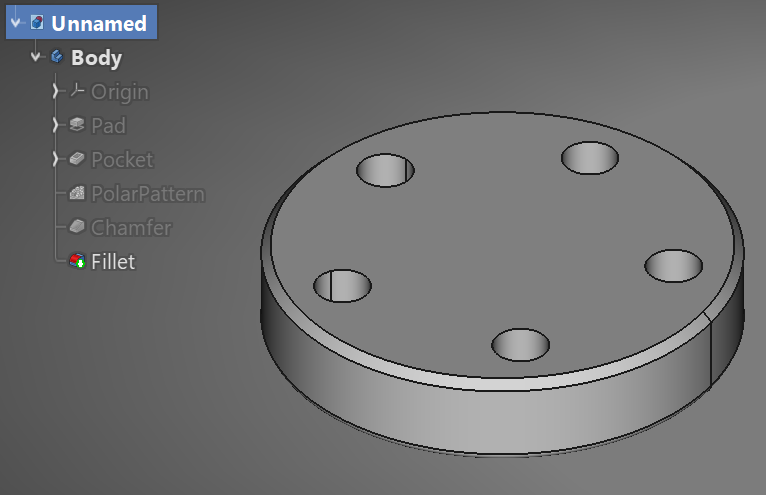
Dönüştürme aracı tutamacının görünümü iyileştirildi. Artık nesneleri 3 varsayılan düzlem boyunca hareket ettirmek için bir dizi düzlemsel tutamaca da sahip.
Katkı İsteği #10706
|
|
Realthunder'ın kenetlenebilir pencere ögelerinin (ağaç ve görev şeffaflığı) üst üste bindirilmesine olanak tanıyan özelliği eklendi.
Katkı İsteği #7888
|
|
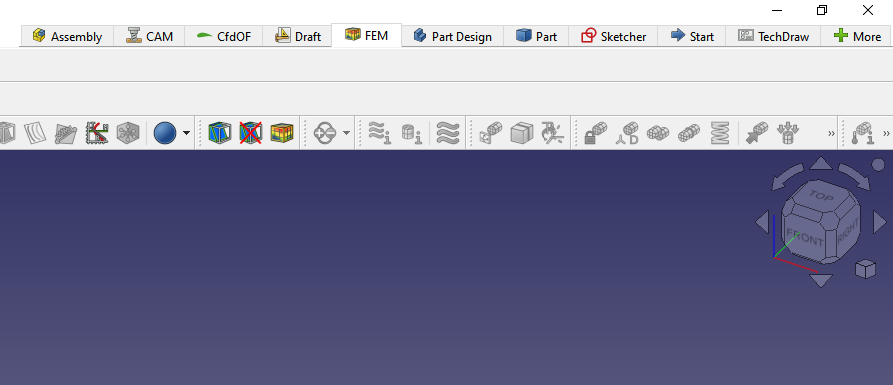
Sekme çubuğu çalışma tezgahı seçicisi eklendi. Tercihler → Çalışma tezgahları bölümünden etkinleştirilebilir ve yapılandırılabilir.
Katkı isteği #12270
|
Animasyon başlamazsa görüntüye tıklayın.
|
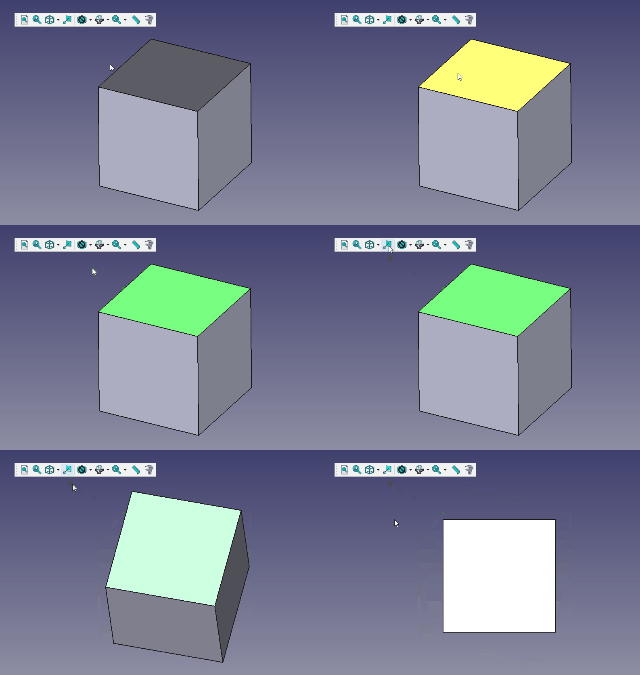
Seçime hizala aracı eklendi. Bu sayede yüzlere dik görünümlere veya kenar yönleri doğrultusundaki görünümlere geçilebiliyor.
Katkı isteği #13906
|
Daha fazla kullanıcı arayüzü geliştirmesi
- Bir proje birim sistemi tanıtıldı. Katkı İsteği #9521
- Kesit aracı artık perspektif görünümde de çalışıyor. Katkı İsteği #10143
- Tezgahları alfabetik olarak sıralama seçeneği eklendi (Tercihler → Çalışma Tezgahları bölümünde sağ tıklayarak kullanılabilir). Katkı İsteği #10363
- Std DlgMacroExecute iletişim kutusuna Dosya bul ve Dosyalarda bul süzgeçleri eklendi. Katkı İsteği #10714
- Görünüm menüsü ve Görünüm araç çubuğu gözden geçirildi. Katkı İsteği #10761
- Makro araç çubuğundan durdurma düğmesi kaldırıldı. Kayıt düğmesi, kayıt devam ederken artık bir durdurma düğmesine dönüşüyor. Katkı İsteği #10836
- Tercihler'deki sıfırlama düğmesi artık ayarları farklı düzeylerde sıfırlama seçeneklerini gösteren bir menü sunuyor: tümü, mevcut grupta veya mevcut sekmede. Katkı İsteği #10688 ve Katkı İsteği #11038
- Yardım Modülü birleştirildi; böylece artık onu kullanmak için bir eklenti indirmeye gerek kalmadı. Katkı İsteği #11008
- Mevcut temayı özelleştirmeye yönelik tercihler eklendi. Katkı İsteği #10238
- 3D penceresinde nesnelerin seçimini kolaylaştırmak için varsayılan seçim ayarları değiştirildi. Katkı İsteği #11187
- Yalnızca metre birim şeması olan Metre ondalık eklendi; zira MKS (m/kg/s/derece) sistemi her zaman boyutların metre olarak gösterilmesini sağlamaz — 0,1 m'nin altındaki değerler için hâlâ milimetre kullanılırken, bazı uygulamalar için (örneğin inşaat mühendisliği) tüm boyutların gösterimini gerçekten metre olarak değiştiren bir birim sistemi faydalıdır. Katkı İsteği #11365
- 4K ekran kullanıcılarına yardımcı olmak için Tercihler → Görüntüleme → 3D Görünüm → İşaretçi boyutu bölümüne ek işaretçi boyutları (20, 25 ve 30 piksel) eklendi. Katkı İsteği #11524
- Seçili nesneler için saydamlığı hızla açıp kapatmak amacıyla Görünüm ve bağlam menülerine Saydamlığı değiştir seçeneği eklendi. Katkı İsteği #10805
- Araç çubuklarını kilitleme komutu eklendi. Bu komutla araç çubuğu konumları kilitlenebilir veya kilidi açılabilir. Görünüm menüsünde ve araç çubuğu alanı bağlam menüsünde kullanılabilir. Katkı İsteği #11596
- Modellerin görünüşünü iyileştirmek için varsayılan şekil rengi ayarlandı. Katkı İsteği #12380 ve Katkı İsteği #12488
- Parça ve Grup kapsayıcıları içindeki ögeler artık sürükleyip bırakarak sıralanabiliyor. Katkı İsteği #12293
- Görünürlük simgeleri (göz simgesi), Tercihler → Görüntüleme → Kullanıcı Arayüzü bölümünde Görünürlük simgesini göster seçeneği işaretlenmişse ağaç yapısındaki nesnelere eklenir. Katkı İsteği #12298
- Donmuş durumu (ağaç yapısındaki bağlam menüsünde Dondurmayı değiştir seçeneği) eklendi; bu, bir nesnenin parametrik davranışını kapatmayı mümkün kılıyor (böylece bağlı olduğu nesneler değişse bile kendisi değişmiyor). Katkı İsteği #12580
- Gezinti canlandırmaları iyileştirildi. Canlandırmalar artık bir yumuşatma işlevi kullanıyor ve Tercihler → Görüntüleme → Gezinti bölümünden değiştirilebilen sabit bir süreye sahip. Katkı İsteği #10881 ve Katkı İsteği #12205
- Varsayılan görünümlerin düğmeleri artık tek bir düğme altında gruplandı. Ayrı düğmeler, ek Ayrı görünümler araç çubuğunda hâlâ mevcut. Katkı İsteği #12878
- Mevcut etkin belgenin adı artık pencere başlık çubuğunda da gösteriliyor. Katkı İsteği #12035
- Özellik Görünümü panelini gösteren bir komut eklendi. Katkı İsteği #12024
- Windows üzerinde 3Dconnexion aygıtlarının FreeCAD ile bütünleştirilmesi iyileştirildi. Katkı İsteği #12929
- Hızlı Ölçüm özelliği eklendi. 3D görünümdeki mevcut seçime ilişkin temel ölçüm bilgilerini (kenar uzunluğu, yüz alanı, noktalar/kenarlar arası mesafe/açı ve dairesel kenarlar/silindirik yüzlerin yarıçapı) görüntülemek için Durum çubuğunu kullanır. Katkı İsteği #12217
- Araç çubukları artık durum ve menü çubuklarına sürüklenip bırakılabiliyor. Katkı İsteği #13571
- Biçem sayfası geliştirmeyi kolaylaştırmak için Biçem sayfasını yeniden yükle düğmesi eklendi. Varsayılan olarak hiçbir araç çubuğuna ait değildir, Araçlar → Özelleştir → Araç Çubukları → Görünüm yolundan elle eklenmelidir. Katkı İsteği #13982
- Belge simgeleri (Aç ve Kaydet simgeleri de dahil olmak üzere) iyileştirildi ve birleştirildi. Katkı İsteği #13865
- Tümünü sığdır simgesi daha anlaşılır olması için değiştirildi. Katkı İsteği #14180
- Birden fazla temel simge (Yeni gibi) iyileştirildi. Katkı İsteği #14278, Katkı İsteği #14434 ve Katkı İsteği #14154
- Eskiz ve Parça Tasarımı görev paneli başlıklarının simgeleri iyileştirildi. Katkı İsteği #13968
- Kafasız kipte, etkileşimli Python konsolu artık sekme ile tamamlama özelliğine sahip; readline modülü mevcutsa kullanılabilir. Katkı İsteği #14213
- Ağaç görünümünde iç adları gösterme seçeneği eklendi. Varsayılan olarak devre dışıdır ve Tercihler → Görüntüleme → Kullanıcı Arayüzü → İç Adları Gizle bölümünden etkinleştirilebilir. Katkı İsteği #14237
- Tercihler penceresinden Yardım düğmesi kaldırıldı; çünkü işlevsel değildi. Katkı İsteği #14695
- Varsayılan biçem sayfaları önemli ölçüde iyileştirildi ve klasik dışında iki değişken — açık ve koyu — olarak sunuluyor. Katkı İsteği #13772
- Tercihler'in Görüntüleme grubundaki Tema ve Kullanıcı Arayüzü sayfaları yeniden düzenlendi ve birleştirildi. Bazı tercihler yeni Gelişmiş sayfasına taşındı. Katkı İsteği #14974
- Parça/Parça Tasarımı denetleme ve iyileştirme tercihleri artık varsayılan olarak etkinleştirildi. Katkı İsteği #14406
- Yeni bir parametre eklendi — BaseApp/Preferences/Bitmaps/Theme/UseIconTheme (boolean): Qt'nin sistem simge temasındaki simgeleri kullanmaya zorlamak için true olarak ayarlayın. Varsayılan değer false olarak belirlenmiştir; böylece FreeCAD kendi simgelerini kullanır. Sistem iletişim kutuları, düğmeler ve diğerleri gibi diğer Qt simge teması mekanizmalarını etkilemez. Bunlar her zaman sistem temasındaki simgeleri kullanmalıdır. Katkı İsteği #16018
- Biçem sayfası, tema ve QtStyle bilgileri artık Yardım → FreeCAD Hakkında bölümünde yer alıyor. Katkı İsteği #16281
- Açılış ekranı artık başlangıçta, kullanıcı modellerini ve bazı eklenti tezgahlarının tanıtımlarını içeren birden fazla görsel arasından rastgele seçiliyor. Katkı İsteği #16071
- Güvenli kip eklendi ve Yardım → Güvenli kipte yeniden başlat yoluyla etkinleştirilebiliyor. Kullanıcı yapılandırmalarını, eklentileri, temaları ve diğer özelleştirmeleri geçici olarak devre dışı bırakarak FreeCAD'i hata ayıklama için \"fabrika ayarlarına sıfırlanmış\" durumda çalıştırır. Katkı İsteği #16858
Dosya biçimi değişiklikleri
Yeni 1.0 sürümüyle oluşturulan dosyaların daha eski FreeCAD sürümlerinde de açılabilmesini sağlamak amacıyla önlemler alınmış olsa da, 1.0 sürümünde eklenen bazı yeni özellikler önceki sürümler tarafından anlaşılamamakta ve 1.0 ile kaydedilen modellerin daha eski sürümlerde açılması sırasında bozulmasına ya da sorunlar çıkmasına yol açabilmektedir. Karşılaşabileceğiniz olası sorunların ve bunların çözümlerinin bir özetini burada bulabilirsiniz. Forum topluluğu da uyumluluk sorunlarını gidermede yardımcı olabilir.
- İliştirme özelliği İliştirmeDesteği olarak yeniden adlandırıldı. Bu durum, bu özelliğe dayanan unsurların (özellikle Assembly4 eklentisini kullanan modellerin) FreeCAD'in önceki bir sürümünde açılabilmeleri için düzeltilmeleri gerektiği anlamına gelir. Bu dosyaları düzeltmek için burada bir makro mevcuttur.
Çekirdek sistem ve API
Çekirdek
- Vektör API'sindeki vektör işlevleri artık İfadeler içinde kullanılabilir. Katkı İsteği #8603.
- Python düzenleyicisi artık Enter tuşuna basıldığında önceki satırın girintisiyle aynı hizaya geliyor. Katkı İsteği #11356.
- Bir iliştirmenin referans nesne(ler)ini tutan özelliğin adı VeriSupport iken VeriAttachmentSupport olarak değişti. Katkı İsteği #12714.
- App::VarSet adlı bir özellik kapsayıcısı çekirdek unsur olarak tanıtıldı. VarSet, kullanıcıların tıpkı hesap tablosu etiketlerinde ve diğer önceki özellik kapsayıcılarında (Dynamic Data, Path PropertyBags ve Assembly 4 Variables) olduğu gibi modellerde kullanılabilecek özellikler tanımlamasına olanak tanır. Katkı İsteği #12135.
API
Yeni Python API
Değiştirilen Python API
- Bir Python unsurundan özel verileri kaydetmek/geri yüklemek için daha önce çağrılan
__getstate__/__setstate__ yöntemleri dumps/loads olarak yeniden adlandırıldı. Bunun nedeni Python-3.11'deki iç değişikliklerdir. Katkı İsteği #10769 ve Katkı İsteği #12243.
Başlangıç
Başlangıç Tezgahı, QtWidgets tabanlı bir uygulama olan Başlangıç sayfası ile değiştirildi. Yardım → Başlangıç seçeneği kullanılarak görüntülenebilir. Katkı İsteği #13134
Aşağıda belirtilen ilk iki katkı isteği Başlangıç Tezgahına aittir ancak Başlangıç sayfasının tasarımına yön vermiştir.

|
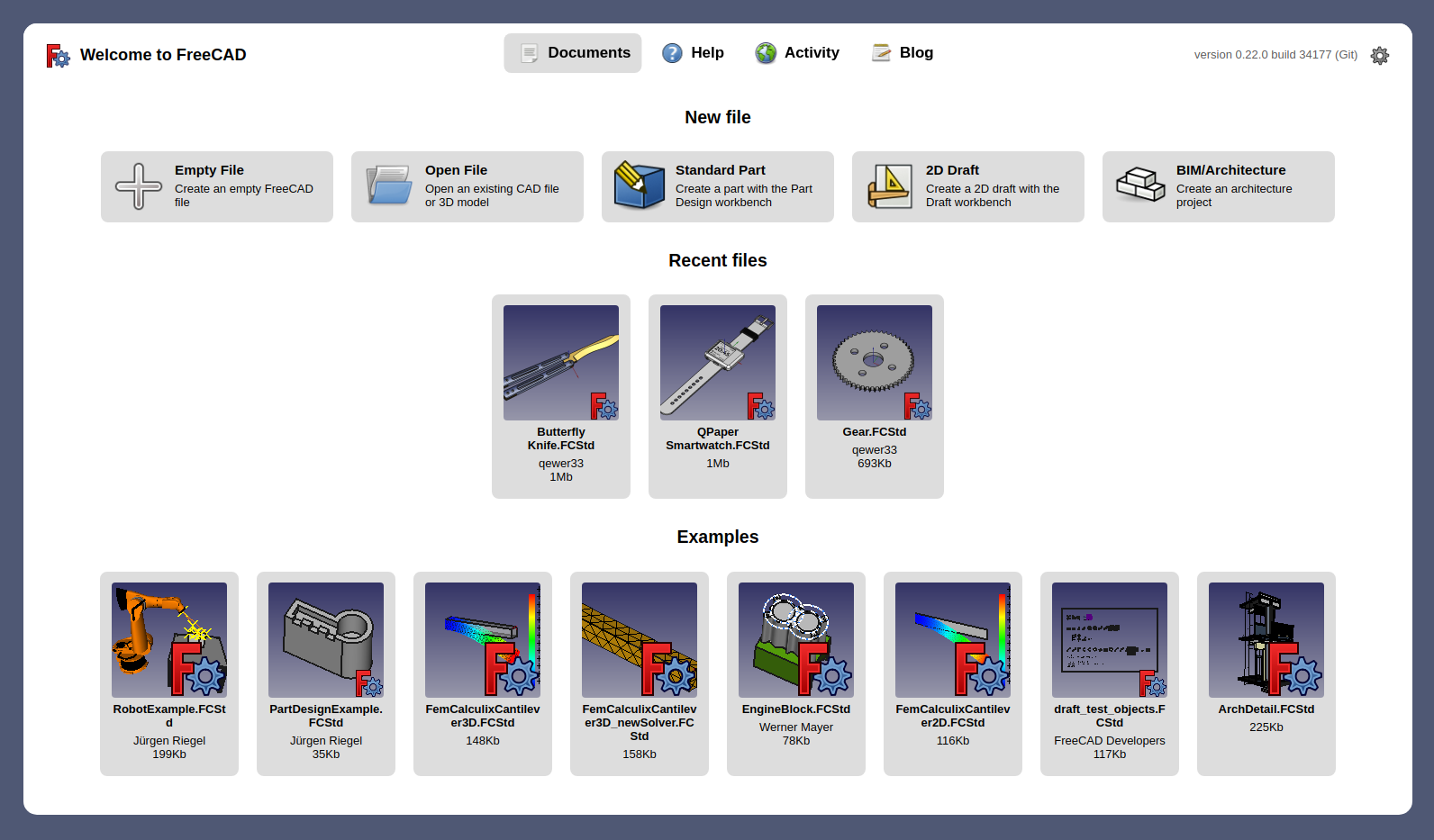
Başlangıç Sayfasına, bir dizi hızlı başlangıç düğmesi içeren bir Yeni dosya bölümü eklendi.
Katkı İsteği #10171
|
|
Başlangıç Sayfasının görsel tasarımı baştan aşağıya yenilendi. Artık daha modern ve tutarlı görünüyor.
Katkı İsteği #10391
|
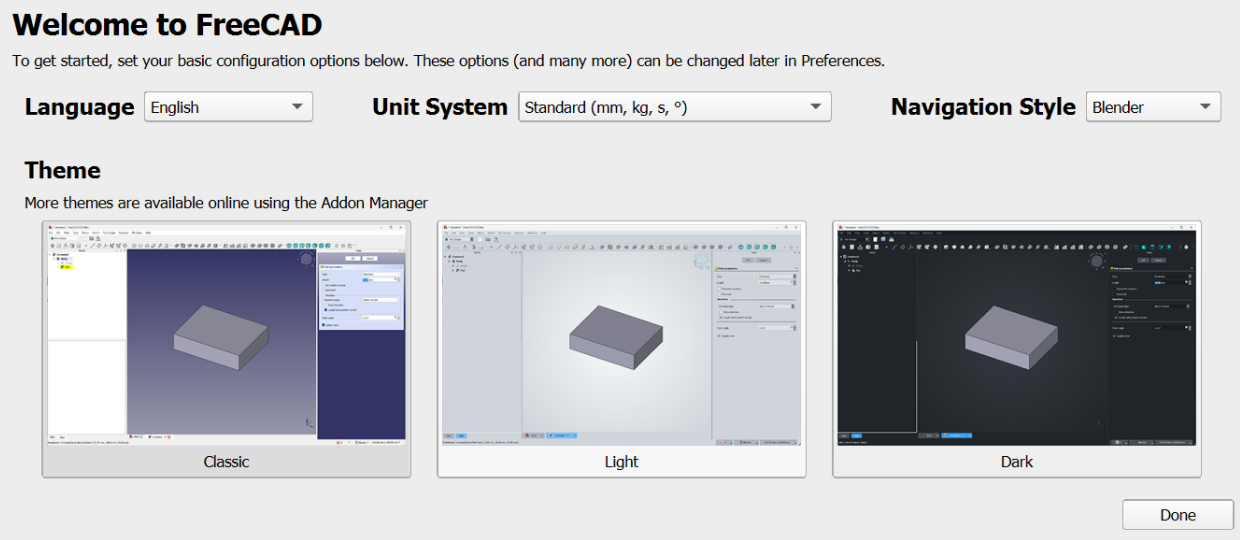
|
Basit bir ilk başlatma pencere ögesi eklendi ve yakın gelecekte genişletilecek.
Katkı İsteği #13650
|
Montaj Tezgahı
Daha fazla Montaj geliştirmesi
BIM Tezgahı
|
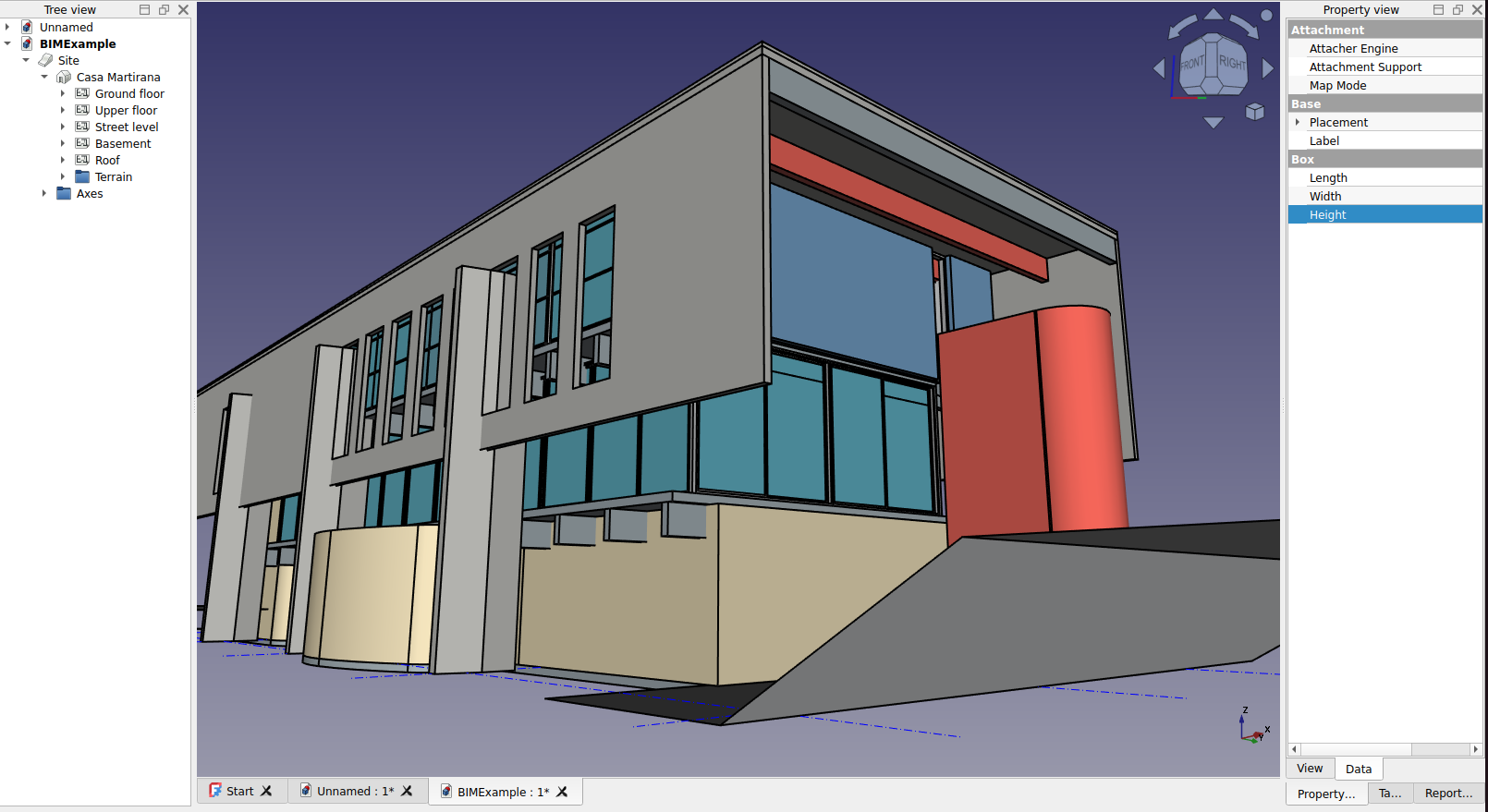
Arch Çalışma Tezgahı nihayet BIM ile birleştirilerek yeni BIM Tezgahı oldu. Yeni BIM Tezgahı, Arch'ten gelen tüm araçları koruyor, birkaç yenisini ekliyor ve tüm BIM ile mimari tasarım iş akışına birçok iyileştirme getiriyor; ayrıca daha iyi kurulum ve yönetim araçları ile daha iyi IFC desteği sunuyor. Katkı İsteği #13783
|
Daha fazla BIM iyileştirmesi
- NativeIFC de yeni BIM tezgahına birleştirildi. NativeIFC ile artık FreeCAD'de IFC dosyaları üzerinde yerel olarak çalışabilirsiniz; FreeCAD dosya biçimiyle herhangi bir dönüştürme olmadan. Daha fazlası için NativeIFC sayfasına bakın. Katkı İsteği #13783
- Arch Çatı nesnesi artık bir Alt Hacim özelliğine sahip. Bu, çatı için çıkarma hacmi olarak özel bir katı nesne kullanmanıza olanak tanır. Katkı İsteği #12346
- Ayrıca, katı bir nesneyi Temel olarak kullanan bir Arch Çatı nesnesi için uygun bir çıkarma hacmi artık kendiliğinden oluşturuluyor. Çizgi tabanlı bir çatı gibi, böyle bir çatı da Arch Remove ile bir binanın duvarlarından çıkarılabilir. Katkı İsteği #13221
- Arch Referans aracı yükseltildi: referans nesneleri artık bir parça seçmek zorunda kalmaksızın tüm dosya içeriğini kullanabiliyor; DXF ve IFC dosyaları için destek eklendi. Katkı İsteği #13287
- Yeni BIM tezgahı ayrıca projenizi kurmanıza veya nesnelerinizin IFC özelliklerini toplu olarak yönetmenize yardımcı olacak yeni yönetim araçları sunar. Daha fazlası için BIM Tezgahı sayfasına bakın.
- IfcOpenShell, FreeCAD'de IFC dosyalarıyla çalışmak için gereken bir başka açık kaynaklı yazılım, artık FreeCAD ekibi tarafından sunulan tüm resmi kurulum paketlerine dahil ediliyor. FreeCAD'i Linux dağıtımınız gibi bir üçüncü taraf sağlayıcıdan edindiyseniz ve IfcOpenShell henüz resmi bir paket olarak bulunmuyorsa, BIM tezgahı IfcOpenShell'i indirip kurmak için bir yardımcı araç sunar. Ve eğer IFC'ye hiç ihtiyacınız yoksa, BIM tezgahı IfcOpenShell olmadan da %100 çalışır.
CAM Tezgahı
Daha Fazla CAM İyileştirmeleri
- Artık işleme, önceki işlemlerin G-kodundan girdi alacak şekilde yeniden uygulandı (Alan işlemlerinin iç yapıları kullanılmak yerine). Bu, Alan operasyonlarında, Alan dışındaki operasyonlardan (özellikle Uyarlamalı / Adaptive) sonra kalan talaş işlemesinin desteklenmesini sağlar. Katkı İsteği #11939
- G43 takım yüksekliği telafisi, centroid CAM ardıl işlemcisine eklendi. Katkı İsteği #12652
- Raybalama ve delme için delme işlemi ayarlarına ilerleme geri çekme seçeneği eklendi. Katkı İsteği #13254
- Alt düzey OpenGL işlevlerine dayalı (daha hızlı ve daha kesin) yeni bir CAM benzetimcisi eklendi. Katkı İsteği #13884 ve Katkı İsteği #15597
- Vcarve işlemi, diğer CAM yazılımlarında yaygın olarak bulunan özellikleri (Adım derinliği, Bitirme pasosu, Kafa hareketi eniyilemesi ve debugVoronoi yöntemi) kapsayacak şekilde elden geçirildi; bu sayede oyma yüzey kalitesi büyük ölçüde iyileştirilirken oyma hızının %50'ye kadar artırılması da olanaklı hale geldi. Katkı İsteği #14093
- Çeşitli malzemelerle birlikte işlenebilirlik malzeme modelleri eklendi. Katkı İsteği #14460, Katkı İsteği #15910 ve Katkı İsteği #16021
Taslak Tezgahı
- Draft ŞekilMetinleri için bir hizalama seçeneği ve ilgili birkaç özellik eklendi. Katkı İsteği #10233
- Radyal ölçüler artık yalnızca tek bir ok gösterir. Katkı İsteği #10655
- Draft ŞekilMetinleri için bir Eğik Açı özelliği eklendi. Katkı İsteği #10783
- Köprü metni desteği eklendi. Yerel ve uzak dosyalara ve URL'lere yönelik köprü metinleri, Draft Metinleri ve Draft Etiketleri içinde, Ağaç görünümü veya 3D görünüm bağlam menüsünden açılabilir. Katkı İsteği #10878
- Draft çalışma düzlemi kodu elden geçirildi. Artık 3D görünüm başına bir çalışma düzlemi bulunuyor. Katkı İsteği #10783
- Draft SelectPlane komutunun geçmiş özelliği ve hizalama seçenekleri iyileştirildi. Katkı İsteği #11062
- Kılavuzun davranışı iyileştirildi. Görünürlüğü artık 3D görünüm başına saklanır. Farklı bir tezgaha geçildiğinde tüm kılavuzlar gizlenir (bunu devre dışı bırakmak için bir ince ayar parametresi mevcuttur). Katkı İsteği #11336
- Taslak tercihleri denetlendi ve iyileştirildi. Bazı tercihler eklendi, kullanılmayan tercihler kaldırıldı. Tercihler Düzenleyicisi'ndeki sayfalar yeni bir yerleşime sahip ve uygun yerlerde birimleri gösteriyor. Taslak tercihi değiştirildikten sonra FreeCAD'i yeniden başlatmak artık gerekli değildir. Katkı İsteği #11379, Katkı İsteği #11503, Katkı İsteği #11512, Katkı İsteği #11550, Katkı İsteği #11579, Katkı İsteği #11585, Katkı İsteği #11677, Katkı İsteği #11694 ve Katkı İsteği #16603
- Genel Taslak tercihlerine yeni bir Fare gecikmesi ayarı eklendi. Sıfırdan farklıysa (varsayılan 1 sn), görev paneli giriş alanlarından birine bir sayı girildikten sonra, fare hareketi devre dışı bırakılır ve böylece belirtilen saniye süre boyunca giriş alanındaki değer değiştirilmez. Çok büyük bir değer ayarlamak, komut bitene kadar fare hareketini pratik olarak devre dışı bırakır. Katkı İsteği #12624
- Draft SelectPlane komutunun görev paneline, kılavuzun rengini hızlıca değiştirmek için bir düğme eklendi. Katkı İsteği #13051
- Draft NoktaDizileri, Draft YolDizileri ve Draft YolBükümlüDizilerine bir Kaynaştır özelliği eklendi. Katkı İsteği #13172 ve Katkı İsteği #13191
- Kılavuzu aç/kapat komutunun düğmesi artık bir iki durumlu düğme gibi davranarak kılavuz durumunun (görünür veya gizli) görsel geri bildirimini sağlar. Katkı İsteği #14452
Daha Fazla Taslak İyileştirmesi
FEM Tezgahı

|
Renk göstergesi etiketlerinin konumu, en üstteki etiketlerin yönlendirme küpü tarafından kapatılma ihtimalini azaltacak şekilde ayarlandı. Etiketlerin varsayılan yazı tipi ve rengi görünürlüğü artırmak için değiştirildi ve etiket rengi ile boyutunun değiştirilmesine izin vermek için tercihler eklendi.
Katkı İsteği #10552
|
|
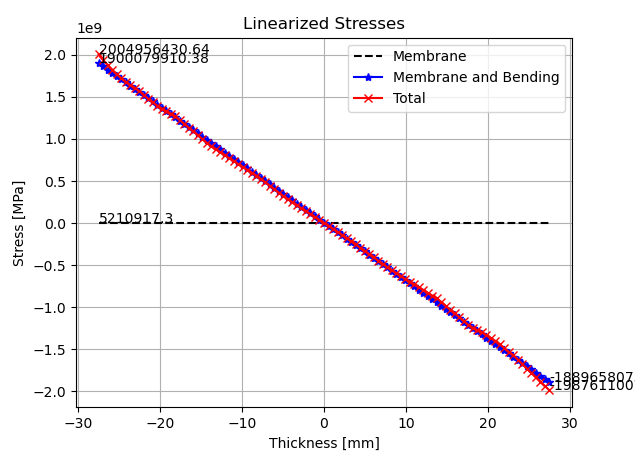
FEM PostFilterLinearizedStresses komutu artık doğrusallaştırılmış gerilme hesaplamaları için gerilme tensörü bileşenlerini kullanabilir. Daha önceden bunun için yalnızca Von Mises, Tresca ve asal (en büyük/orta/en küçük) gerilmeler kullanılabilirdi.
Katkı İsteği #11724
|
|
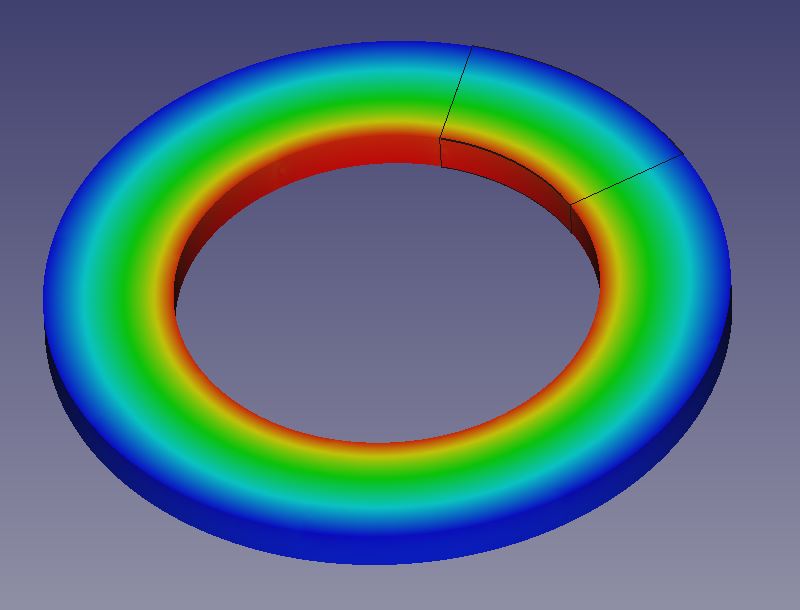
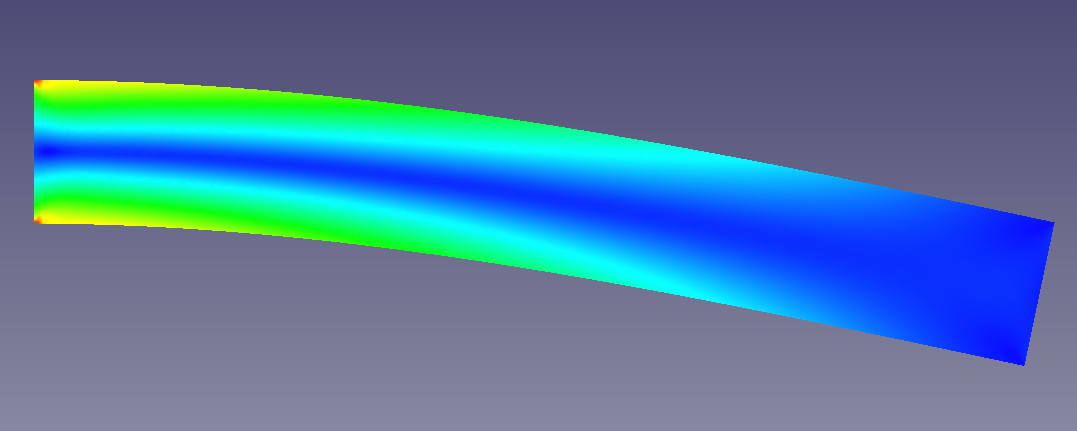
CalculiX'te bağ kısıtı aracılığıyla döngüsel simetri desteği eklendi; bu sayede dönel periyodik simetriye sahip modellerin tek bir tekrarlayan sektör kullanılarak analiz edilmesi mümkün hale geldi.
Katkı İsteği #12289
|
|
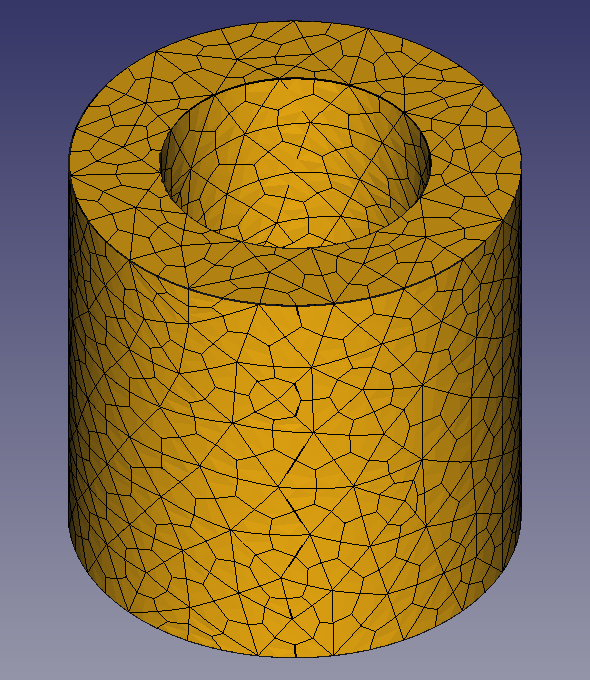
CalculiX çözücüsü için 2B (düzlem gerilmesi, düzlem şekil değiştirmesi ve eksenel simetrik) analiz desteği eklendi. Bunlar, kabuk elemanlı simülasyonlarla aynı şekilde yapılandırılır, ancak adı geçen viki sayfasında açıklanan bazı ek kısıtlamalar vardır. Yeni Model Uzayı seçeneğinin uygun şekilde ayarlanması gerekir. Katkı İsteği #12562
|
|
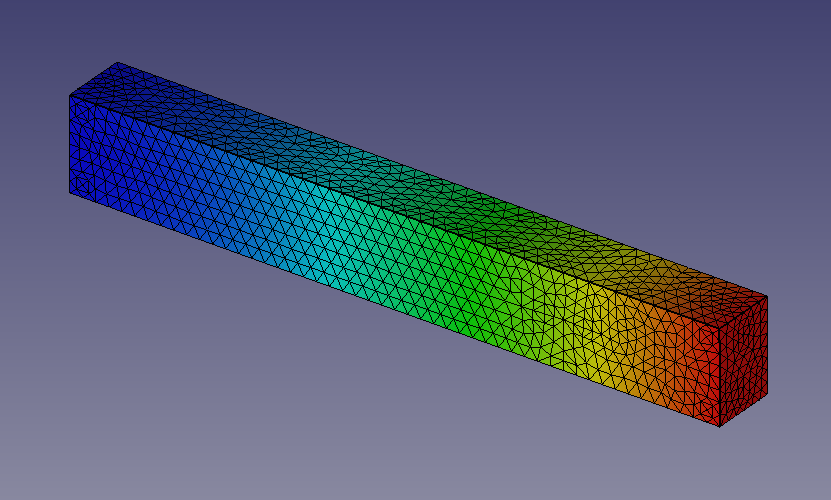
Hegzahedral elemanlar için destek yolundaki ilk adım olarak, yeni Gmsh özelliği Alt Bölüm Algoritması sayesinde Gmsh alt bölüm tekniği kullanılarak bunların üretilmesi artık mümkündür. Ayrıca dört kenarlı elemanlar oluşturmak için de kullanılabilir. Katkı İsteği #12698
|
|
Sonuç boru hattı nesnelerine yeni Görünüm özellikleri eklendi. Kenarlı Yüzey görüntüleme modu için ağ kenarı rengi ve genişliği artık değiştirilebilir. Düğüm boyutu Düğümler modu için değiştirilebilir. Ayrıca tüm modlar için bir saydamlık ayarı da bulunmaktadır. Katkı İsteği #13066
|
|
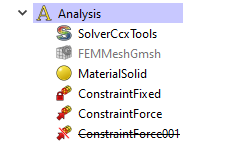
FEM kısıtları artık bastırılabilir (bir kısıt üzerine sağ tıklayıp Bastır seçilir) ve böylece çözücüler tarafından yok sayılabilir. Bu sayede, şu anda gerekmeyen kısıtları silmek zorunda kalmadan analiz kurulumunu değiştirmek mümkündür. Katkı İsteği #12359
|
|
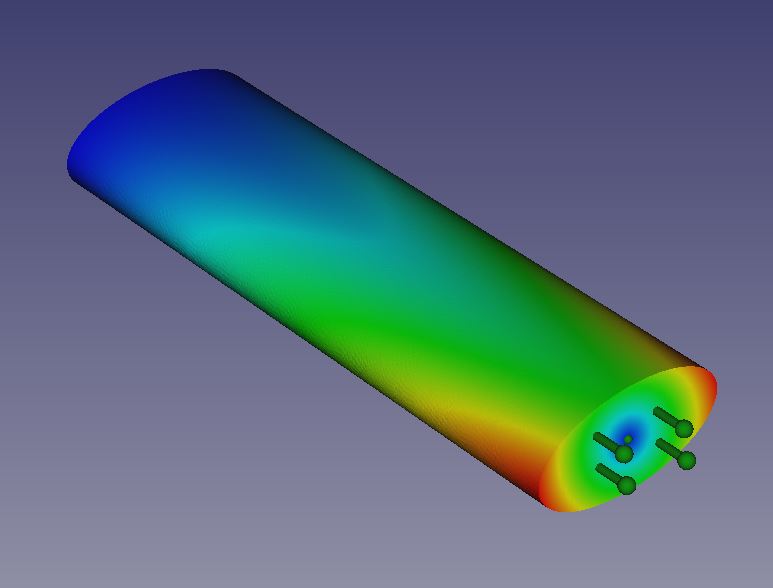
CalculiX'in katı cisim kısıtı için destek eklendi; bu sayede diğerlerinin yanı sıra rastgele bileşenlerin burulmasını simüle etmek ve uzak yükler uygulamak nihayet mümkün hale geldi. Katkı İsteği #13900
|
Daha Fazla FEM İyileştirmesi
- The Model → Constraints without solver menu was removed from the GUI. The listed constraints could not be used. Pull request #10457 and Pull request #10459
- The word "constraint" was removed from the names and descriptions of most features in the FEM workbench to ensure the correct nomenclature. The names were changed in such a way to fit the standards in the FEA industry and to make them intuitive for new users. Pull request #10519 and Pull request #10799
- New icons were added for Solver CalculiX Standard, Solver job control and Run solver calculations for greater intuitiveness. Pull request #10885
- Solver CalculiX (new framework) was removed from the GUI since it's unfinished and unnecessary at the moment. Its examples were also removed. Pull request #10823 and Pull request #12876
- The layout of some postprocessing tool task panels was improved to reduce the size of the horizontal space occupied by them. Pull request #11066
- The FEM ConstraintTemperature task panel was reworked to fix issues when editing this feature. Pull request #11126
- An old issue with the FEM PostFilterDataAlongLine being able to plot only magnitude, not vector components of a selected output variable was finally fixed. Pull request #10992
- The FEM ConstraintForce and FEM ConstraintPressure were overhauled to make them work better on the source code side. Pull request #10935 and Pull request #10923
- The FEM PostFilterDataAtPoint now has a PointSize property to set the size of the point symbol for more visibility. Pull request #11054
- For clarity, the FEM mesh region command was relabeled to FEM mesh refinement in the GUI (the command name remains unchanged). Pull request #11489
- The magnitude of gravity acceleration can now be changed using the properties of FEM ConstraintSelfWeight. Pull request #12044
- Contact and tie constraint were significantly improved. Contact stiffness now uses the correct unit and stick slope value can be specified for friction in contact. Moreover, clearance adjustment can be specified for contact while tie constraint may have adjustment enabled or disabled. Pull request #12133
- PaStiX and Pardiso were added to supported CalculiX matrix solvers. They are the fastest ccx solvers but the possibility of using them depends on the CalculiX binary version and available additional libraries. Pull request #12478
- The Beam Reduced Integration property (set to true by default) was added to CalculiX solver settings. It enables a reduced integration scheme for beam elements, making it possible to use the pipe beam section and eliminating accuracy issues in analyses with plasticity, among others. Pull request #12513
- The unfinished Nodes set tool was removed from the GUI. It couldn't be used. Pull request #12611
- The Check Mesh CalculiX analysis procedure now generates the results mesh properly. Pull request #12612
- It was clarified in the task panel that the diameter used by the pipe beam section is the outer diameter. Pull request #12609
- The Beam Shell Result Output 3D property of the CalculiX solver is now set to true by default to provide results for beam elements and provide meaningful results for shell elements. Pull request #12493
- Symbols of analysis features are now properly positioned when the Body (or Part container) has modified placement property. Pull request #12527
- Pressure load is now working properly for shells regardless of the mesh groups setting. This setting can be changed in the Preferences. Pull request #12437
- Simple hardening in FEM MaterialMechanicalNonlinear was renamed to isotropic hardening. Moreover, kinematic hardening was added. Pull request #12666
- Now geometric nonlinearity is not automatically activated and required when a nonlinear material is used. Those are independent forms of nonlinearity. Pull request #12703
- Mixed meshes consisting of both triangular and quadrilateral elements are now displayed properly in the results pipeline. Pull request #12740
- The Output Frequency property was added to CalculiX solver settings. It defines the frequency of output writing in increments. Pull request #12672
- Second-order quadrilateral elements can now be generated. Previously, the 2nd order Gmsh setting was generating 1st order quad elements because of the lack of a SecondOrderIncomplete Gmsh command which is now used internally. Those elements can also be used for 2D analyses. Pull request #12698 and Pull request #12774
- The determination of beam cross-section orientation was partially fixed. Due to a bug in the current release of CalculiX, there may still be issues with some orientations. Pull request #12833
- Cantilever FEM examples on the Start page were updated and a new one using 1D elements was added. Pull request #12871
- The format in which FreeCAD writes the force constraint is now compatible with the CalculiX format, eliminating rare issues with too long numbers. Pull request #12932
- It is now possible to export the results pipeline to the VTK format. Pull request #12987
- New incrementation control properties were added to CalculiX solver settings. Currently, in addition to the initial increment size and time period of the step, one can specify minimum and maximum increment size. Also, the Iterations Thermo Mech Maximum property was renamed to Iterations Maximum as it can now be used for static (non-thermomechanical) analyses too. Pull request #12662
- Default 2D element thickness was changed from 20 mm to 1 mm as it makes more sense in practice. Pull request #13077
- Many FEM icons were significantly improved to reduce their similarity and make it more clear what the tools do. Pull request #13130
- The Thermo Mech Type property was added to CalculiX solver settings. It makes it possible to switch a regular (coupled) thermomechanical analysis to uncoupled or a pure heat transfer one. Pull request #13296
- Min. Size property was added for Netgen mesher to prevent the generation of too small elements when meshing more complex geometries. Pull request #12794
- An old issue with a non-functioning symbol scale property for FEM constraints was finally fixed and the Scale property can now be used to adjust the size of symbols of a selected constraint. Pull request #13274
- Automatic scaling of FEM constraints was improved to better handle very small and very large objects. Pull request #13586
- Heat flux load now has a radiation heat flux mode to model surface radiation to ambient. Pull request #13466
- A few unused constraint symbol View properties were removed. Pull request #13569
- New view properties (with the main one being Color Mode) were added to FEM mesh objects so that custom color and transparency settings for meshes can be saved and restored. Pull request #13698
- Now only the last added filter under each results pipeline object is visible by default. Pull request #13820
- The task panel tips of several constraints were changed to actually reflect the rules of the geometry selection for those constraints. Pull request #13921 and Pull request #14002
- Support for heat flux results from thermomechanical analyses was added to the results pipeline. Pull request #14019
- The Section print feature was improved, adding support for heat flux and drag stress (not yet available as 3D fluid analyses with CalculiX haven't been implemented yet) results. Pull request #14046
- Body heat source can now be used with CalculiX and has two input modes - dissipation rate [W/kg] and total power [W]. Pull request #14417
- The rotation properties of the Local coordinate system were replaced with a single Rotation property for consistency. Pull request #14353
- An Erase Elements tool was added to make it possible to hide elements of a mesh selected with a polygon. Pull request #11492
- The three FEM examples on the Start page were replaced with one, containing all three variants of the cantilever beam model (1D, 2D and 3D) in Group containers. Pull request #15786
- The redundant Fix properties and checkboxes of the FEM ConstraintDisplacement were removed. Pull request #15531
- The behavior of the Cancel buttons in the task panels of the Gmsh and Netgen meshers was fixed so that they can be used to abort ongoing meshing which is particularly important when an initial guess regarding element size is too low. Moreover, the Netgen mesher was reimplemented, finally making it possible to use it on all systems, including Linux. Pull request #16515 and Pull request #16433
- The Quasi-structured Quad 2D algorithm missing in the Gmsh mesher was added to it along with other fixes. Pull request #15624
Material Workbench
|
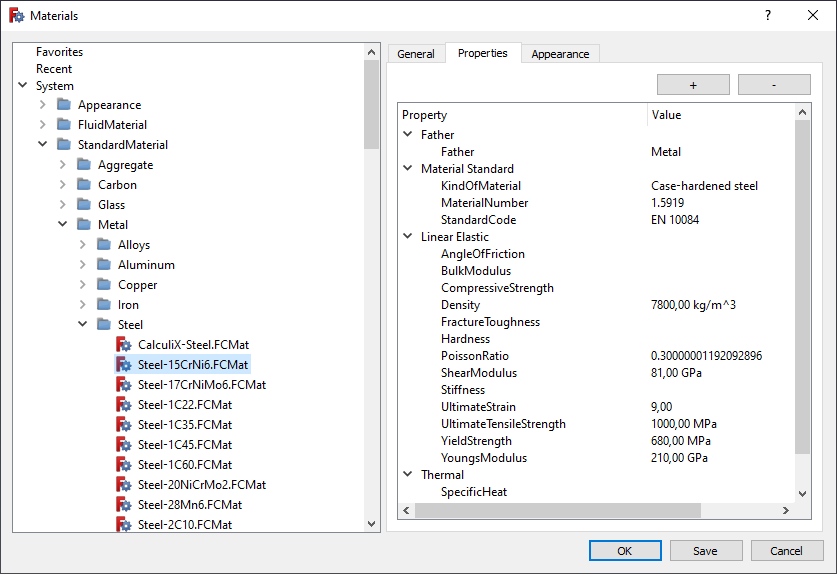
The material handling system, including the editor, has been completely reworked. Further improvements in this regard will follow.
Pull request #10690
|
|
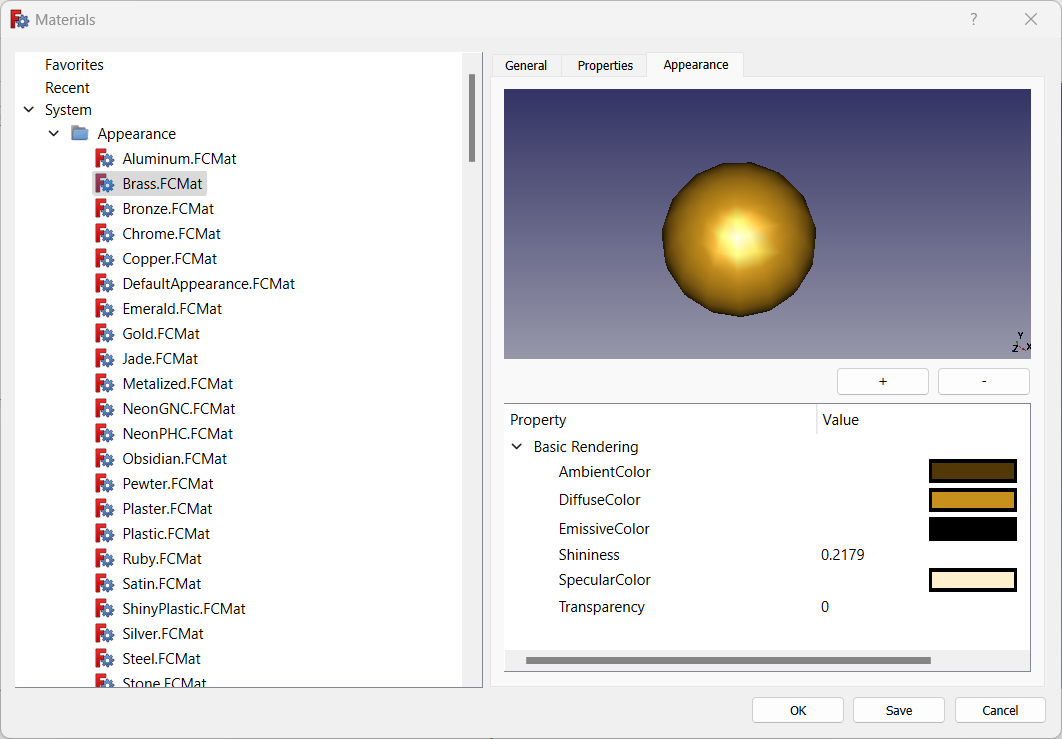
Appearance preview was added to show the materials in the same way they will be shown in documents.
Pull request #11628
|
Further Material improvements
- Dialogs to view the Appearance and Material properties of an object were added and available as Inspect Appearance and Inspect Material tools. Pull request #13967
Parça Tezgahı
Further Part improvements
- The Frenet property is now enabled by default for the Part Sweep tool to avoid a common rendering issue. Pull request #11590
- A new attachment mode called Intersection was added to the Engine Line. It finds the intersection of two planar faces. Pull request #12328
- The Part ProjectionOnSurface tool is parametric now. Pull request #13158
- Now all the Part icons use the blue theme and the primitives use the same icon for the toolbar and the tree. Pull request #14074
- The Create sketch command was added to the Part toolbar and menu since operations such as extrusion typically use sketches as input. Pull request #14318
- A new attachment mode called XY parallel to plane was added to the Engine Plane and Engine 3D. It results in an attachment similar to Object's XY but with the XY plane translated to pass through a selected vertex. In contrast to the Translate origin attachment mode, it does not move the origin in 2D/Sketcher. It can be used with origin planes, datum planes and sketches, but also with any object with a Placement property. Pull request #14372
PartDesign Workbench

|
Experimental support for multiple solids within a Body was added. It can be enabled in the preferences (for new Bodies) or in the properties of an existing Body.
Pull request #13960
|
|
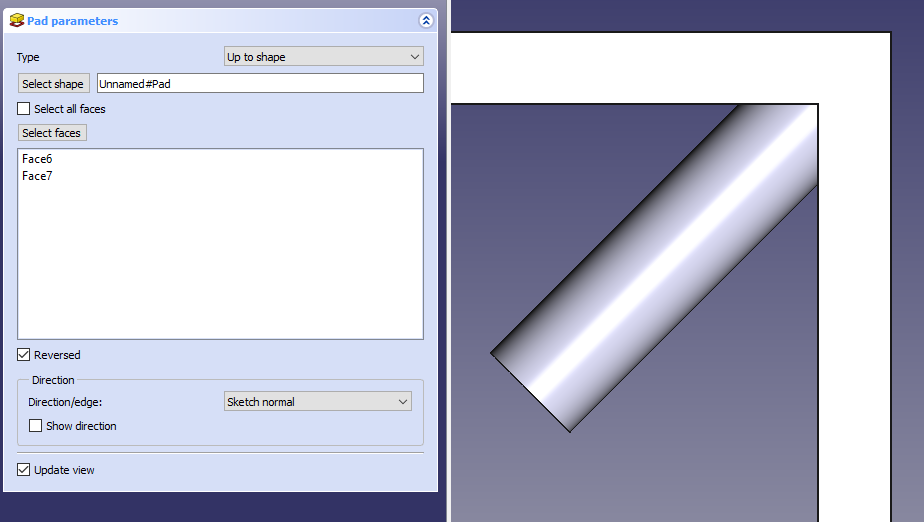
Up to shape mode was added for Pad and Pocket, making it possible to end them on multiple faces, as opposed to Up to face mode which allows the selection of only a single face.
Pull request #11392 and Pull request #14433
|
Further PartDesign improvements
- The Make thickness inwards option is now enabled by default for the Thickness tool. Pull request #7488
- Datum points now change color when highlighted or selected (like other datums). Pull request #12439
- Part Design icons where slightly improved for consistency. Pull request #13109
- A Suppressed property was added to temporarily disable a feature. Pull request #12096 and Pull request #12412
- The Part Design toolbars have been updated - datums and sketch-based actions are grouped now, Part CheckGeometry was added to the toolbar and menu, and the toolbars were split into individual ones to make it possible to rearrange them. Pull request #13833
- Now all the Part Design features use the same icons for the toolbar and the tree. Pull request #14074
- A new Transform body mode was added to Part Design mirror and pattern tools, making it possible to transform the whole base feature's shape instead of the individual tool shapes of additive and subtractive features. Pull request #12589
- The layout of the Hole tool dialog was improved. Pull request #14031
- The Migrate tool was removed from GUI since it was only useful for migrations between versions that are now highly outdated. Pull request #15196
Sketcher Workbench
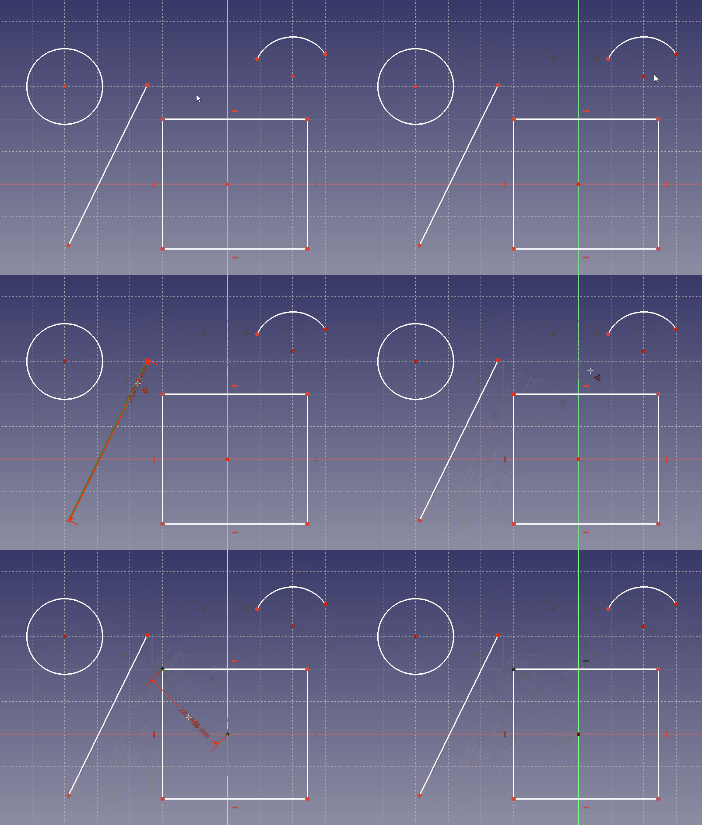
Click on the image if the animation does not start.
|
A contextual Dimension constraint tool was added to enable quick and intuitive dimensioning with a single versatile tool.
Pull request #9810
|
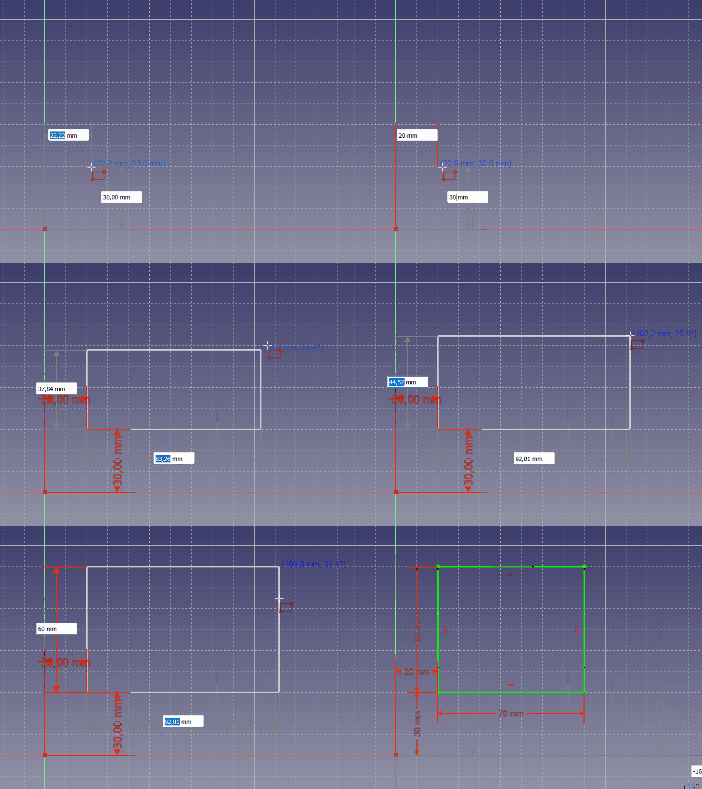
Click on the image if the animation does not start.
|
Tool parameters were added to allow dimensioning on the go (when drawing shapes). Depending on the preference setting On-View-Parameters, they can be disabled, reduced to dimensions only (no initial coordinates) or fully enabled. Moreover, modes were added for the shape tools. They can be selected using the M key or a drop-down list in the task panel. Some tools have additional settings in the form of checkboxes in the task panel and additional keyboard shortcuts. Currently, the new features are available for points, lines, arcs, ellipses, rectangles, polygons, slots and B-splines.
Pull request #11048, Pull request #11174 and following
|
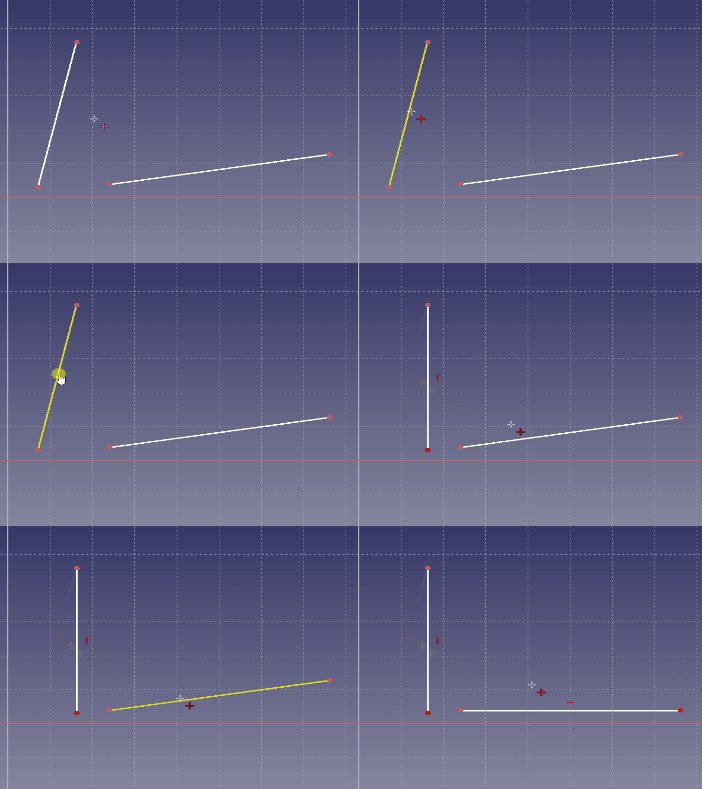
Click on the image if the animation does not start.
|
A Horizontal/Vertical constraint was added. It automatically applies horizontal constraint if a line is closer to horizontal orientation or vertical constraint if it's closer to vertical orientation.
Pull request #11538
|
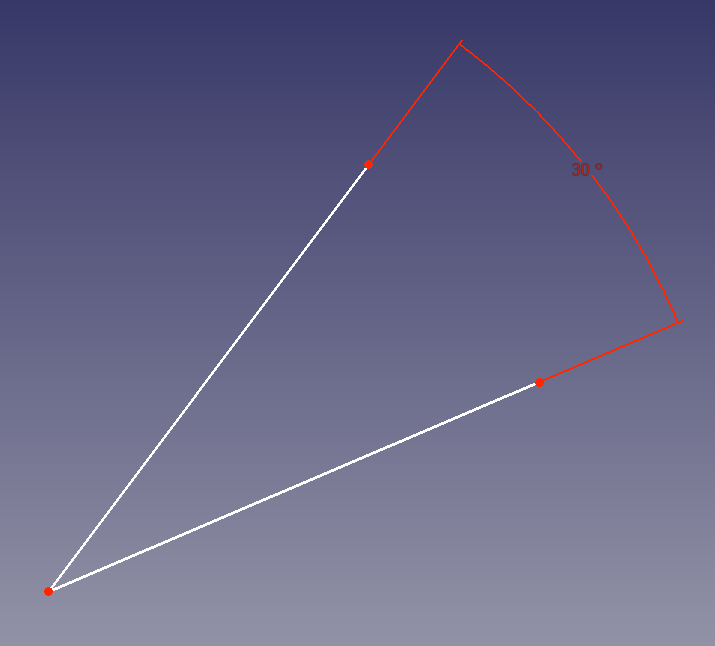
|
Rendering of angle and radius constraints was improved. Angle constraints have full extension lines now.
Pull request #11507
|
Click on the image if the animation does not start.
|
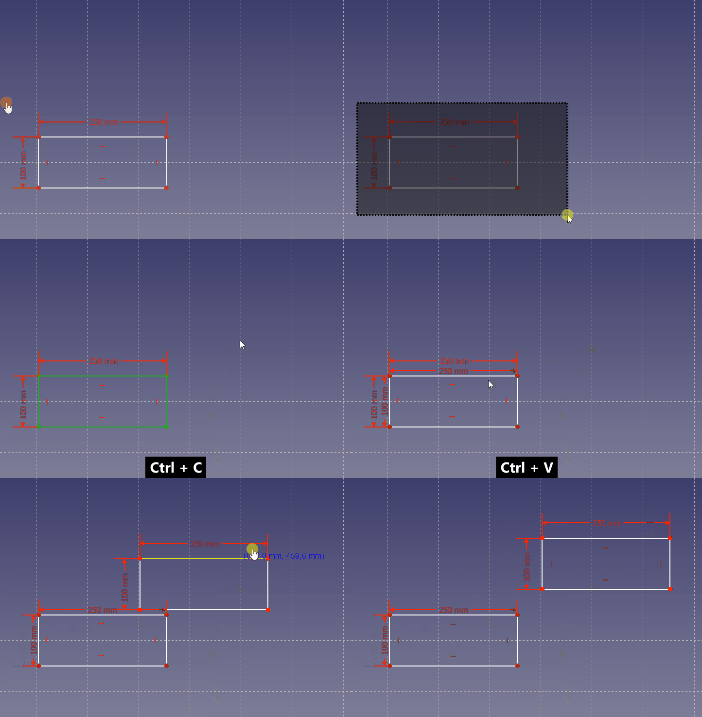
It is now possible to copy/cut and paste sketch geometry (with constraints) using typical keyboard shortcuts: Ctrl+C, Ctrl+X and Ctrl+V. Not only within a single sketch but also between different sketches or even different instances of FreeCAD. The geometry is copied in the form of Python commands so it can be used in other ways too (e.g. shared on the forum).
Pull request #11537
|
|
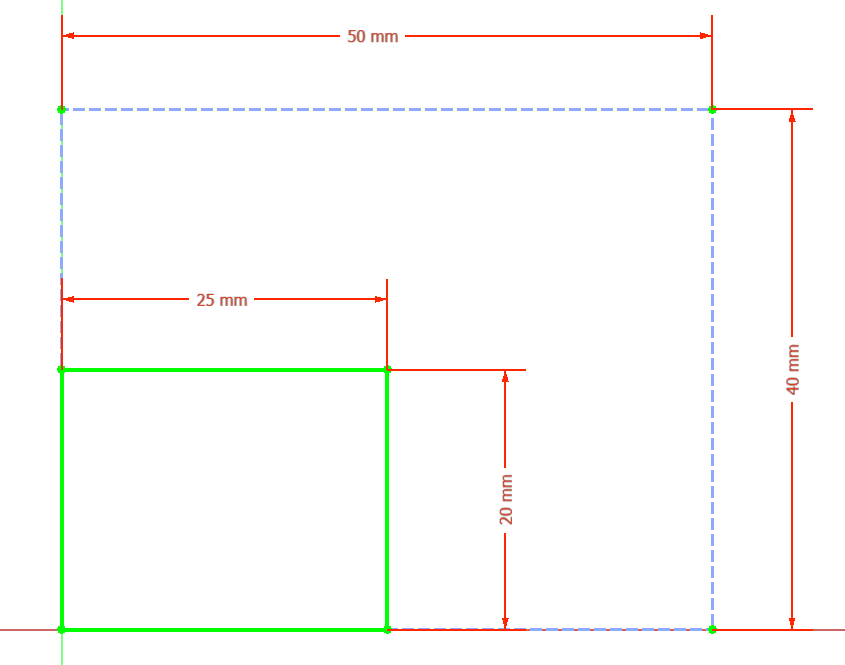
A Scale transform tool was added, making it possible to scale the geometry in the sketch using a selected center point and a scale factor or two reference points.
Pull request #11265
|
Click on the image if the animation does not start.
|
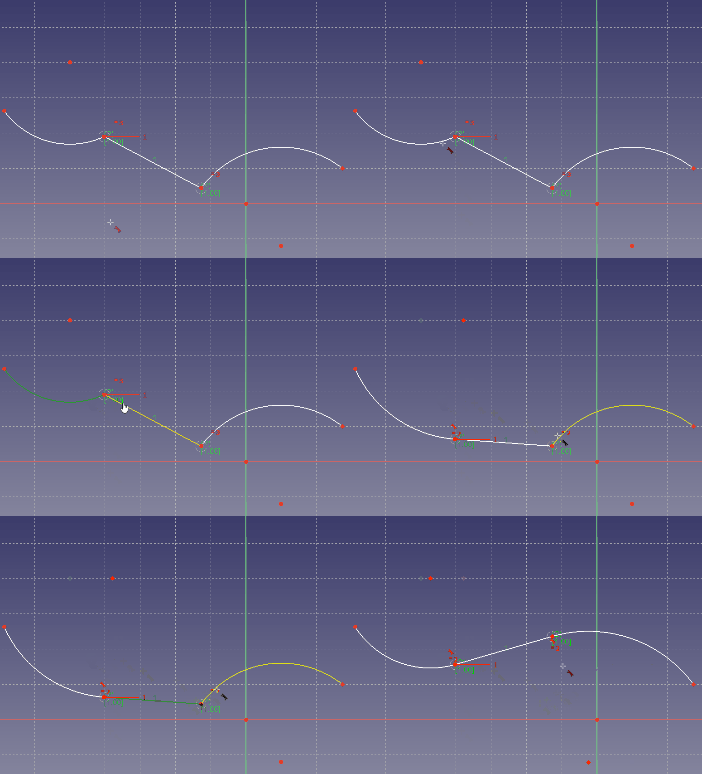
Tangency to B-spline edge was added, eliminating the need to use endpoints and various workarounds instead.
Pull request #11853
|
Click on the image if the animation does not start.
|
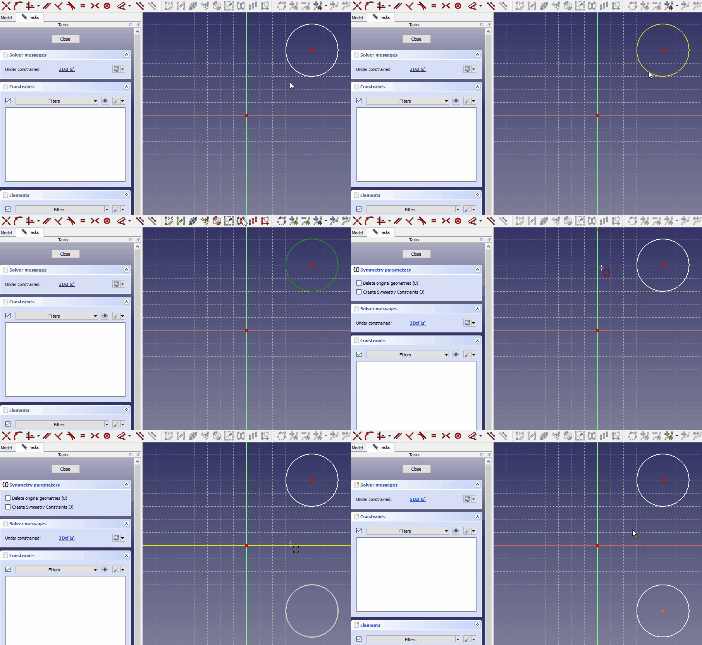
The Symmetry tool has been reworked. Now it works by preselecting the geometry and picking a line or point about which the geometry will be mirrored. A preview is shown and the behavior of the tool can be controlled through tool settings.
Pull request #11853
|
|
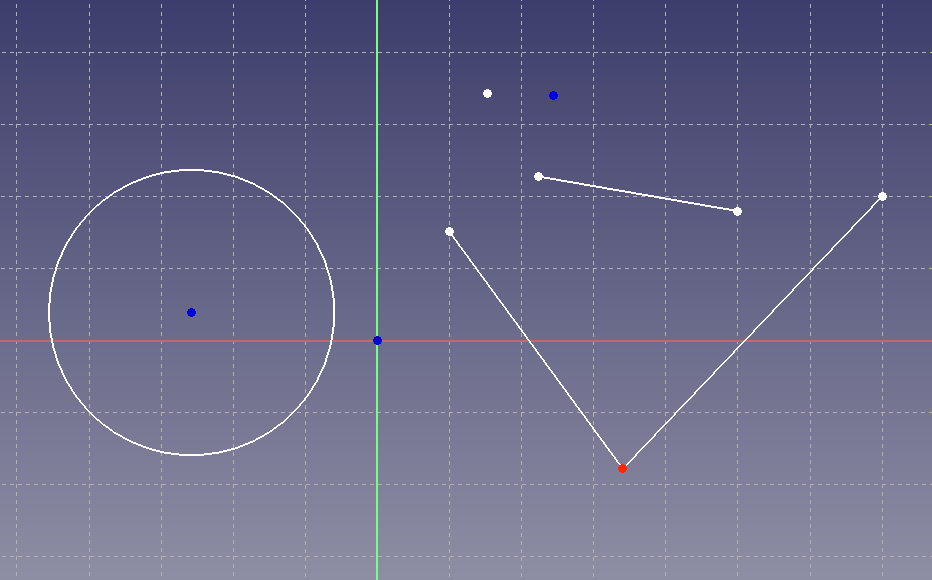
The rendering color of points is now different depending on whether it's a normal point/endpoint (white, now created by default when using the CreatePoint tool), a construction point/center point (blue) or a point coincident with another one (red).
Pull request #13098
|
Further Sketcher improvements
Spreadsheet Workbench
Further Spreadsheet improvements
TechDraw Workbench
Further TechDraw improvements
- Sections based on other sections now use the original (uncut) shape by default. This can be changed in section settings to use the previous section instead. Pull request #10281
- Cosmetic objects and centerlines can now be deleted by selecting them and pressing the Delete key. Previously, this resulted in the whole view being deleted. Pull request #10695 and Pull request #10813
- A new, more intuitive icon was added for the WeldSymbol tool. Pull request #10936
- The behavior of the point + edge mode of the LengthDimension was corrected. Pull request #10860
- A checked state was added for the ToggleFrame button so that a user can see whether the button is activated or not. Pull request #11240
- The behavior of the DecorateLine tool was improved. Now double-clicking a line invokes this tool. And line styles are correctly restored if the user presses Cancel. Previously, there was no difference between pressing OK and Cancel. Pull request #11188
- Color and transparency of faces can now be set per view. Pull request #11315
- Multiselection mode was added and can be enabled in Preferences. In this mode, multiple vertices, edges and faces can be selected by left-clicking on them, without having to keep the Ctrl key pressed. Pull request #11417
- ExtensionAreaAnnotation can now calculate areas of arbitrary faces. Pull request #11473
- Non-continuous lines will now follow the ISO/ANSI standards instead of a Qt line style. A new preference was added to select the standard. Pull request #11594
- The behavior of the AxoLengthDimension tool was improved. Now, when dimensioning edges parallel to the global coordinate system axes, the actual (3D) value is calculated automatically and inserted into the Format Spec property (as text). Pull request #11678
- The ExtensionPositionSectionView tool can now be used by selecting an edge in a section view and a vertex in the source view. Pull request #11797
- The ExtensionInsertRepetition tool, to insert a repeated feature count, was added. Pull request #12509
- Small but important usability improvements were made - double-clicking on the TechDraw page now enters this workbench and the TechDraw MoveView tool was replaced by simple drag and drop in the tree. The TechDraw ClipGroupAdd and TechDraw ClipGroupRemove tools were also replaced by tree drag and drop behavior. Pull request #13063
- The drawing templates are now automatically filled with available information (like date and title). Pull request #13005
- The Project shape tool was removed from TechDraw as it's inherited from the old Drawing workbench and has nothing to do with a TechDraw page. Pull request #13655
- The Insert View tool was improved so that it can handle more object types and settings. This allowed the following tools to be removed from the toolbar: SpreadsheetView, ArchView, Symbol, Image and ProjectionGroup. Pull request #13219
- Snapping was added to allow automatic alignment of views and dimensions. Snapping can be temporarily disabled with the Alt key modifier. Pull request #13659
- Handling of cosmetics was improved in various ways. Pull request #14216
- Many TechDraw icons were improved. Pull request #14873 and following
- The task panel of the SurfaceFinishSymbols tool was significantly improved visually. Pull request #16147
Import/Export


