Macro FCCircularText/de
|
|
| Beschreibung |
|---|
| Dieses Makro nutzt das Werkzeug Draft Textform, um eine Textzeile zu erstellen, die in verschiedenen kreisförmigen Ausrichtungen platziert werden kann, darunter umlaufend und spiralförmig (ähnlich wie bei der Trajanssäule). Es kann auch verwendet werden, um ein Zifferblatt mit arabischen Ziffern „1, 2, 3“ usw. oder römischen Ziffern „I, II, III“ usw. zu erstellen. Versionsmakro : 0.23 Datum der letzten Änderung : 2026/09/13 FreeCAD version : 0.19 und mehr Herunterladen : Werkzeugleisten-Symbol Autor: Mario52 |
| Autor |
| Mario52 |
| Herunterladen |
| Werkzeugleisten-Symbol |
| Links |
| Makros Rezepte Wie man Makros installiert Symbolleisten anpassen |
| Macro-Version |
| 0.23 |
| Datum der letzten Änderung |
| 2026/09/13 |
| FreeCAD-Version(s) |
| 0.19 und mehr |
| Standardverknüpfung |
| None |
| Siehe auch |
| None |
Beschreibung
Dieses Makro nutzt das Werkzeug  Draft Textform, um eine Textzeile zu erstellen, die in verschiedenen kreisförmigen Ausrichtungen platziert werden kann, darunter umlaufend und spiralförmig in Anlehnung an die Trajanssäule. Es kann auch verwendet werden, um ein Zifferblatt mit arabischen Ziffern „1, 2, 3“ usw. oder römischen Ziffern „I, II, III“ usw. zu erstellen. Letztere Verwendung wurde durch den Forum-Thread Macro to Create Clock Face (Makro zum Erstellen eines Zifferblatts) von FC-Community-Mitglied cblt2l inspiriert.
Temporary code for external macro link. Do not use this code. This code is used exclusively by Addon Manager. Link for optional manual installation: Macro
# This code is copied instead of the original macro code
# to guide the user to the online download page.
# Use it if the code of the macro is larger than 64 KB and cannot be included in the wiki
# or if the RAW code URL is somewhere else in the wiki.

from PySide import QtGui, QtCore

diag = QtGui.QMessageBox(QtGui.QMessageBox.Information,
    "Information",
    "This macro must be downloaded from this link\n"
    "\n"
    "https://gist.githubusercontent.com/mario52a/a25e802498bae6959335/raw/e47c085e509467817b824579001c94951f840109/Macro_FCCircularText.FCMacro" + "\n"
    "\n"
    "Quit this window to access the download page")

diag.setWindowFlags(QtCore.Qt.WindowStaysOnTopHint)
diag.setWindowModality(QtCore.Qt.ApplicationModal)
diag.exec_()

import webbrowser
webbrowser.open("https://gist.githubusercontent.com/mario52a/a25e802498bae6959335/raw/e47c085e509467817b824579001c94951f840109/Macro_FCCircularText.FCMacro")

Beispiel für das Makro, das Text in einer 360-Grad-Ausrichtung anzeigt
Anwendung
Den Makroordner FcString für erstellte Zeichen und eine Datei FcClock für erstellte Uhren starten.
Alle Zeichen sind und bleiben unabhängig. Beim Erstellen von Extrusionen wird nichts gelöscht. Wenn ein Verbund mit Run Comp erstellt wird, wird er aus dem Ordner kopiert.
Die Optionen sind standardmäßig ausgegraut und in allen Funktionen aktiv, wenn sie aktiviert sind  :
:
 Zeichen extrudieren
- Platzierung
- SP-Neigung

Mit Ausnahme einer Uhr-Serviceplatzierungsbox wird Z aktiviert und verschiebt den Text in Richtung Z, um ihn auf der Auflagefläche zu platzieren.
Hinweise
- Dieses Makro blendet Optionen, die für eine ausgewählte Funktion nicht relevant sind, aus (deaktiviert sie).
Schnittstelle
Übersicht

Erster Abschnitt

- TextEdit-Fenster, in dem der anzuzeigende Text kopiert werden kann (durch Klicken auf die Schaltfläche Zurücksetzen kann die Nummer der Eingabezeichenfolge anzeigt werden, die im Fenstertitel angezeigt wird).
- Die Schaltfläche Reverse kehrt den Text um
- Word aktiviert, diese Option betrachtet den Text als Wort, der Text wird an Leerzeichen geschnitten und Wort für Wort geschrieben (anstatt Zeichen für Zeichen wie bei normaler Verwendung)
- Die Schaltfläche Help zeigt die Wiki-Seite im FreeCAD-Browser an
- LineEdit: Zeigt den Pfad und den Namen der Datei-Schriftart an.
- Other-Schaltfläche zum Suchen der Schriftart in einem anderen Verzeichnis, falls nicht alle Verzeichnisse automatisch gefunden werden.
- ComboView zum Auswählen der Schriftart.
- Origin kehrt zum ursprünglichen System-Schriftartenpfad zurück, z. B. „C:/Windows/Fonts/“.
- Standardmäßig ARIAL.TTF.
Verfügbare Optionen
Nach der ersten Verwendung müssen die folgenden Parameter geändert werden:
User parameter:BaseApp/Preferences/Macros/FCMmacros/FCCircularText
switchModeTextList
- 0 = Normaler Textmodus (und Schwarz) schneidet die switchFontComBox
- 1 = erlaubt switchFontComBox 1
switchFontComBox
- 0 = (und switchModeTextList= 1) Textmodus (in Farbe) in der ComboBox-Liste, schneller
- 1 = (and switchModeTextList= 1) fontFamily langsamer, aber schönerer ComboBoxst!
setSystemFonts
- 0 = matplotlib.font_manager.findSystemFonts("C:/", "ttf")
- Alle Schriftarten (in allen Ordnern und Unterordnern des DD) bearbeiten!
- 1 = fontman.findSystemFonts(self.pathFont)
- alle Schriftarten im Verzeichnis (und in allen Unterordnern)
seTtextAlignement
- 0 = Linksbündig (standard)
- 1 = Zentriert
- 2 = Rechtsbündig
setFontByDefault
- Standardschriftart
switchResetFALSE
- 0 = Zurücksetzen (Standard)
- 1 = kein Reset (nicht empfohlen) Einige Schalter können offen bleiben oder sich unerwartet schließen!
Beispiele

- switchModeTextList=
false - switchFontComBox =
false - setSystemFonts =
false - seTtextAlignement = 0

- switchModeTextList=
true - switchFontComBox =
false - setSystemFonts =
false - seTtextAlignement = 0

- switchModeTextList=
true - switchFontComBox =
false - setSystemFonts =
false - seTtextAlignement = 1 (0=Links, 1=Zentriert, 2=Rechts)

- switchModeTextList=
true - switchFontComBox =
true - setSystemFonts =
false - seTtextAlignement = 1
Zweiter Abschnitt
Konfigurieren von Zeichen in FCCircularText

Erste Zone
Deine Wahl:

-
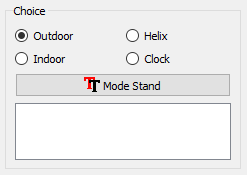 außenliegend
 -
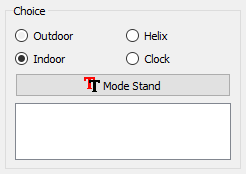 innenliegend
 -
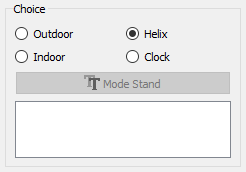 Wendel
 -
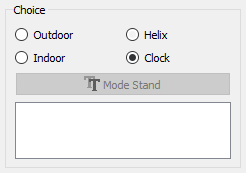 Uhr
Uhr


- Mode Stand oder Mode Flat : Der Text wird stehend oder flach (wie bei einer Uhr) platziert. Die Optionen „außenliegend“ und „innenliegend“ sind vertauscht.
-
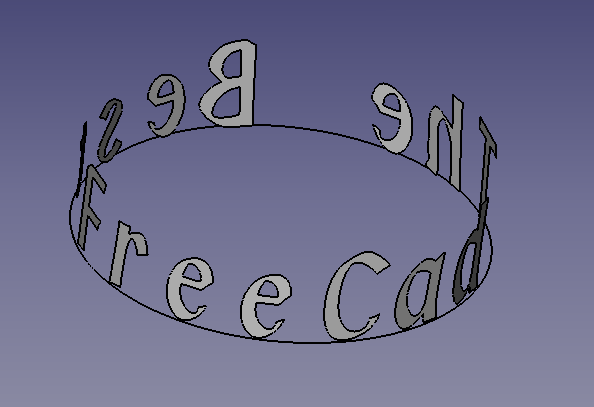 Mode Stand Outdoor Der Text wird oberhalb geschrieben.
 -
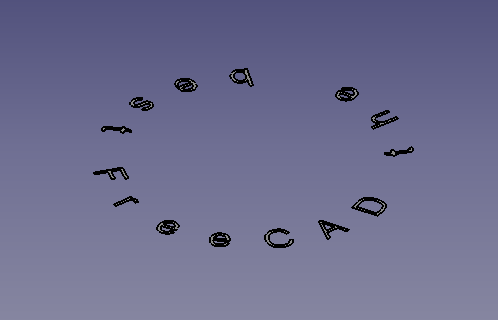 Mode Flat Outdoor Der Text wird flach platziert.

-
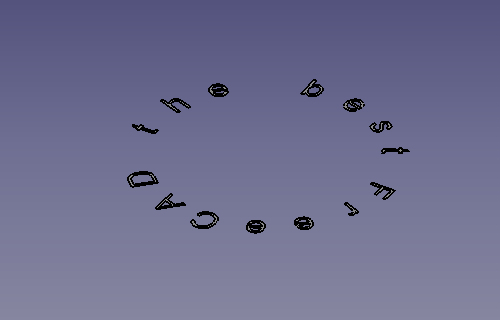 Mode Flat Indoor Der Text wird flach platziert.
 -
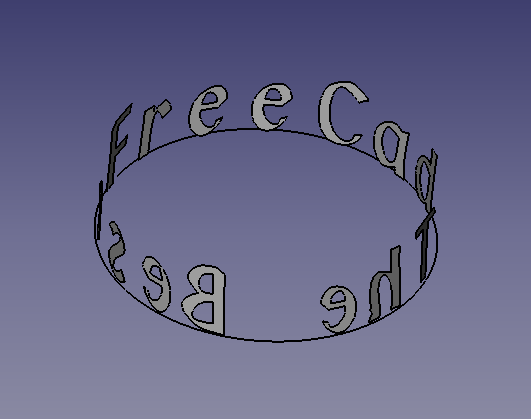 Mode Stand Indoor Der Text bleibt registriert (wie bei einer Uhr).


Zweiter Bereich
In diesem Abschnitt kann man das allgemeine Verhalten der Zeichen in allen verfügbaren Optionen konfigurieren, jedoch mit einigen Abweichungen. Wenn der Befehl in der ausgewählten Option nicht verwendet wird, wird er ausgegraut.

- 10.0 mm
 Radius of circle : Radius des Kreises. (Standardwert 10)
 - 2.0 mm Size character : Zeichenhöhe. (Standardwert 2)
- 0 deg Begin angle : Startwinkel des ersten Zeichens im Kreis. (Standardwert 0°)
- 360 deg End angle : Winkelende des letzten Zeichens des Textes. (Standardwert 360)
- 10.0 deg Correction angle : Zeichenkorrekturwinkel, um es tangential zum Kreis zu machen. (Standardwert 10°)
- 0.15 mm Correction radius : Der Radius der Kreiszeichen wurde korrigiert (optional). (Standardwert 0,15)
- Extrude Char : Extrusionszeichen für Kontrollkästchen. (Standardmäßig deaktiviert)
- Placement : Textplatzierung in der 3D-Ansicht. (Standardmäßig inaktiv)
- Sp. inclination : Neigung von Zeichen in drei Achsen X, Y und Z (Beispiel für die Abdeckung eines solchen Kegels). (Inaktiv, Standard)

Ausserhalb
Standardmodus. Der Text wird an der Außenseite des Kreisumfangs geschrieben.
-
Outdoor
-
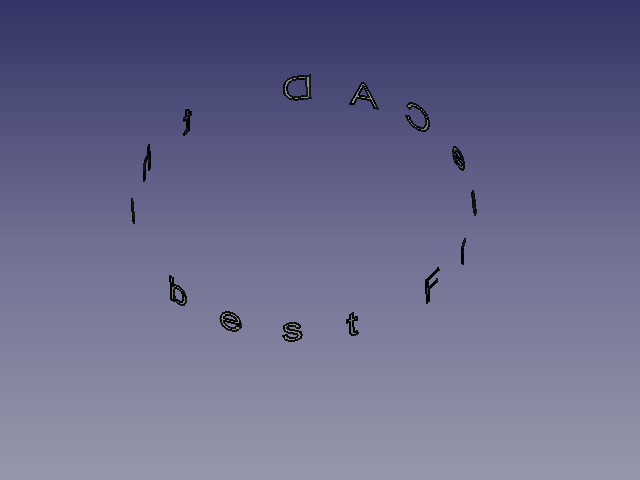
-
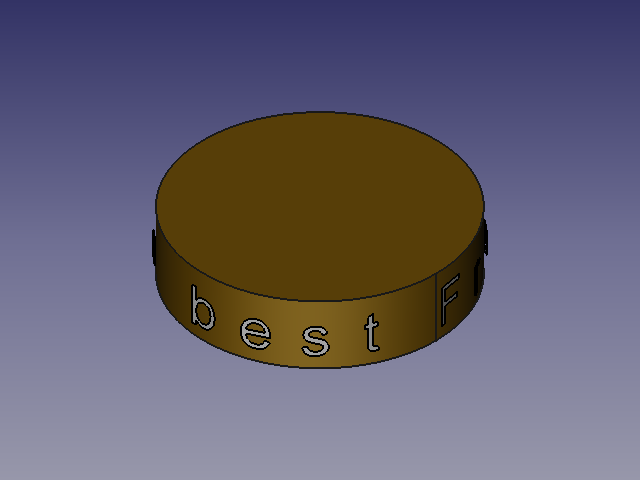


Innerhalb
Der Text ist auf der Innenseite des Kreisumfangs geschrieben
-
Innerhalb
-
-
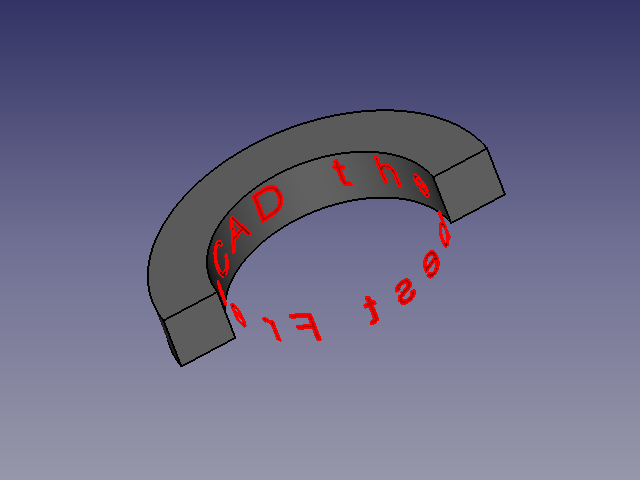

Helix
Der Text wird auf den Außenumfang einer Helix geschrieben.
-
Wendel
-
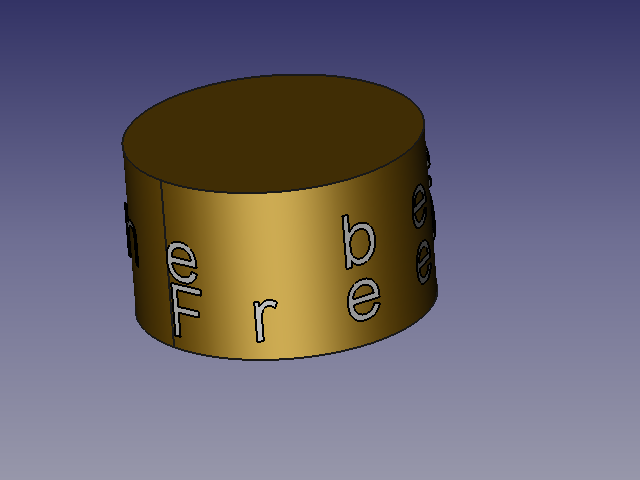
-
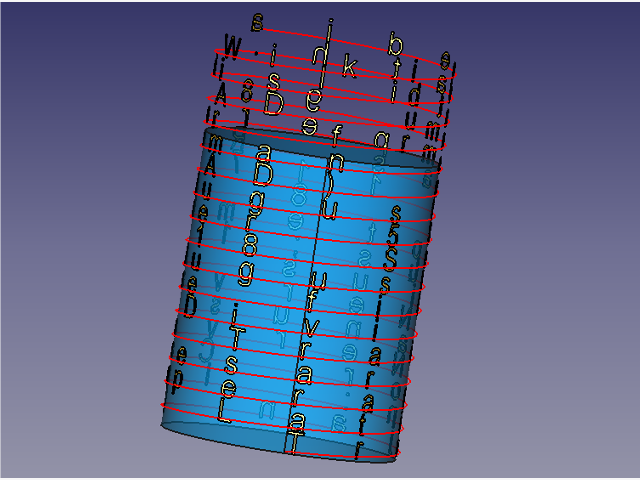


- Der Wendel-Bereich ist standardmäßig ausgeblendet. Das Fenster ist sichtbar, wenn das Optionsfeld
 Helix aktiviert ist.


- Alle Zeichenkonfigurationsoptionen sind verfügbar.
- Step of helixentspricht der Steigung der Helixwindungen und zeigt standardmäßig 2 (Zeichenhöhe) an.
- Char. per turn aktiviert und zeigt standardmäßig 10 an, was 10 Zeichen pro Windung entspricht.

- Wenn Step of helix (Steigung der Wendel) Null ist, werden die Drehschalter Base Helix und End Helix aktiviert.
- Base Helix bildet die Grundlage für den Startpunkt der Wendel (auch Positionierung Z). Wenn 'Placement Z' ungleich Null ist, wird der Startpunkt zu Placement Z hinzugefügt.
- End Helix Das Ende der Steigung der Wendel wird relativ zur Höhe und zur Anzahl der Zeichen pro Windung berechnet.
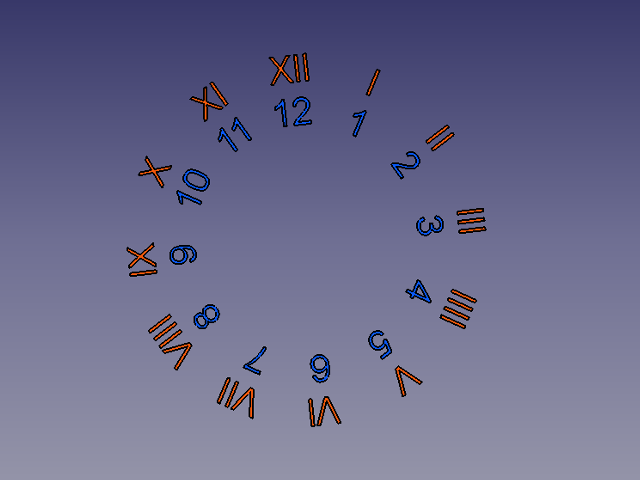
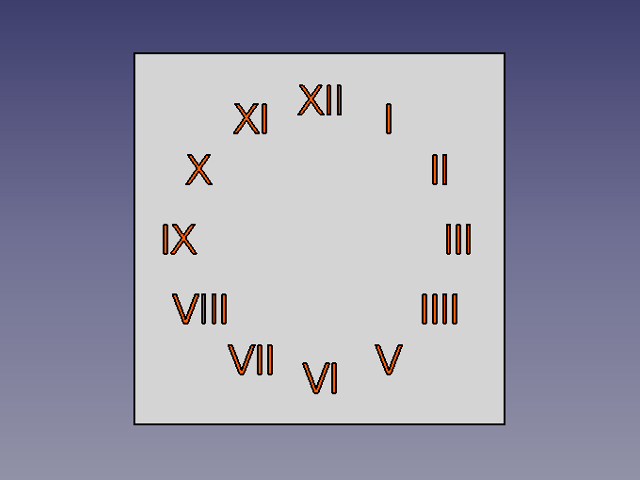
Uhr
Die Zahlen sind Teil eines Kreises mit arabischen oder römischen Ziffern.
-
Clock (Uhr)
-
 Axial
Axial -
 Redress


- Standardmäßig ist dieser Abschnitt ausgeblendet. Das Fenster wird angezeigt, wenn das Optionsfeld Clock aktiviert ist.

- Wenn die Auswahl getroffen ist, werden die folgenden Funktionen dunkel und sind nutzbar:
- Begin angle (Startwinkel).
- End angle (Endwinkel).
- Correction angle (Korrekturwinkel).
- Correction radius (Korrekturradius).
- Die Schaltflächen Mode Stand oder Mode Flat.
- Der Bereich Clock (Uhr) wird aktiviert.

- Radius of support : Wenn ein Wert angegeben wird, wird Unterstützung erstellt (Standardwert 0).
- If Support number face unterscheidet sich von Null, wird eine Stütze erstellt. (Wenn Extrude support = Null ist, wird eine Fläche erstellt).
- 1 = Ein Kreis wird erstellt (Kreis erscheint).
- 2 = Es wird ein Rechteck erstellt (Länge = (Radius des Mediums * 1,5) Breite = Radius der Stütze) (Rechteck wird angezeigt).
- 3 = Ein Dreieck wird erstellt (umschrieben) (Dreieck erscheint).
- 4 = Ein Quadrat wird erstellt (Radius der Unterstützung) (Quadrat erscheint).
- 5 = Ein Polygon mit der angezeigten Anzahl von Flächen (umschrieben) (Polygon wird angezeigt).
- Die Funktion „Extrudieren“ ist aktiviert und es kann eine Extrusionsabmessung angegeben werden.


- If Support number face (Anzahl der Unterstützungsflächen) ist gleich Null, gibt es keine Unterstützung.
- Mode Roman : Die Schrift wird in römischen Ziffern sein. I II III IIII V VI VII VIII IX X XI XII
- Axial : Die Zahlen werden axial geschrieben.
Abschnitt Pfad

Der Titelbereich ändert sich und zeigt die Länge der ausgewählten Kante an.
Wenn man einen Linienzug, einen Bogen, einen Kreis, eine Linie oder eine Kante auswählen, wird der Abschnitt Pfad in grün und der nicht verwendete Befehl in rot eingefärbt.
 Orthogonal Das Zeichen ist orthogonal zur Ansicht.
- Tangential Das Zeichen ist tangential zum Punktpfad auf dem Linienzug.

- BB Base Der Punktbasis des Charakters soll den Pfad auf dem Linienzug anzeigen.
- BB Center Die BounBox-Mitte des Charakters soll den Pfad auf dem Linienzug anzeigen.
- BB Top Die obere BoundingBox des Charakters soll den Pfad auf dem Linienzug anzeigen.
Der zuletzt verwendete Radiobutton wird im Parameter von FreeCAD gespeichert.
Abschnitt Befehl

- Exit : Verlässt das Makro.
- Reset : Alle Werte zurücksetzen und die Anzahl der im Fenster angezeigten Zeichen anzeigen.
- Run Comp : Startet das Makro und erstellt ein zusammengesetztes Objekt aus allen Zeichen.
- Run : Startet das Makro
Verfügbare Parameter
Bestimmte Parameter sind in den Parametern von FreeCAD verfügbar, siehe: Menü → Werkzeuge → Parameter bearbeiten
- Benutzerparameter: BaseApp/Preferences/Macros/FCMmacros/FCCircularText
switchModeTextList:falseNormaler Textmodus (und schwarz) deaktiviert switchFontComBoxtrueerlaubt switchFontComBox 1 (Standard)
switchFontComBox:false(und switchModeTextList = 1) Textmodus (in Farbe) in Faster ComboBox-Liste (Standard)true(und switchModeTextList = 1) Schriftart in ComboBox-Liste, langsamer aber schöner!
setSystemFonts:falsematplotlib.font_manager.findSystemFonts ("C: /", "ttf") Alle Schriftarten (in allen Ordnern und Unterordnern der Festplatte) bearbeiten!truefontman.findSystemFonts (self.pathFont)
alle Schriftarten im Verzeichnis (und in allen Unterordnern) erstellen (Standard)
seTtextAlignement: 0 = AlignLeft (Standard) 1 = AlignCenter 2 = AlignRightsetFontByDefault: Standardschriftart (die zuletzt verwendete)switchResetFALSE:falsezurücksetzen (Standard),truenicht. zurücksetzen (nicht empfohlen) Einige Schalter können unerwartet offen oder geschlossen bleiben!setPathOrthogonal:truefalsesetPathTangent:truefalsesetPositionBase:truefalsesetPositionCenter:truefalsesetPositionTop:truefalseswitchVersionSearch:truefalseVersion: FCCircularText-Version
Den Makroordner FcString für erstellte Zeichen und eine Datei FcClock für erstellte Uhren starten.
Skript
Das Schaltflächen-Symbol:
- als .PNG 
- als .SVG 
(Siehe Symbolleisten anpassen für mehr)
Skript
Macro_Circular_Text.FCMacro
oder das Skript herunterladen:
- auf GitHub Macro_FCCircularText.FCMacro
- im Forum Extrude from curved surface of cylinder
Beispiele
-
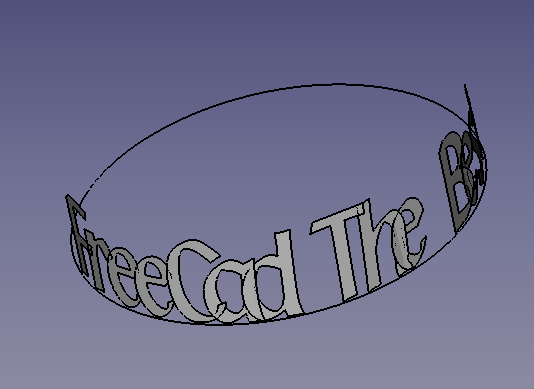 Text beginnt bei 180 Grad (Begin angle) und endet bei 360 Grad (End angle) auf der äußeren Kurve.
 -
Text auf der inneren Kurve.

-
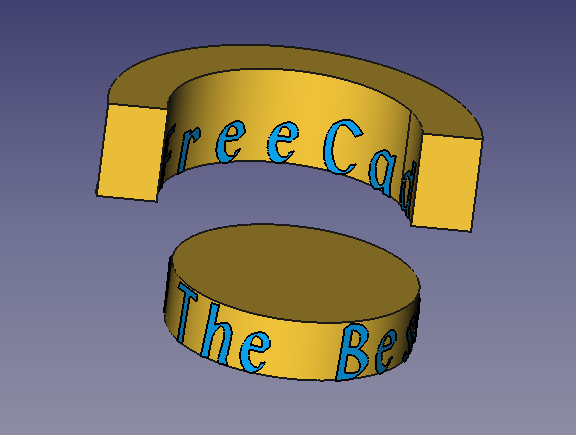 Runder Text auf internen und externen Kurven.
 -
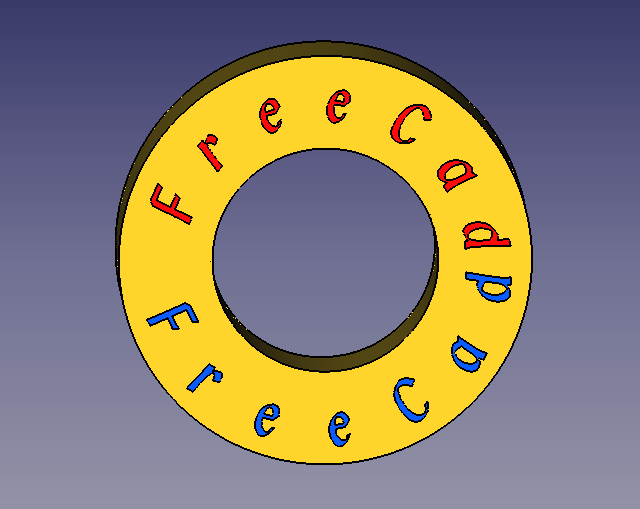 Runder Text auf einem kreisförmigen Objekt.


-
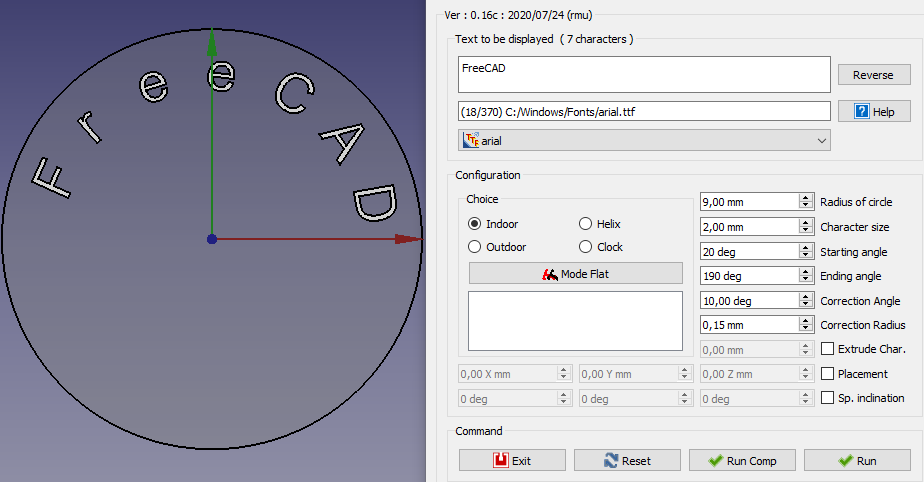 Konfiguration höherwertig. (Zum Vergrößern bitte anklicken)
 -
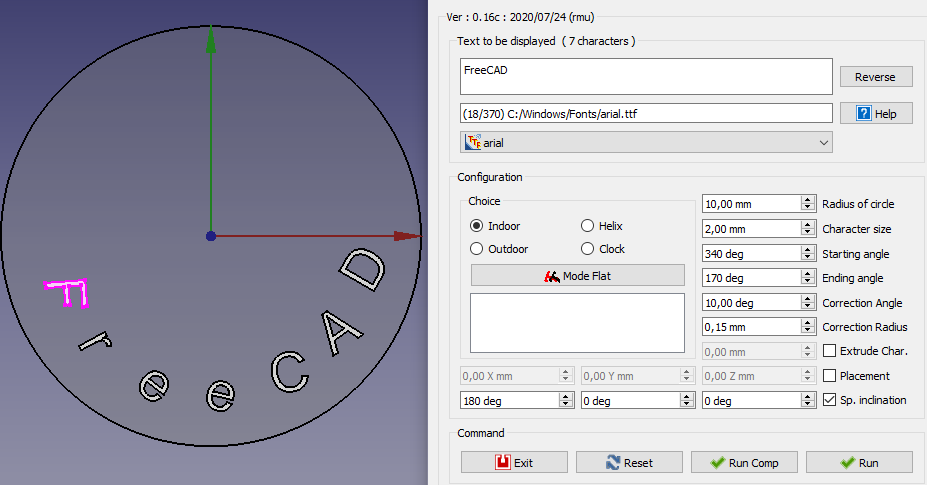 Konfiguration minderwertig. (Zum Vergrößern bitte anklicken.)


-
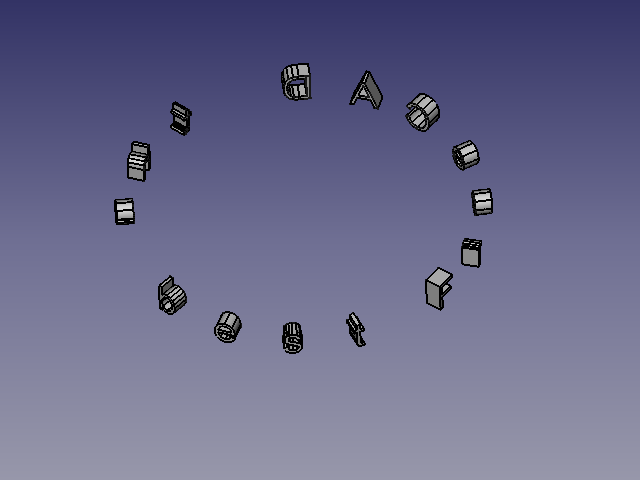 Außenkurve.
 -
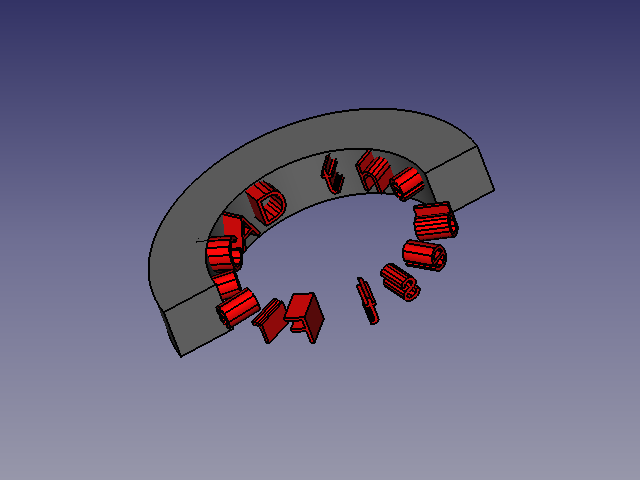 Innenkurve.


-
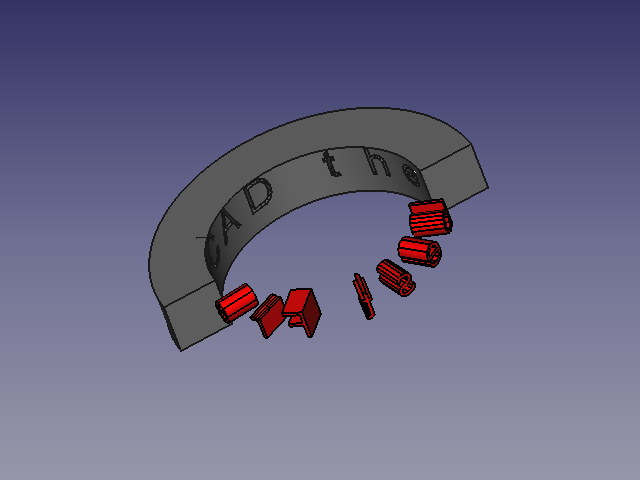 Internes Kurven-Extrusionsmaterial bezeichnet und subtrahiert.
 -
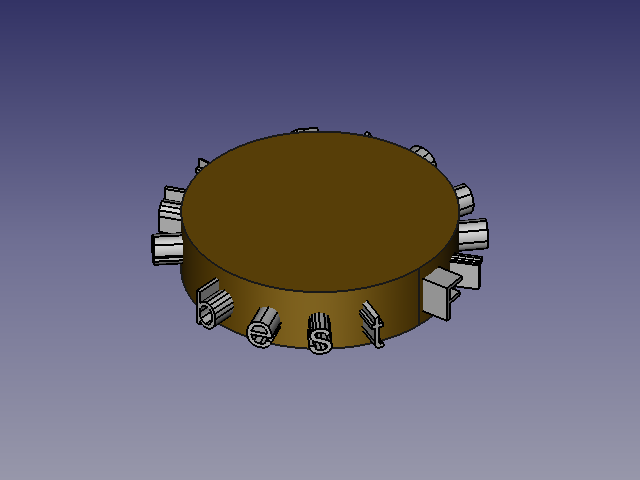 Externe Kurve.


-
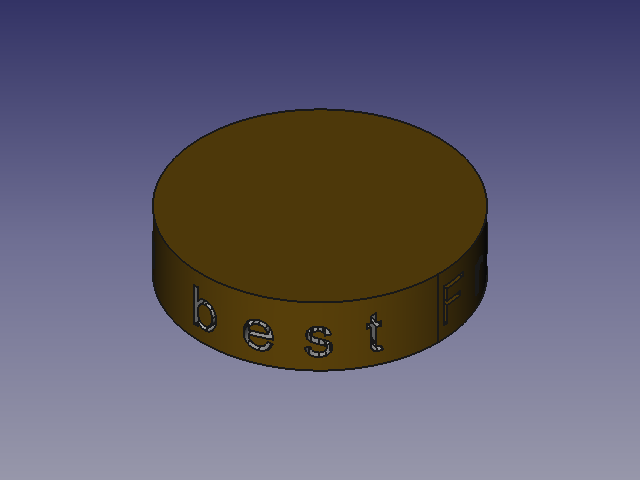 Innere Kurve mit Subtraktion.
 -
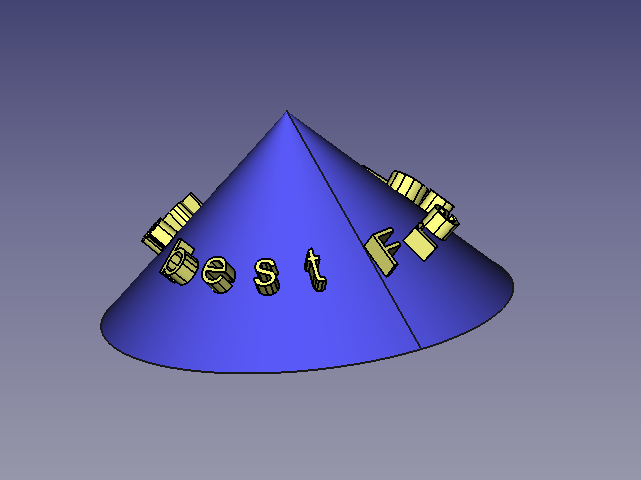 Extrusion auf einem Kegel mit einer Neigung Sp. Inclination von 45° zur Z-Achse.


-
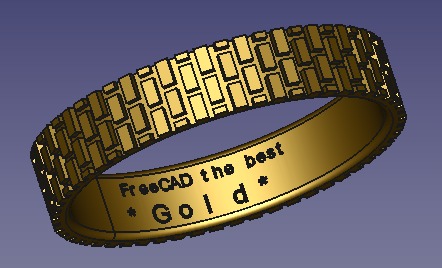 Ring Innenkurve mit Subtraktion.
 -
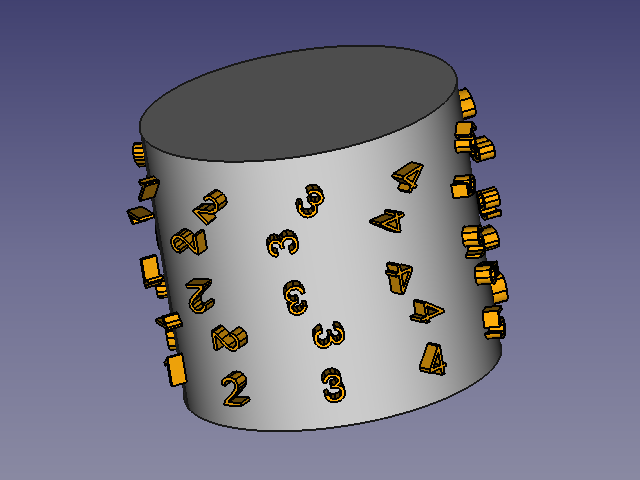 Drehpunkt 0°, 90° usw.


-
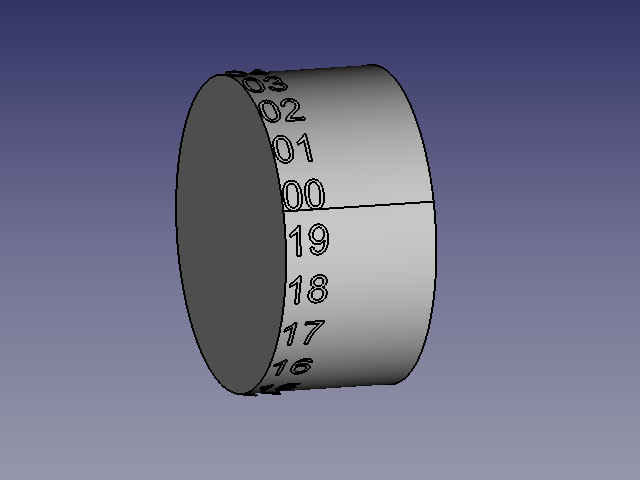
 Word Der Text wird an Leerzeichen abgeschnitten.

Beispiel auf Ellipse
-
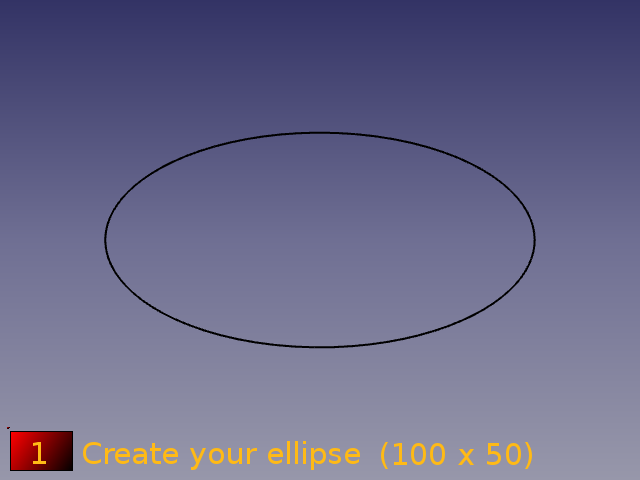 Die Ellipse mit den Maßen 100 x 50 erstellen.
 -
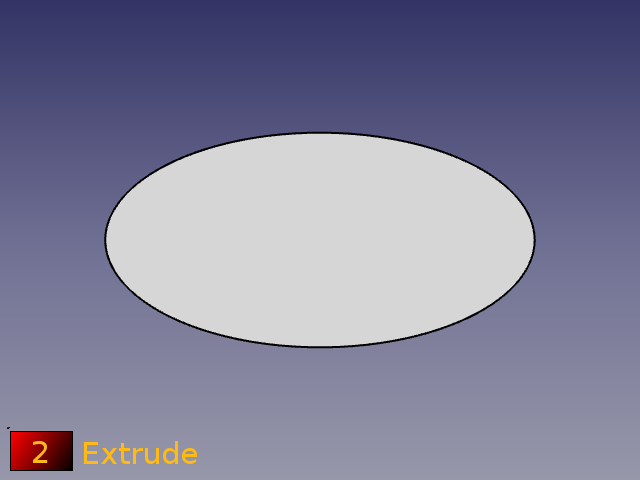 Sie 50 mm extrudieren.


-
 Den Umfang diskretisieren und Punkte mit dem Makro ArbeitsFunktionen erstellen.
Reiter Point > Point 2/3 > Points=Cut (Wire) -
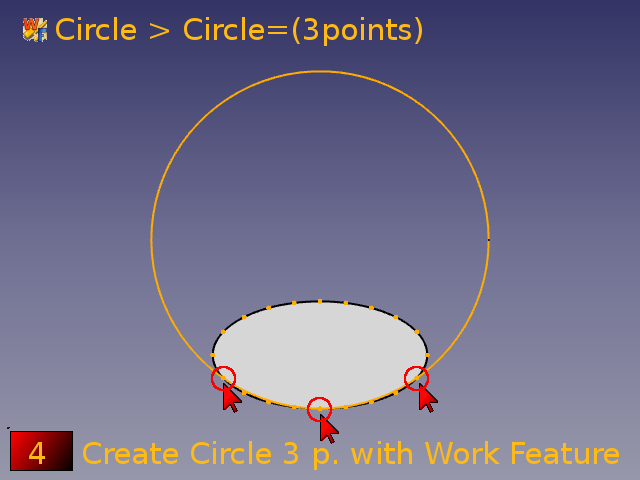 Den Kreis mit drei Punkten mit dem Makro ArbeitsFunktionen erstellen.
Reiter Circle Circle=(3 Points)


-
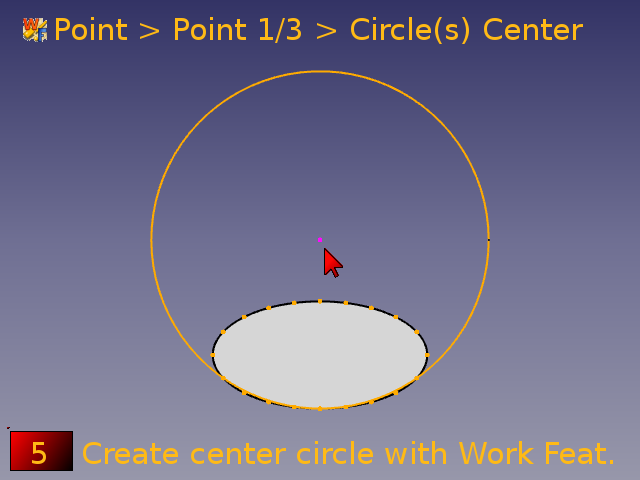 Einen Mittelpunktkreis mit dem Makro Arbeits-Funktionen erstellen.
Tab Point > Point 1/3 > Circle(s) center. -
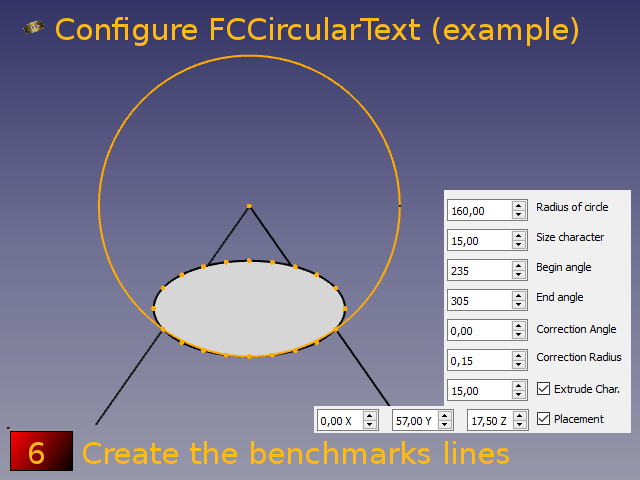 Die Referenzlinien erstellen und FCCircularText konfigurieren.


-
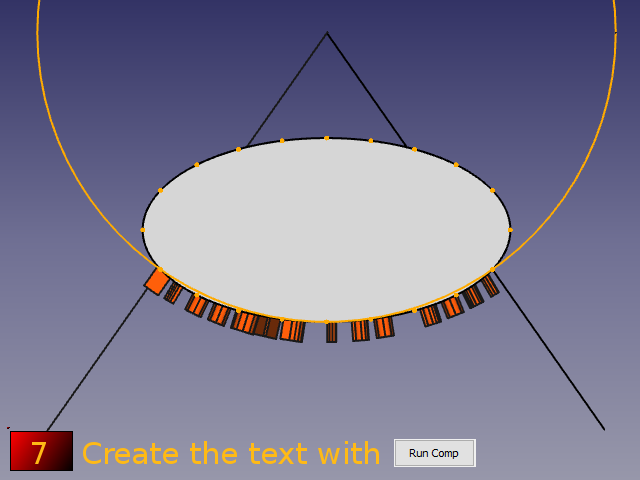 Den Text mit Run Comp erstellen.
 -
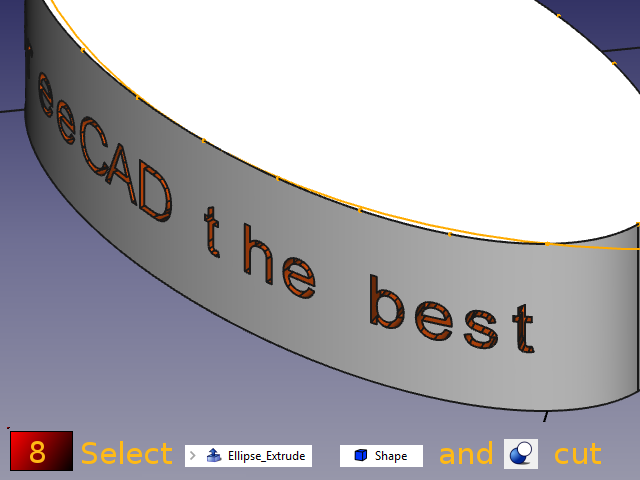 Ellipse extrudieren, Form wählen und die Schaltfläche
 Part Cut drücken.


-
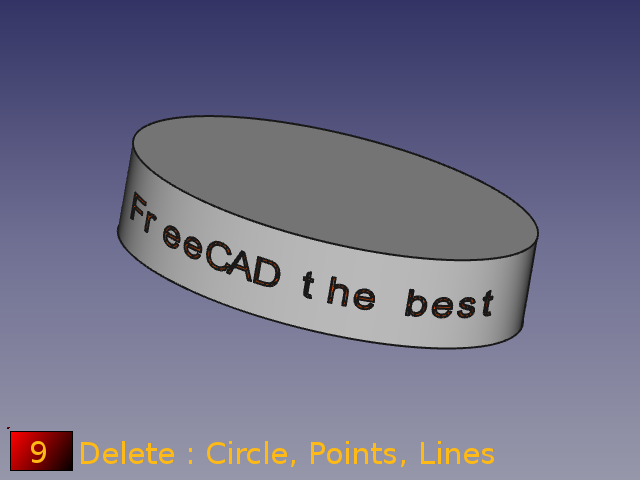 Den Kreis, die Punkte und die Linien löschen.
 -
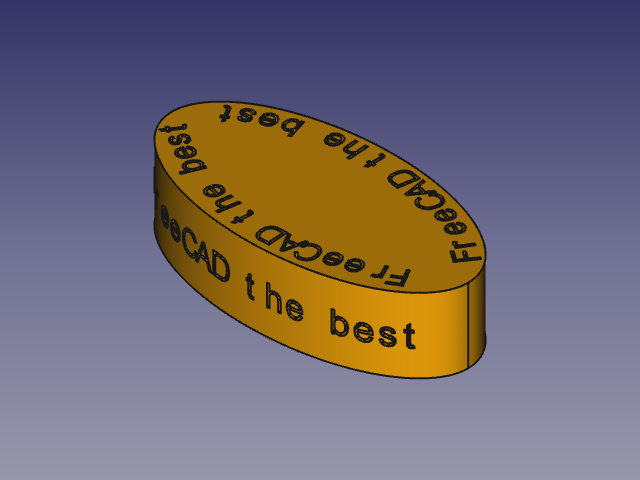 Ellipsen.


Modusentlastung:
-
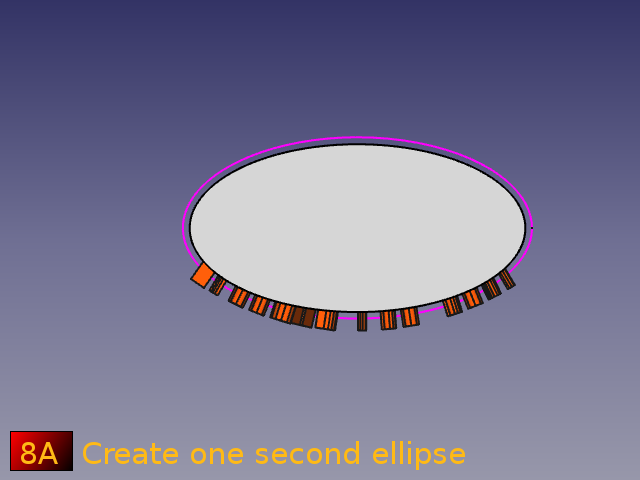 Erstellt eine Ellipse.
-
 Erstellt ein Rechteck, das alle Objekte enthält.


-
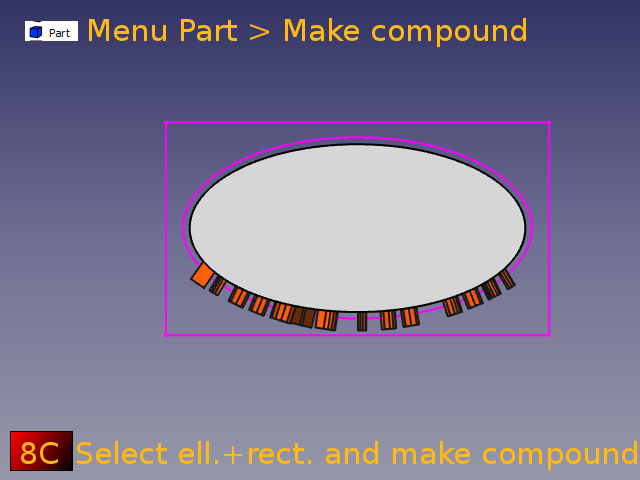 Das Rechteck und die Ellipse auswählen und einen Verbund erstellen. Das Modul Part aktivieren und dann im Menü Part die Option Verbund erstellen auswählen.
 -
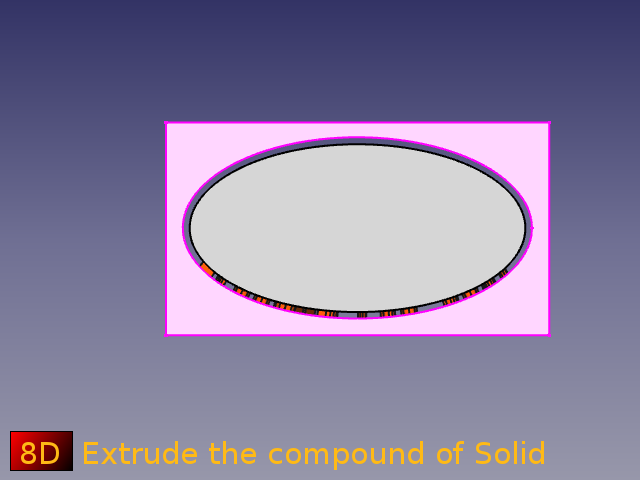 Den Verbund eines Festkörpers extrudieren.


-
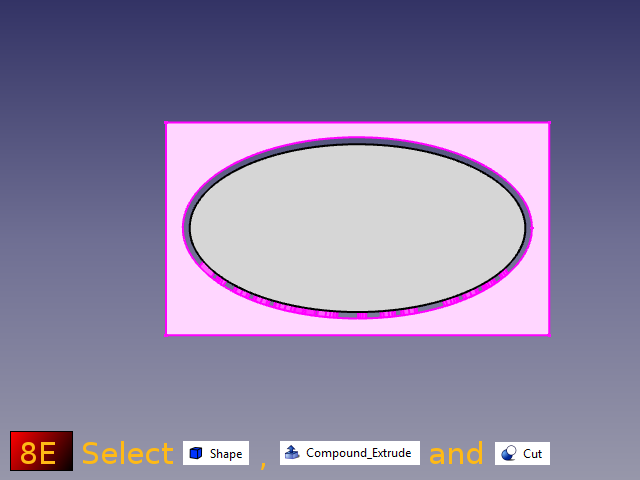 Die „Form“ (Text) wählen, den Verbund und Schnitt.
 -
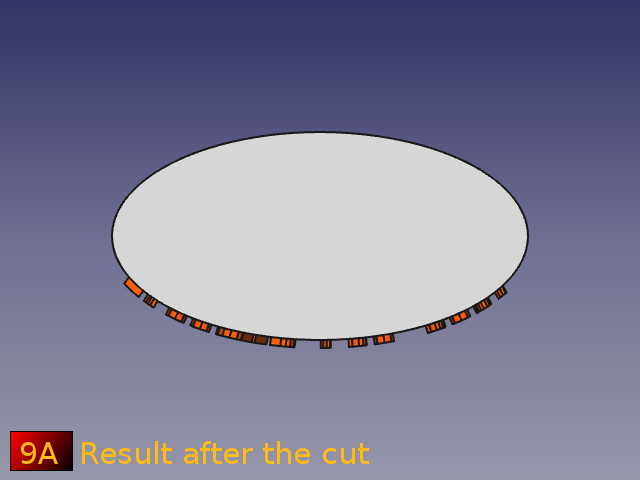 Der Text ist in Form einer Ellipse ausgeschnitten.


-
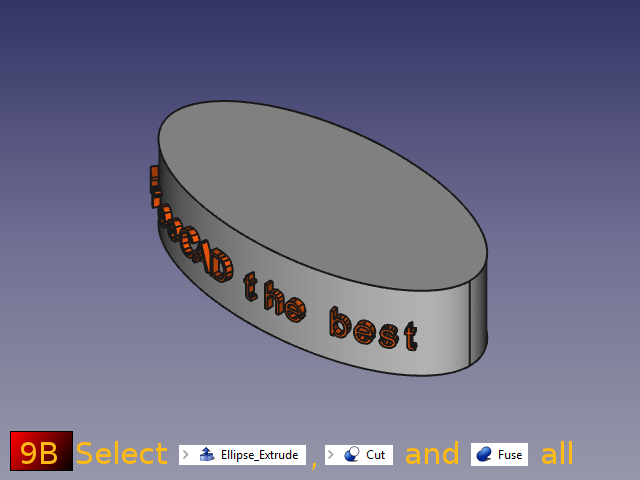 Die extrudierte Ellipse auswählen, den Schnitt (text) und diese vereinigen.

Example section path
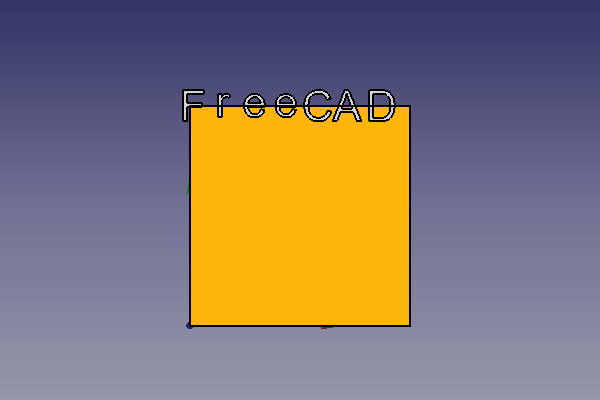
-
 Text auf BoundBox Base (normal)
 -
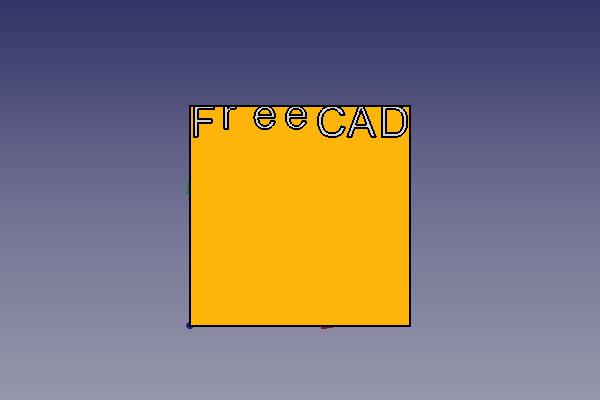
 Text auf BoundBox-Zentrum-Buchstabe


-
 Text auf BoundBox-Oben-Buchstabe
 -
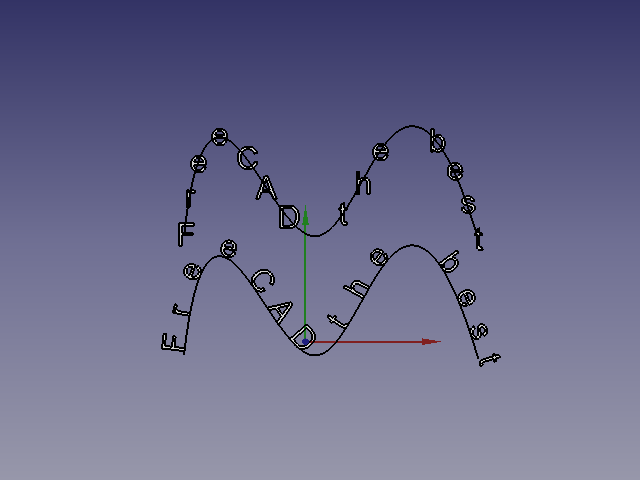 Text auf ausgewählter Linie:
1: Orthogonal
2: Tangential


-
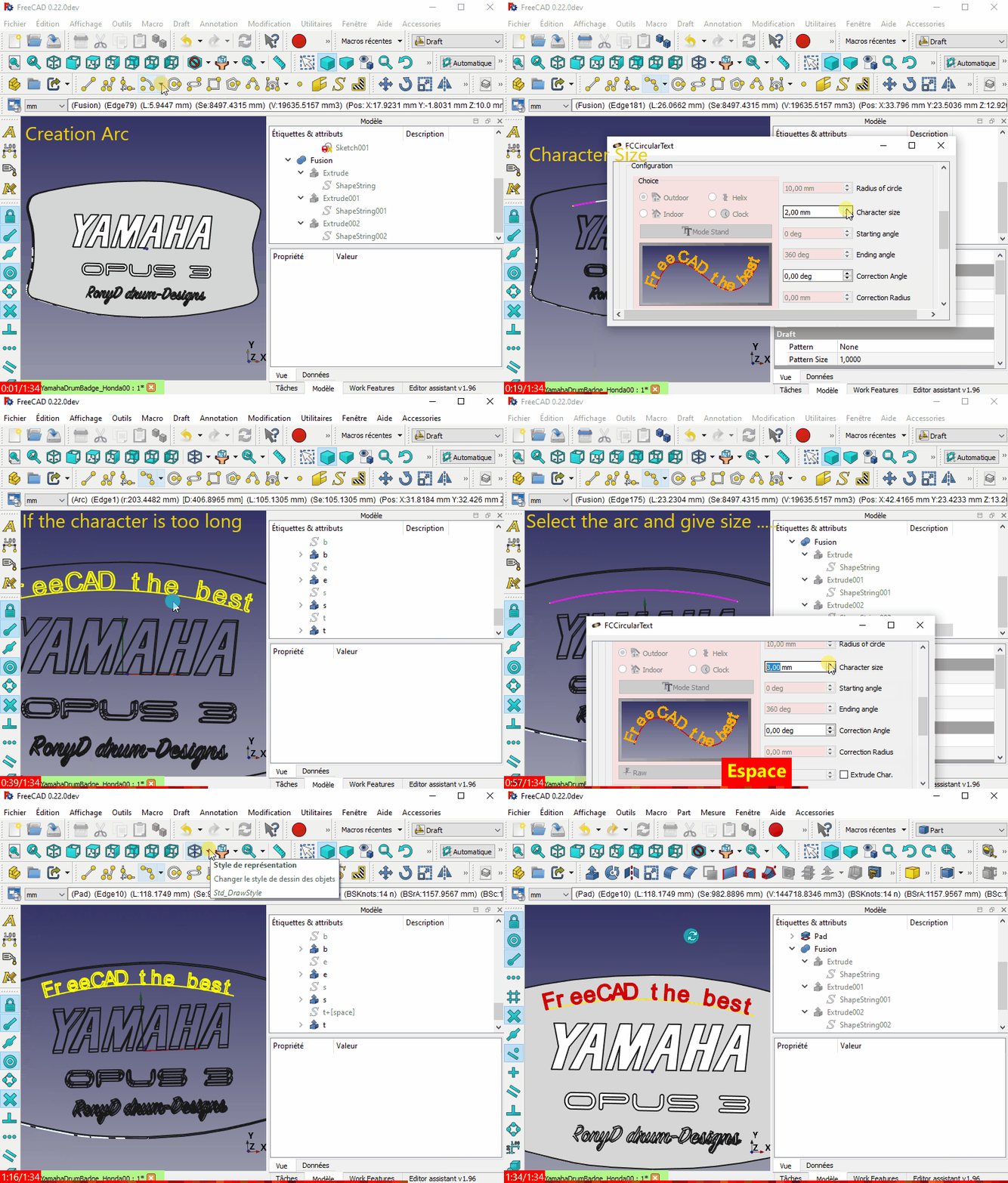 Anwendungsbeispiel (Geschwungener Text auf einer ebenen Fläche? (engl.))

Einschränkungen
Hinweis Es ist möglich, dass zwischen den Versionen ein Fehler auftritt. Bitte das Problem im Forum melden und auf die aktualisierte Fehlerbehebung oder die Rückkehr zu einer früheren Version des Makros warten. Vielen Dank.
Es ist möglich, dass zwei Zeichen überlappen. Wenn dies passiert, hier ist eine Problemumgehung verfügbar unter Verwendung des Rotate-To-Point Makro.
-
 Character overlap issue and the workaround

(nicht vollständig entwickelt)
Geplant:
Schreiben eines kreisförmigen Textes auf einem Pfad des ausgewählten Positionsobjekts.
Änderungsprotokoll
Ver. 0.23 2026/09/13 : Ausrichtung, Verfolgung, Invertieren, Farboption hinzugefügt
- ver 0.22f 2025/09/25 : Zu PySide zurückkehren, Informationen zur Verwendung der Schriftart MONOSPACE hinzufügen
- ver 0.22e 2024/07/11 : "ss.support = None" gelöscht
- ver 0.22d 2024/07/11 : "import WebGui" gelöscht, denn es erzeugte einen Fehler in FreeCAD 0.22xxx und ersetzt durch "import webbrowser"
- ver 0.22c 2023/11/17 : Hinzufügen der Option Auswahl wiederherstellen nach dem Löschen des letzten Objekts, von TheMarkster, danke
see Curved text on a flat surface?
sel = Gui.Selection.getCompleteSelection()
#delete objects
#restore previous selection
Gui.Selection.clearSelection()
for s in sel:
    Gui.Selection.addSelection(s.Object,s.SubElementNames)
- ver 0.22b 2023/11/15 : Upgrade-Korrektur stylesheet und FreeCAD.activeDocument().recompute(None,True,True)
- ver 0.22 2022/06/06 : Hinzufügen von QScrollArea, Ursache : Unable to run FCCircularText [Problem with screen size]
- ver 0.21 2022/05/31 : Schaltfläche Anderen Pfad suchen manuell hinzufügen und Schaltfläche Zurück zur ursprünglichen System-Schriftart
- ver 0.20 2021/04/05 : Hinzufügen von Symbolen im Makro, Registerkarte zum Verringern der Höhe des Makros, Entfernen aller Abmessungen von Widgets, die nun vollständig mit dem Stylesheet kompatibel sind, Überarbeitung der Suchversion hinsichtlich Kompatibilität und andere kleinere Änderungen.
- ver 1.19 2021/03/15 : Hinzufügen der Schaltfläche Delete für das zuletzt erstellte Objekt und des Codes
FreeCAD.ActiveDocument.openTransaction("FCCTc")für das System „Rückgängig/Wiederherstellen“
- Hinzufügen einer CheckBox Zurücksetzen für umgeschaltet/aktiviert (von Benutzern angefordert) das natürliche Zurücksetzen nach allen Drucktasten Ausführen und Ausführen comp. Die Verwendung dieser CheckBox wird nicht empfohlen, da Sie bei einer Fehlfunktion die Taste Reset drücken oder FCCircularText beenden und neu starten sollten.
- Hinzufügen einer CheckBox
- ver 0.18 2021/01/19 : Fehler korrigiert, siehe FCCircularText Macro issues
- ver 0.17b 2020/09/28 : Korrektur kleiner Fehler (pl statt plm im Pfadabschnitt) und Anordnung des Fensters (Abmessung) Uhr, Wendel, Pfad
- ver 0.17 2020/09/26 : Hinzufügen von kreisförmigem Text auf ausgewähltem Linienzug (Kurve, Bogen, Spline, Linie ...), Moduswort
ver 16d 2020/09/15 : siehe MasterCATZ kommentiert am 14. September 2020 Nachricht
Den Abschnitt FC 0.18-Test löschen:
#### Test FreeCAD.Version simple ############################################################################################################
if int(FreeCAD.Version()[1]) < 18:      # Version de FreeCAD
    FreeCAD.Console.PrintMessage("This version " + __Title__ + " rmu  work with the FreeCAD 0.18 or higher." + "\n\n")
    FreeCAD.Console.PrintMessage("For the precedent version see the page " + "\n\n")
    FreeCAD.Console.PrintMessage("https://gist.githubusercontent.com/mario52a/a25e802498bae6959335/raw/db47f78f2b20a35137ac213b8d1a62d30f525dcb/Macro_FCCircularText.FCMacro" + "\n\n")
#### Test FreeCAD.Version simple ############################################################################################################
- ver 0.16c 2020/07/24 : Textvorschlag von Kunda1 ändernPlease review FCVerticalText Macro
- ver 0.16b 2020/07/24 : __title__ auf __Title__ in 0.18 FC korrigiert, test (siehe Please review FCVerticalText Macro)
- ver 0.16 2020/06/07 : Kleiner Fehler in Linux mit dem Pfad, Steuer PolicePath = "/usr/share/fonts/" (blieb beim Pfad /xx/xx/xx/xx/xx/xx/ beim Betreten)
- ver 0.15 2020/06/01 : Für PySide2 Qt5 Hinzufügen von Matplotlib-Schriftarten in comboView, Konfiguration über Parameter
- ver 0.14-4 2020/04/25 : Korrektur für "DisplayMode = u"Flat Lines" :
- ver 0.14-3 2020/04/25 : angepasst für :
OS: Windows 10 (10.0)
Word size of OS: 64-bit
Word size of FreeCAD: 64-bit
Version: 0.19.20655 (Git)
Build type: Release
Branch: master
Hash: e8e67e8c5ebbc9f9ed9ea67aba5b891969595ece
Python version: 3.6.8
Qt version: 5.12.1
Coin version: 4.0.0a
OCC version: 7.3.0
- ver 0.14-2 2019/07/22 chr(176) ersetzt (gibt Fehler <FC 0.18) und ersettz mit Code von wmayer, siehe Fehler in Version 0.19 pre ??
       carDegrees = b' \xc2\xb0'.decode("utf-8")    #thanks wmayer	https://forum.freecad.org/viewtopic.php?f=13&t=36380&p=308476#p308357
       self.DS_InclinaisonX.setSuffix(carDegrees)
       self.DS_InclinaisonY.setSuffix(carDegrees)
       self.DS_InclinaisonZ.setSuffix(carDegrees)
- ver 0.14-1 2019/06/11 "°" mit chr(176) ersetzt
- ver 0.14 2019/04/27 Kompatibilität zu Python 3.6.6 und Qt 5.6.2 (Grund: unicode() )
latest testing:

#OS: Windows 10
#Word size of OS: 64-bit
#Word size of FreeCAD: 64-bit
#Version: 0.19.16523 (Git)
#Build type: Release
#Branch: master
#Hash: 9b3ec233c8b21e0df66fada487cd10f471d60cac
#Python version: 3.6.6
#Qt version: 5.6.2
#Coin version: 4.0.0a
#OCC version: 7.3.0
- ver 0.13 30/01/2018 Funktion Pivot hinzufügen, um die Figur um sich selbst zu drehen
ver 0.13 09/08/2016 Schaltfläche "New font" mit "fontComboBox" ersetzt, Ursache, unter Windows 10 bleibt das Fenster Schriftart leer, die Dateien sind ausgeblendet.
- ver 0.12 03/07/2016 Den Code optimieren, damit Dezimalzahlen bei der Winkelbestimmung akzeptiert werden. Ersetzen Sie die Zeile.
for angleTr in range(debut,rotation,((rotation-debut)/nombre)):
zu
for angleTrFloat in range((debut*10000),(rotation*10000),int((round(((float(rotation)-float(debut))/float(nombre)),4)*10000)) ):    # pour 4 decimales
                angleTr = (float(angleTrFloat)/10000)
- ver 0.10 17/05/2015 Zeilen 1365, 1366 hinzugefügt, nur mehr Zifferblatt erstellt?? ()
supp.MakeFace = True
            App.activeDocument().recompute()
- ver 0.9 11/05/2015 Dank an NormandC fürs Testen
replace
self.DS_InclinaisonX.setSuffix(" X°")
        self.DS_InclinaisonY.setSuffix(" Y°")
        self.DS_InclinaisonZ.setSuffix(" Z°")
to
self.DS_InclinaisonX.setSuffix(unicode(" X°"))
        self.DS_InclinaisonY.setSuffix(unicode(" Y°"))
        self.DS_InclinaisonZ.setSuffix(unicode(" Z°"))
- ver 0.8 10/05/2015 replace "String=texte[ii2]" to "String=unicode(texte[ii2])" line 1290. cause "TypeError: Property 'FontFile': type must be str or unicode, not QString"
# ver 0.8 10/05/2015 /_ # testing with OS :
##################################################################################################
# OS: Ubuntu 14.04.1 LTS                          # OS: Ubuntu 14.04.2 LTS
# Platform: 32-bit                                # Word size of OS: 32-bit
# Version: 0.14.2935 (Git)                        # Word size of FreeCAD: 32-bit
# Branch: master                                  # Version: 0.16.4928 (Git)
# Hash: eab159b6ee675012bf79de838c206a311e911d85  # Branch: master
# Python version: 2.7.6                           # Hash: d8f63bcfd10301f3d1e141cced4370f0782238d0
# Qt version: 4.8.6                               # Python version: 2.7.6
# Coin version: 4.0.0a                            # Qt version: 4.8.6
# SoQt version: 1.6.0a                            # Coin version: 4.0.0a
# OCC version: 6.7.0                              # OCC version: 6.8.0.oce-0.17
##################################################################################################
# OS: Windows Vista                               # OS: Windows Vista
# Word size of OS: 32-bit                         # Word size of OS: 32-bit
# Word size of FreeCAD: 32-bit                    # Word size of FreeCAD: 32-bit
# Version: 0.15.4527 (Git)                        # Version: 0.15.4671 (Git)
# Branch: master                                  # Branch: releases/FreeCAD-0-15
# Hash: 0da2e4c45a9a259c26abd54c2a35393e1c15696f  # Hash: 244b3aef360841646cbfe80a1b225c8b39c8380c
# Python version: 2.7.8                           # Python version: 2.7.8
# Qt version: 4.8.6                               # Qt version: 4.8.6
# Coin version: 4.0.0a                            # Coin version: 4.0.0a
# OCC version: 6.7.1                              # OCC version: 6.8.0.oce-0.17
##################################################################################################
- Version 0.7 02.02.2015 Unterdrückung von 2 Zeichenfolgen „App.Console.PrintMessage(str(PolicePath)+"\n")” zu „App.Console.PrintMessage((PolicePath)+"\n")”, die einen Fehler mit Zeichen über 128 im Police-Pfad verursachten.
- Version 0.6 23.11.2014 Korrektur von „texte = unicode(self.textEdit.toPlainText())”, akzeptiert nun „'éèà@...”.
- Version 0.5 vom 19.11.2014 Gui
- Version 0.4 vom 10.10.2014 Hinzufügen der Variablen „rotation” in der Schleife (for i in range(0,rotation,(rotation/nombre)): # 360 a parametrer)
- Version 0.4 27.08.2014 Korrektur des Radiusfehlers (exterieur=0, debout=1)
- Version 0.3 26.08.2014 Hinzufügen des Erstellungstextes für flache Kurven
- Version 0.2 26.08.2014 Hinzufügen des Erstellungstextes für interne Kurven
- Version 0.1
(2537)
Verweise
Um einen Kommentar abzugeben zuExtrude from curved surface of cylinder
 Draft
Draft
- Drafting: Line, Polyline, Fillet, Arc, Arc From 3 Points, Circle, Ellipse, Rectangle, Polygon, B-Spline, Cubic Bézier Curve, Bézier Curve, Point, Facebinder, ShapeString, Hatch
- Annotation: Text, Dimension, Label, Annotation Styles, Annotation Scale
- Modification: Move, Rotate, Scale, Mirror, Offset, Trimex, Stretch, Clone, Array, Polar Array, Circular Array, Path Array, Path Link Array, Point Array, Point Link Array, Edit, Highlight Subelements, Join, Split, Upgrade, Downgrade, Convert Wire/B-Spline, Draft to Sketch, Set Slope, Flip Dimension, Shape 2D View
- Draft Tray: Working Plane, Set Style, Toggle Construction Mode, AutoGroup
- Snapping: Snap Lock, Snap Endpoint, Snap Midpoint, Snap Center, Snap Angle, Snap Intersection, Snap Perpendicular, Snap Extension, Snap Parallel, Snap Special, Snap Near, Snap Ortho, Snap Grid, Snap Working Plane, Snap Dimensions, Toggle Grid
- Miscellaneous: Apply Current Style, New Layer, Manage Layers, New Named Group, SelectGroup, Add to Layer, Add to Group, Add to Construction Group, Toggle Wireframe, Working Plane Proxy, Heal, Show Snap Toolbar
- Additional: Constraining, Pattern, Preferences, Import Export Preferences, DXF/DWG, SVG, OCA, DAT
- Context menu:
- Most objects: Edit
- Layer container: Add New Layer, Reassign Properties of All Layers, Merge Layer Duplicates
- Layer: Activate Layer, Reassign Properties of Layer, Select Layer Contents
- Text and label: Open Links
- Wire: Flatten
- Working plane proxy: Save Camera Position, Save Visibility of Objects
 Anwenderdokumentation
- Erste Schritte
- Installation: Herunterladen, Windows, Linux, Mac, Zusätzliche Komponenten, Docker, AppImage, Ubuntu Snap
- Grundlagen: Über FreeCAD, Graphische Oberfläche, Mausbedienung, Auswahlmethoden, Objektname, Voreinstellungseditor, Arbeitsbereiche, Dokumentstruktur, Objekteigenschaften, FreeCAD unterstützen, Spenden
- Hilfe: Anleitungen, Videoanleitungen
- Arbeitsbereiche: Std Base, Arch, Assembly, BIM, CAM, Draft, FEM, Inspection, Material, Mesh, OpenSCAD, Part, PartDesign, Points, Reverse Engineering, Robot, Sketcher, Spreadsheet, Surface, TechDraw, Test Framework