FreeCAD 26.3 is under development, there is no expected released date yet.
FreeCAD 26.3 was released on D Month Year, get it from the Download page. This page lists all new features and changes.
Previous FreeCAD release notes can be found in the Feature list.

 General
- FreeCAD has adopted a new release schedule of three stable releases per year and switched to a CalVer versioning scheme (YY.N), starting with version 26.3. FEP-0003
- Multiple documents can now be edited simultaneously with independent tasks and undo/redo stacks, for example, having two Sketches open at the same time (GSoC project). Pull request #21978
- .FCBak backup files can now be opened directly from the File → Open dialog without renaming them to .FCStd first. Saving such a file triggers Save As… to prevent accidentally overwriting the backup. Pull request #28454
- The .FCBak backup date format preference now validates invalid filename characters and replaces invalid timestamp characters when creating backups. Pull request #25985
- The "Using undo/redo in documents" preference was removed as redundant. Pull request #30616
- An experimental Windows-on-ARM build of FreeCAD is now included with the release. Pull request 31514
User interface
Further user interface improvements
- The built-in text editor now supports line selection via clicking on the line number (and optionally also holding Shift for range selection). Pull request #27677
- In the built-in text editor, the search field is now prefilled with the currently selected text. Pull request #27674
- Documents whose files are not writable now show read-only overlays in the Tree View, with tooltips explaining that changes cannot be saved directly. Links to read-only documents now use a red read-only link overlay. Pull request #26702
- Customization of keyboard shortcuts was moved to the Preferences Editor. Pull request #27725
- Clicking the expand/collapse indicator in the Tree View no longer accidentally changes the current selection range. Pull request #29687
- Double-clicking a face of the Navigation Cube will now rotate to it, but also center the view. Pull request #28608
- The Recompute Object Tree View context menu option (Recompute command) now has a keyboard shortcut Ctrl+Shift+R. Pull request #27880
- There is now a
 Toggle Bottom Panels button and a shortcut Ctrl + 0 to toggle the bottom panels (Report View and Python Console). Pull request #28598
- The
 Align to Selection command now supports multi-selection. Pull request #29182
- The 3D View now supports drag box selection in common navigation styles, with left-to-right window selection and right-to-left crossing selection. Pull request #29547
- Double-clicking on an expression field now clears the expression and keeps the current value. If no change is made, the expression is restored after losing focus. Pull request #29414
- SpaceMouse rotations now honor the active navigation rotation center mode, including Object center and Drag at cursor modes. Pull request #29998
- On macOS release builds, 3Dconnexion SpaceMouse devices now initialize correctly instead of reporting that the Navigation Framework is running outside an application bundle. Pull request #29465
- The VarSet Rename Property Group dialog now offers autocompletion for existing property groups, making it easier to move variables between groups. Pull request #30200
- There is now a warning when saving files created in older versions. A preference was added to allow disabling it. Pull request #28389
- Clearing the recent files list now asks for confirmation before the list is removed. Pull request #27274
- All Status Bar widgets can now be toggled through the context menu. Pull request #30349
- The built-in text editor received several improvements for search feedback. Pull request #29423
- It is now possible to suppress multiple objects at once. Pull request #30438
- An icon and shortcut were added for the Clear option in the context menu of the Python Console. Pull request #30551
- It is now possible to rotate the view by dragging the Navigation Cube. Pull request #30727
- The VarSet properties of the Percent type are now displayed with the percent suffix in the editor. Pull request #28730
- Selection and preselection colors were improved for better visibility and distinguishability. Pull request #31050
- An option to delete group contents for multiple objects at once was added. Pull request #30586
- It is now possible to add custom toolbars with groups of Open, Save, and Help commands. Pull request #31525
- The Viewprovider actions were added to the 3D View context menu. Pull request #30990
- Input hints were added to the built-in text editor. Pull request #29639
- Double-clicking doesn't select the whole object anymore. Pull request #32028
- The FreeCAD Dark stylesheet now uses a lighter background color for better visibility of black lines. Pull request #32827
- The Splash screen with multiple images was replaced by a single image with the FreeCAD logo. Pull request #32363
- A group of Create tools was added to the bottom of the Edit menu. Pull request #31435
- The fullscreen toggle (F11) now exits fullscreen on the second press without having to explicitly activate the 3D View. Pull request #32035
- The Property View allows you to move dynamic properties from one document object to another (Pull request #23841) and to show which properties reference a given property (Pull request #23989).
Core system and API
Core
Click on the image if the animation does not start.
|
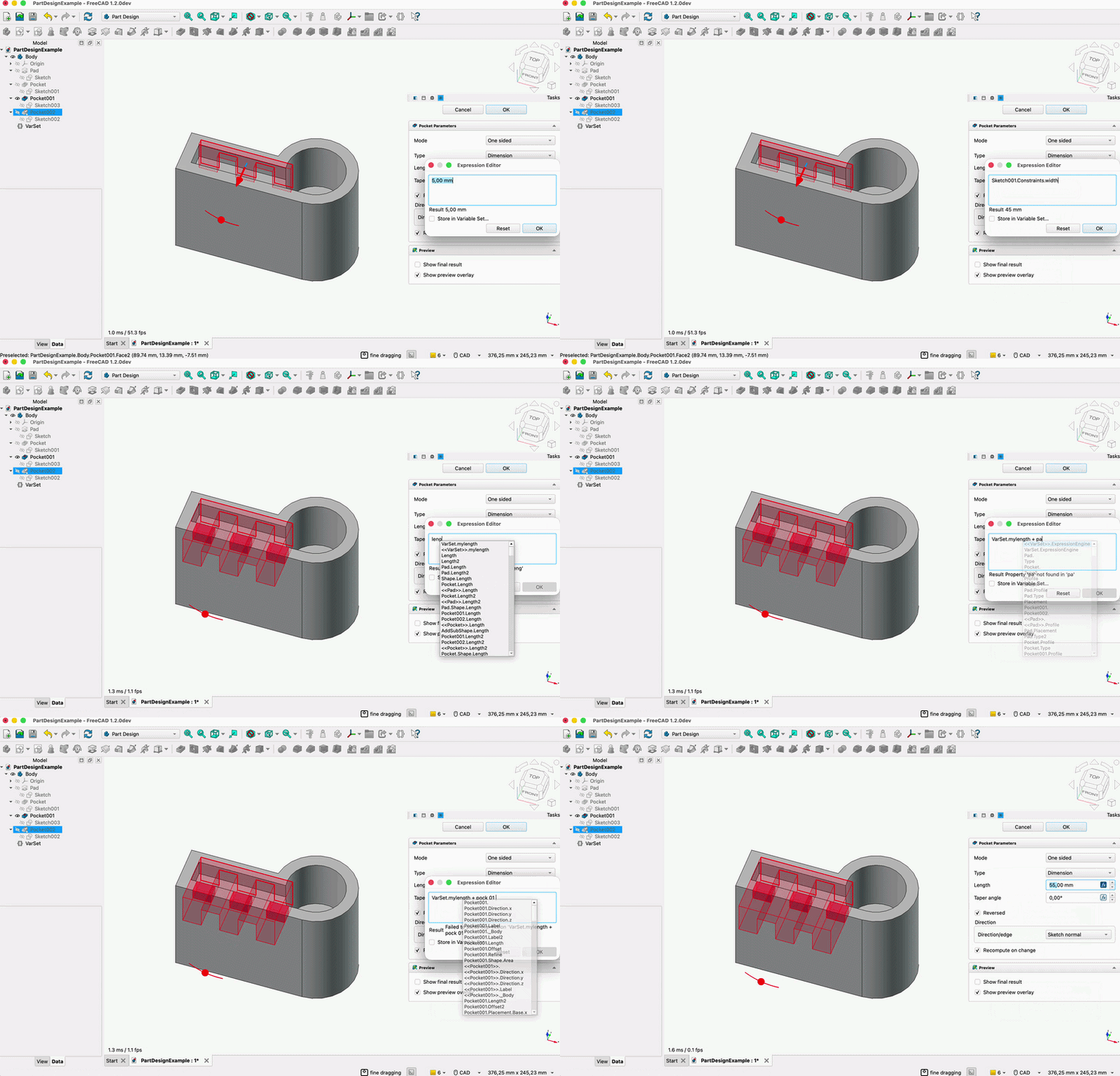
The expression editor's autocomplete now uses fuzzy matching instead of requiring an exact prefix match, with caching and ranking that prioritizes property names over container labels, making it easier to find properties, objects, and functions by typing partial or approximate names.
Pull request #30531
|
|
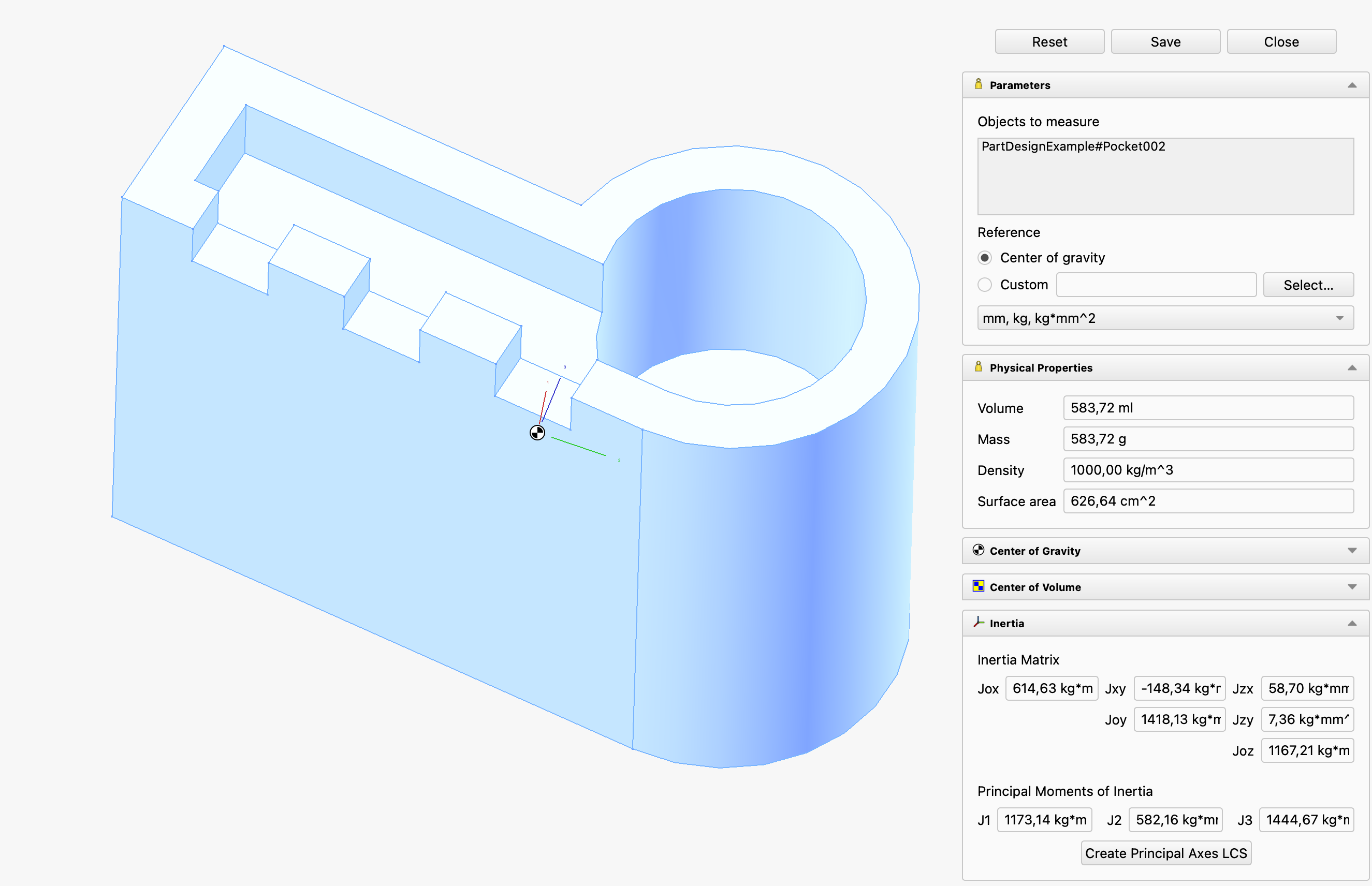
A new  Mass Properties command has been added to calculate volume, mass, surface area, center of gravity, center of volume, and inertia for parts and assemblies, with support for custom reference frames and material-aware calculations. Mass Properties command has been added to calculate volume, mass, surface area, center of gravity, center of volume, and inertia for parts and assemblies, with support for custom reference frames and material-aware calculations.
Pull request #27347
|

Click on the image if the animation does not start.
|
The  Transform tool now supports a custom coordinate system mode: translation and rotation inputs are expressed relative to any object with a placement in the document (bodies, shapes, local coordinate systems, Part containers, etc.), while the dragger position and orientation remain unchanged. Rotations are applied around the current dragger origin (object origin or custom dragger position) using the axes of the custom coordinate system. Optionally, the dragger axes can be visually aligned to the custom coordinate system to also drag the object interactively in its directions. This allows moving or rotating an object at or around the current dragger relative to another object's coordinate system. Transform tool now supports a custom coordinate system mode: translation and rotation inputs are expressed relative to any object with a placement in the document (bodies, shapes, local coordinate systems, Part containers, etc.), while the dragger position and orientation remain unchanged. Rotations are applied around the current dragger origin (object origin or custom dragger position) using the axes of the custom coordinate system. Optionally, the dragger axes can be visually aligned to the custom coordinate system to also drag the object interactively in its directions. This allows moving or rotating an object at or around the current dragger relative to another object's coordinate system.
Pull request #30227
|
Further Core improvements
- The search bar in the
 Preferences is now able to search through tooltips, dropdown values, checkboxes and group titles. Pull request #24283
- The
 Measure tool now has the option to display the measured result of circular elements as diameters instead of radii. Pull request #24853
- The Measure tool now supports the measurement of the radius and diameter of cylindrical faces. Pull request #27044
- On macOS the .FCStd files now support the native QuickLook extension to show a thumbnail of the file in the finder and the full preview. Pull request #25239
- The Measurement units can now be converted and viewed on the fly. Pull request #27462
- The Measure tool now keeps the selected display unit with the measurement object, so changing units updates the task panel result and 3D label immediately. Pull request #29157
- The Measure tool can now report the radius and diameter for circular faces in addition to the existing measurement types. Pull request #27415
- The Measure tool now displays area units using unicode superscripts. Pull request #28044
- Macros now support directories to collect the files associated with them. Pull request #27005
- The macro dialog and the Open Macros Folder command now open the configured macro path instead of the default macro directory. Pull request #29224
- The broken built-in macro debugging actions now show a message directing users to the remote debugger workflow instead of implying breakpoint debugging is available there. Pull request #29889
- The Measure tool can now report the radius and diameter for spheres and toruses. Pull request #29369
- The Measure tool now supports curved faces in Distance mode. Pull request #29367
- The appearance and placement of the Angle Measurement arrows was significantly improved. Pull request #27135
 Box Element Selection now takes into account the
  selection filters. Pull request #28982
- The Measure tool now supports circular faces for angle measurements. Pull request #29803
- The Measure tool now supports internal sketch faces. Pull request #29551
- The Quick Measure feature now shows the diameter of circular faces. Pull request #29385
- Selection filters can now select other entities within the viewer pick radius instead of immediately showing the blocked-selection state. Pull request #29705
- FreeCAD was adapted for OpenCascade 8 while keeping OpenCascade 7 compatibility, updating geometry, import/export, CAM, Sketcher, FEM mesh, and related code paths. Pull request #25502
- CMake now warns that Qt 5 support is deprecated and scheduled for removal, prompting packagers and builders to update to Qt 6. Pull request #30222
- On Unix-like systems, lock files now use owner-only permissions, and Coin image export avoids creating world-writable files. Pull request #30239
- The Conda release build preset now enables
FREECAD_WARN_ERROR, and related warnings were fixed so release CI catches new compiler warnings earlier. Pull request #30228
- The Transform tool can now use the Center of mass / centroid mode with Links and Part containers. Pull request #30208
- The Transform tool now snaps the dragger to the start and end points of an edge when hovering near them, in addition to the existing edge center snap, while preserving the dragger orientation aligned to the edge. Pull request #30213
- The Transform custom dragger mode now supports selecting an object in the Tree View to use its placement as the dragger reference, in addition to picking elements in the 3D View, and no longer stays active when switching back to another dragger mode. Pull request #30943
- The JT file importer was improved, including support for JT 10.x files. Pull request #29768
- The bounding box feature used in several ways including the Fit Selection tool and sketch edit mode was reworked. Pull request #26291
- Fine-grained recomputes were introduced. These are recomputes based on dependencies between properties instead of objects. This is an experimental feature that can be toggled with a preference. Pull request #25603
- The
 Image Plane calibration tool now supports rotating the imported image so the calibration line aligns to the nearest 45-degree angle (horizontal, vertical, or diagonal), and can center the image on the midpoint of the calibration line. Now it also supports input hints. Pull request #30755 and Pull request #31291
- The Measure tool's support for
 datums was significantly improved. Pull request #29720
- The Mass Properties tool can now calculate inertia around any selected straight edge, in addition to the existing reference options. Pull request #31157
- The Mass Properties tool can now calculate the area of non-solid (surface) objects. Pull request #30810
- The Measure tool's angle measurement now accepts cylindrical and conical faces, using their axis, so picking two holes directly gives the angle between them instead of requiring a straight edge parallel to the axis. Pull request #31905
- The
 Send to Python Console tool has been extended to support multiple objects and additional variables. Pull request #31096
- File thumbnails are now captured with a dedicated camera framed to fit the document's geometry, using the default home view and a transparent background instead of the last-used viewport and a color-keyed background. Pull request #32489
- Delta measurements of the Measure tool were added to its task panel. Pull request #30641
- The FEM unit scheme was significantly improved to make it correct and user-friendly. Pull request #31013
- The handling of 2 discs or 1 disc and 1 plane by the Quick Measure feature was improved. Now it also shows the axis distance. Pull request #31770
- The Center of Mass mode of the Measure tool was refactored to align it with other modes. Pull request #29310
- A moment unit was added to the MKS unit schema. Pull request #32708
- Mass and area moment of inertia units were added. Pull request #31972
- Now it is finally possible to use Graphviz for Dependency graphs in all builds. Pull request #32042
- When opening/saving a file, filters with very long extension lists (Supported Formats & Image Formats) no longer take up all the screen width. Pull request #23209
- Linux AppImage releases now use the system's file open/save dialogs by default. Pull request #32212
- Linux AppImages can now be forced to start in Wayland mode using the
FREECAD_QT_QPA_PLATFORM=wayland environment variable. Pull request #32212
API
Removed Python API
Changed Python API
New Python API
- A Python typing stub generator was added for FreeCAD's C++/PyCXX API surface, using source-adjacent .pyi inputs and smoke checks to keep generated stubs valid. Pull request #29334
 Start
Start
The Addon Manager in this release focuses on three areas: installing and updating very large addons,
managing Python packages, and supporting addon repositories hosted outside GitHub.
Installation and updating
- Very large addons are installed and updated with git. Addons that the catalog marks as too large to cache in full, the Parts Library being the canonical case, now use git when it is available on the user's machine. Updating fetches only what changed instead of re-downloading the entire archive, and the dialog states which method is in use. Pull request #467 and Pull request #451
- Installation progress, cancellation, and recovery were substantially reworked. The progress dialog reports formatted transfer amounts for zip downloads and git's own progress lines with a percentage for git installs, and it distinguishes updating from installing. Cancelling states whether it is stopping the work or clearing up afterwards, removes the partial download on a background thread so the interface keeps repainting, and terminates the whole subprocess tree. A failed git install now offers "Try again" or "Download a zip instead" rather than reporting a dead end. Pull request #467
- Uninstalling a macro removes its toolbar button. The custom toolbar button and its generated icon files, which the Addon Manager itself created at installation time, are now cleaned up on removal rather than being left behind pointing at a missing macro. Pull request #471
Python packages
- The Python Package Manager is now a top-level command with a working interface. It can be opened directly from the menu without going through the Addon Manager dialog. The dialog gained an "Add Package" button for installing a package by name, a "Stop" button that actually cancels a running pip operation, an animated progress bar with a live detail line carrying pip's own output, and a selectable installation path field. Pull request #396, Pull request #421, Pull request #458 and Pull request #472
- Python package policy comes from published constraints files, and PyPI is no longer contacted directly. The hard-coded
ALLOWED_PYTHON_PACKAGES.txt list is gone. FreeCAD publishes one constraints file per Python minor version, pinning every vetted package including transitive dependencies to an exact version. The Addon Manager fetches, caches, and applies it through pip's --constraint, and determines outdated packages by comparison against the vetted version rather than by querying PyPI. Pull request #455 and Pull request #345
- Python dependency installation no longer times out. The previous 120-second wall-clock limit, which killed legitimate installations on slow connections or with large wheels, has been removed in favor of monitored output. Pull request #458 and Pull request #472
Custom repositories
- Custom repositories work with hosts other than GitHub. The Addon Manager determines which software a git host is running, covering GitHub, GitLab, and Gitea or Forgejo including Codeberg, by probing raw-file URL layouts. It remembers the answer in preferences and uses it for metadata, icons, READMEs, and archive downloads. Zip extraction detects the archive's wrapper directory by structure rather than guessing at each host's naming convention. Pull request #426, Pull request #425 and Pull request #442
- The branch field for a custom repository is now optional. Leaving it blank makes the Addon Manager ask the repository for its default branch via
git ls-remote, falling back to probing main and then master. Previously an unspecified branch was assumed to be master. Pull request #428
- Custom repositories show full metadata, icons, and update status. Custom addons are constructed through the same code path as catalog addons, fetching
package.xml and the icon from the host, instead of appearing as a bare name. Pull request #424 and Pull request #367
Interface and other changes
- User interface text was revised to follow FEP-0007. Tooltips are phrased in the descriptive third person, for example "Shows the compact view", dialog titles use title case, and terminology was made consistent across the options page, the uninstaller, and the view selector. Pull request #447
- The "Other" category no longer hides unrecognized addons. Any package content type without a dedicated category, including types introduced after this version of the Addon Manager was released, now appears under "Other" instead of being filtered out of every category. Pull request #470
- Custom repositories are not held to the catalog's Python allow-list. When every addon in an installation comes from a repository the user added themselves, unreviewed Python dependencies are presented for confirmation rather than being silently dropped. The allow-list still applies as soon as one catalog addon is involved. Pull request #427
- Malformed addon icons no longer produce console noise. PNG icons carrying duplicate
iCCP chunks, which Qt warns about on every paint, are detected and handled. Pull request #354
- The Report View is considerably quieter. A large volume of routine status output moved from
PrintMessage to PrintLog, and genuine problems moved to PrintWarning. Pull request #440
Further Assembly improvements
- ToDo (last check: 20261006, #33219):
|
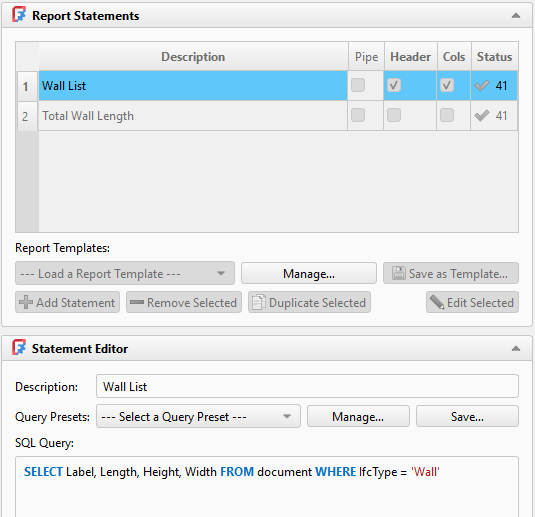
A  Report command has been added. It uses an SQL-like query language to select, filter, and aggregate data. Report command has been added. It uses an SQL-like query language to select, filter, and aggregate data.
Pull request #24078
|
|
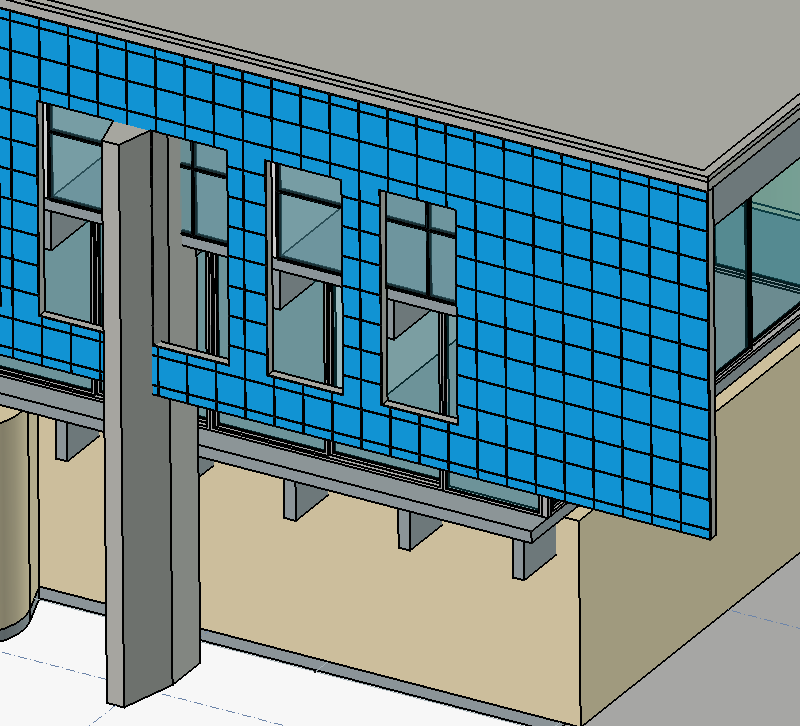
A  BIM Covering command has been added. It can apply finishes like flooring, wall cladding, ceiling tiles, or façade panels to existing geometry. BIM Covering command has been added. It can apply finishes like flooring, wall cladding, ceiling tiles, or façade panels to existing geometry.
Pull request #27222
|
|
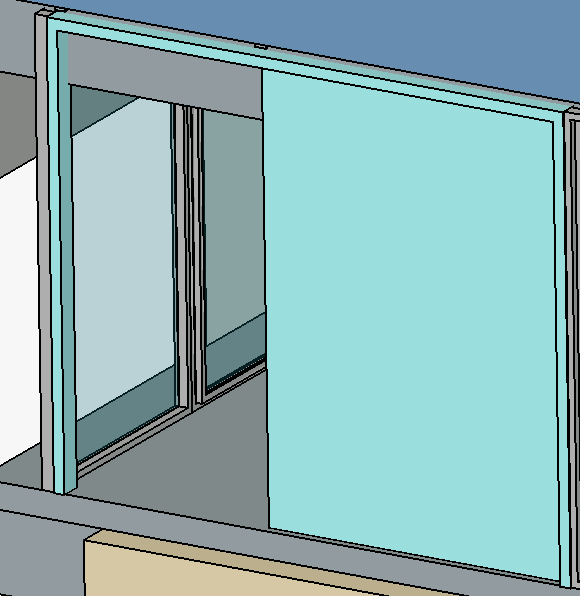
 BIM Windows now include a Sliding Door preset whose opening follows the BIM Windows now include a Sliding Door preset whose opening follows the Opening property, and the Tree View context menu can invert the sliding direction.
Pull request #27375
|
- Removing a wall base now preserves the wall's placement and parametric dimensions for supported straight Draft or Sketch bases, and warns before removing unsupported complex bases. Pull request #24550
- Walls can now be created without a base object by default, with the selected wall baseline mode remembered in preferences. Pull request #24595
- The BIM toolbar layout was decluttered by grouping related commands, removing the Shape from Text and BIM Views entries from the default toolbar, and rearranging common drafting and copy tools. Pull request #25147
- BIM Windows now provide a task-panel options box for editing common window properties with expression-aware fields and a cancel action. Pull request #27381
- BIM Window types can now use LinkGroups, avoiding out-of-scope subvolume warnings while preserving unset base-object properties. Pull request #27420
- Walls now provide task-panel options for common wall properties, and the same quick-access task-box framework was extended to other BIM objects. Pull request #26758 and Pull request #27746
- BIM link handling was refactored, and the new Make Link command creates an
App::Link and immediately starts a move operation for BIM workflows. Pull request #28104
- Sites now provide task-panel options for several site properties. Pull request #28504
- Defining external geometry in base sketches is no longer ignored. Pull request #30086
- Status Bar input hints were added for BIM tools. Pull request #30511
Further BIM improvements
- The Arch Remove command can now remove windows and doors from walls. Pull request #21561
- An Export FreeCAD groups setting has been added to the IFC Export preferences. Pull request #21583
- Native IFC projects now also support a relative path to the IFC file. Pull request #24190
- The BIM Project command was removed from the toolbar, moved to the Utils menu, renamed to IFC Project for clarity, and the Setup Project dialog now defaults to non-IFC-native projects. Pull request #25086
- The default value for the Move With Host property has been changed to
true. Pull request #27685
- BIM Nudge shortcuts now use Alt combinations to avoid conflicts with existing shortcuts. Pull request #28036
- Native IFC objects now expose the full active-schema class list for their object type in the
IfcClass property, including IFC2X3 type families. Pull request #28994
- Stair railings now follow stair visibility changes, including visibility inherited from parent objects such as levels. Pull request #29173
- The branch of a pipe T-connector can now have a different profile than the main pipes. Pull request #29504
- The endpoints of walls without a base have been made editable with the Draft Edit command. Pull request #29860
- DrawingView cut lines now use the default line width and cut areas line thickness ratio preferences for thicker cut-line output. Pull request #30149
- IFC import now treats a multicore preference value of 0 as disabled before creating the IfcOpenShell geometry iterator, avoiding invalid worker counts when multicore processing is turned off. Pull request #30201
- The classification systems download URL was updated. Pull request #30247
- In the top part of the BIM Views Manager a Height column has been added. The Level column has been relabeled to Elevation. Pull request #30420
- 2D drawings receive a label that matches the label of the section they are based on, with the - Drawing suffix, but only if the section has a non-default label. Pull request #30716
- The task panel of the Arch Axis command now shows units. Pull request #31156
- The Draft Edit command was added to the Modify menu and toolbar in BIM. Pull request #31538
- The BIM Unclone command was moved to the Modify → Cloning Tools menu, and the Arch Survey command to the Manage → Report Tools menu. Pull request #31547
- Working plane proxies can now be activated from the BIM Views task panel, and their Visibility Map updated from the context menu of the task panel with the Save Visibility of Objects option. Pull request #31791
- The initial value of the Elevation With Flooring property of a space object is no longer inferred from its geometry. Pull request #31893
- The Draft PathArray and Draft PointArray commands in the BIM GUI have been replaced by their more efficient Link counterparts: Draft PathLinkArray and Draft PointLinkArray. Pull request #32325
- The deprecated Cut Distance property has been removed from section plane objects. Pull request #32644
- Tooltips have been added to several object edit task panels. Pull request #32904

|
CAM operations (Profile, Pocket, MillFacing, Drilling, Circular Hole, Engrave, Vcarve, Adaptive, Deburr) now support 3+2 (indexed) machining: each operation can be assigned a Workplane, and the toolpath is computed relative to that plane. For a non-Z-up workplane, the required rotary-axis positioning move is automatically computed and emitted based on the configured machine's kinematic chain. This requires a machine with rotary axes and machine-based postprocessing.
Pull request #30106
|
Further CAM improvements
- The Units (Metric/Imperial) property was added to ToolBits. Pull request #25783
- The new CAM simulator now uses the same ortho/perspective view mode and navigation style as the 3D View. Pull request #23073
- The Pocket operation can now handle horizontal edges in addition to faces. Pull request #27750
- The Op Final Depth property of the Engrave operation now has a better default value depending on stock and engraving shape. Pull request #26543
- Start Point can now be set from the task panel for Profile and Pocket operations. Pull request #29502
- The Circular Hole Base feature used to select Base Geometry for some operations now shows position and blind state (for cylinder faces) in addition to face name and diameter. Pull request #27869
- CAM operations now recover more gracefully when linked Base Geometry becomes invalid: the path is cleared, the operation is marked with an error state, and invalid Base entries can be removed from the task panel. Pull request #27559
- The Helix operation now has the Helix Max Ramp Angle property while Helix Pitch was renamed to Helix Max Pitch. Pull request #29286
- The Zig Zag Angle property of the Pocket operation was renamed to Angle. It is now hidden if the selected pattern is Offset. Pull request #26842
- A new dressup tool was added to allow mirroring paths. Pull request #21820
- A rapid move from Clearance Height to Safe Height was added at the beginning of the Slot operation's G-code. Pull request #25845
- The Slot operation now handles perpendicular and start-to-end paths for multiple edges or faces more reliably, supports straight edges and non-horizontal arcs, and clears invalid paths when a slot cannot be created. Pull request #25090
- The Slot operation task panel now includes the CutPattern option, whose values were renamed to Bidirectional and Directional; the removed LayerMode behavior now matches other operations' step-down handling. Pull request #25867
- The CAM context menu was improved. Pull request #26492
- Engraving has two new properties: Pattern (allows swapping the direction after step down to exclude retraction) and Reverse (forces direction change). Pull request #22226
- Linking now considers the tool shape. Pull request #28180
- The Array tool's Jitter feature was improved. Pull request #26326
- The HandleMultipleFeatures feature can now process more cases for the Area operation. Pull request #26867
- The DressupTag tool can now automatically place tags for several closed paths. Pull request #22468
- The DressupTag tool now scales better with many edges. Pull request #29094
- The Z Depth Correction Dressup now shows a warning instead of an error when the path is outside the probe area. Pull request #28582
- The Adaptive operation now uses helix generator to create a helix entry. Helix properties were moved to the Adaptive Helix Entry group. There are also new property names Helix Max Ramp Angle and Helix Max Pitch. Pull request #22357
- Toolpath rendering for multi-revolution rotary moves now uses the full angular travel, avoiding coarse display segments on long G0/G1, G2/G3, and drilling-cycle rotations. Pull request #29707
- The job creation and editing dialogs were improved. Job creation now includes a unit schema selector, template description was added to the json and there is a machine selector, as well as a button to create new machines on the General tab. Several other widgets within those panels were also enhanced. Pull request #29861
MachineState.G0F, and .ReturnMode were added for Drilling commands. Pull request #29892- CAM drilling cycle expansion now uses MachineState for more accurate machine state tracking while expanding drilling cycles. Pull request #30112
- The Drilling, Helix and MillFacing linking options now include collision-avoidance strategies for using retract height, clearance height, line-of-sight checks, tool diameter, or tool shape. Pull request #29983
- The Linking generator was added to the Engrave and Deburr operations to use the safe height instead of clearance height for linking moves. The Linking Mode and Safety Margin options were added to the task panels, also for Drilling and Helix operations. Pull request #29959
- The loop selection tool can now handle horizontal faces. Pull request #26786
- A Points pattern type option was added to the Array operation. With this type the position and direction of array elements is taken from selected shapes. Pull request #23606
- ToDo (last check: 20261005, #33240):
Click on the image if the animation does not start.
|
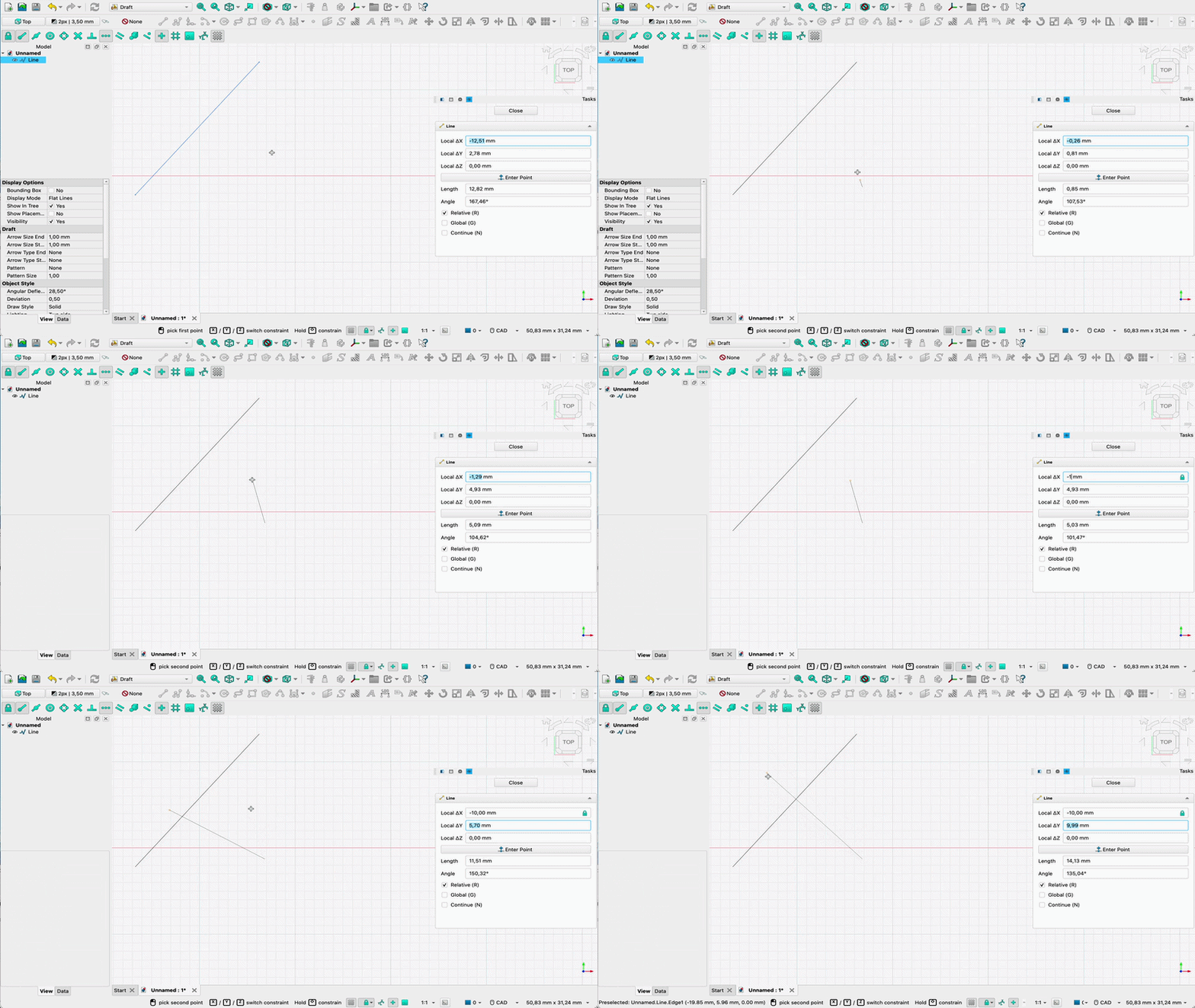
Typing a value into any X/Y/Z/Length/Angle input field in Draft and BIM task panels now automatically locks that field, preventing the 3D cursor from overwriting the entered value. Locked fields are indicated by a lock icon in the spinbox, constrain the cursor in the 3D view to the locked values, and can be unlocked by clicking the icon, double-clicking the field, or clearing the value.
Pull request #30448
|
Further Draft improvements

|
The  Z88 solver was completely refactored. It can be used with both open-source versions of Z88 - Z88OS and Z88Adria. It supports several element types (including true truss, plate, shell, plane stress and axisymmetric elements) and basic features for linear analyses. Pull request #28944 Z88 solver was completely refactored. It can be used with both open-source versions of Z88 - Z88OS and Z88Adria. It supports several element types (including true truss, plate, shell, plane stress and axisymmetric elements) and basic features for linear analyses. Pull request #28944
|

|
The Z-refinement algorithm of  Netgen, allowing the creation of extruded meshes, now also supports shells. Netgen, allowing the creation of extruded meshes, now also supports shells.
Pull request #28204
|

|
Material assignments are now read from the  CalculiX's .frd results files. They can't be accessed in FreeCAD yet, but they can be visualized in ParaView upon conversion to .vtm format. CalculiX's .frd results files. They can't be accessed in FreeCAD yet, but they can be visualized in ParaView upon conversion to .vtm format.
Pull request #27847
|
Further FEM improvements
- The
 Electric Charge Density load now has a Concentrated checkbox in the Total Source mode to use concentrated instead of distributed load (making it also applicable to edges and vertices) with CalculiX. Pull request #25237
- The
 FEM results objects now support the animation of half cycles in addition to reversed full cycles. Pull request #24129
- The
 Section Print feature now supports 2D models and electric flux in electrostatic analyses. Pull request #25081
- The Neumann mode of the
 Electrostatic potential boundary condition can now be used to apply a magnetic flux density boundary condition. Pull request #25897
- In Z88 exports, materials and elements without references can now be used as default values for mesh elements that do not have explicit references. Pull request #29185
- The Displace Mesh property was added to the refactored CalculiX solver, making it possible to view true scale deformation of the mesh without having to use the Warp filter. Pull request #27786
- The addArrayFromFunction Python function was added, making it possible to create custom arrays based on the
 pipeline fields. Pull request #26076
- A context menu command to
 clear mesh groups was added. Pull request #27945
- A log verbosity preference was added for
 Elmer. Pull request #28058
- All solver commands are now always shown (even if a given solver is not installed) and are grouped in the toolbar as well as in the menu. The default icon in the toolbar depends on the default solver selected in the Preferences. Pull request #28144
- The
 Non-linear mechanical material objects are now grouped under the
  Solid Material objects. The Geometrical Nonlinearity and Material Nonlinearity properties are now Boolean. The latter is enabled by default and only applied if any material in the analysis has a non-linear mechanical material object assigned to it. Otherwise, it is ignored. Pull request #27862
- It is now possible to edit the input files for the meshers to add some custom commands for mesh generation, similar to what could already be done for the solvers. Some general preferences of the FEM Workbench were improved too. Pull request #27942
- The Electrostatic potential boundary condition is now named Electromagnetic boundary condition. Some smaller renames were also done. Pull request #27614
- The Iterations Control Parameter Field property was added to the CalculiX solver to allow adjusting the convergence criteria. Pull request #29227
- The Beam Reduced Integration property of the CalculiX solver was replaced by the generalized Reduced Integration property that replaces standard solid, face (shell, 2D) and beam elements with their reduced integration counterparts. Pull request #29223
- The refactored CalculiX solver is now used by default. Pull request #29220
- The Section print feature can now be used with the Z88 solver. Pull request #29188
- Materials now have the Material Name property, making it easier to identify the actual materials represented by the material objects in the Analysis container. Pull request #29609
- Three new
 FEM examples were added for CalculiX: basic 1D fluid network, axisymmetric shaft and plane stress plate with a hole. Pull request #29697 and Pull request #29711
- Several CalculiX preference labels were changed for clarity, including geometrical nonlinearity, advanced solver controls, eigenmode count, and frequency bounds. Pull request #30099
- The Data and extractions widget no longer raises an exception if the pipeline is empty. Pull request #29739
 Displacement boundary condition now correctly writes the rotations in radians for the CalculiX solver. Pull request #29689
- Node indexing was improved for the Z88 solver. Pull request #29606
- The Groups of Nodes property was removed to better handle groups in meshers. Pull request #29440
 Force load now uses the global placement of the reference geometry for the force direction (for example, if the reference is inside a Part container). Pull request #29513
- The dependence of FEM examples on workbenches other than Part was removed. Pull request #29488 and Pull request #29438
- For the Mesh refinement command, the expected mesh property was changed to Mesh Refinement List. Pull request #29554
- The Z88 solver can now use different cross sections assigned to different truss elements. Pull request #29379
 Pressure load now takes into account the shell thickness for plane stress models solved with the Z88 solver. Pull request #29377
- The Z88 solver now uses materials and elements without references as default. Pull request #29185
- The legacy SolverCalculiX object created with old FreeCAD versions is now updated to the new solver object. Pull request #29102
 Fixed boundary condition now works properly (constrains only the available DOFs) for plane stress, plane strain, axisymmetric, membrane and truss elements. Pull request #28986
- Some redundant log messages generated during the mesh element search stage for the CalculiX solver were removed. Pull request #28049
- The legacy get_ccx_version check searching for a very old version of CalculiX was removed. Pull request #28194
- Transparency was removed from equation icons to make their non-grayed-out state clearer. Pull request #28193
- The results pipeline no longer crashes if its data is a mutiblock with a null block. Pull request #28171
- The pipeline frames now include time/frequency units for the refactored CalculiX solver. Pull request #27845
- The
 clipping plane command can now be enabled in feature edit mode. Pull request #25145
- Mesh error handling was improved for the solvers, including proper error messages when there's no mesh or multiple meshes are present. Pull request #29186
- The names of objects were improved, mainly by removing the redundant word "constraint". Pull request #30665
- A new electrostatic spark gap FEM example was added for CalculiX and Elmer. Pull request #30928
- The default pressure value was changed to 1 MPa. Pull request #31036
- The getNodeColor() and getElementColor() methods were implemented. Pull request #30726
- Two new FEM examples were added for CalculiX involving radiation
 heat flux - one for radiation to ambient and one for surface-to-surface (cavity) radiation. Pull request #31171 and Pull request #31175
 Contact and
  Tie constraint now include options to change the side of a shell surface. Moreover, tie constraint now has separate selectors for master and slave sides. Pull request #31055
- Elmer's mechanical equations now properly handle 2D coordinate systems. The axisymmetric shaft example from CalculiX is now also available with Elmer. Pull request #31610
- Eigenvalues (natural frequencies and buckling factors) obtained with Elmer's
 Elasticity equation are now saved to the text document generated with the analysis. Pull request #31667
- Elmer's
 Heat equation now supports radiation heat flux including cavity (surface-to-surface) radiation. Pull request #31641
- A new 3D magnetization FEM example was added for Elmer's
 Magnetodynamic equation. Pull request #31856
- Eigen analyses (modal and buckling) performed with Elmer's Elasticity equation now use multiframe result pipelines. Pull request #31851
- The Scale Factor of the
 Glyph filter was improved, including the support for expressions. Pull request #31862
- The Apply button in the task panels of meshers and solvers was renamed to Run to make it clear that it starts meshing or calculations. Pull request #31954
Further Inspection improvements
Further Material improvements
- The Material-Metals database has been extended with additional copper and copper-alloy materials. Pull request #25832
- Material assignment via Std SetMaterial now wraps changes in a transaction, replacing the "Close" button with "OK" and "Cancel" to enable proper undo support. Pull request #27910
- Material library paths using symbolic links are now handled correctly by the Materials Editor and material-loading API calls. Pull request #28500
Further Mesh improvements
- A status widget now displays the reason when adding a triangle to a mesh fails. Pull request #29945
|
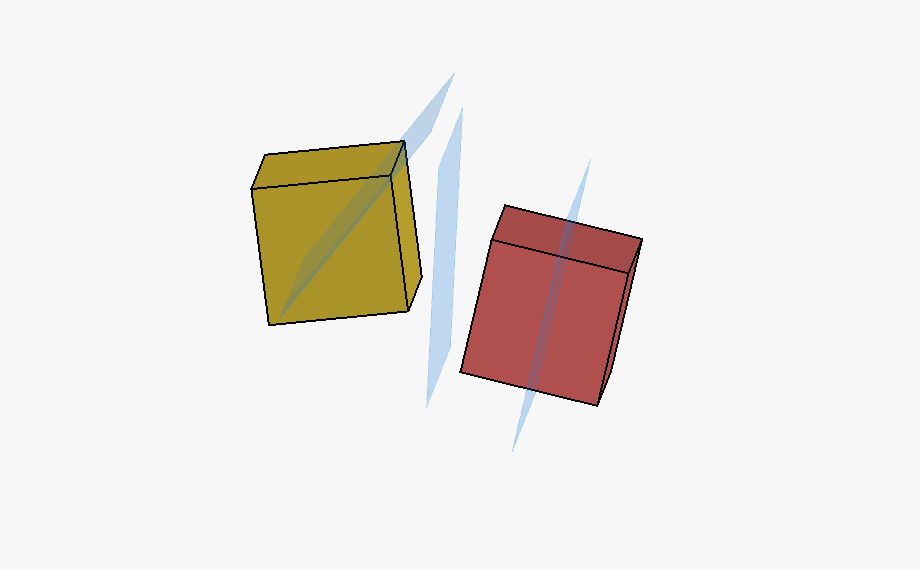
A new  Midplane between faces attachment mode was added, placing the attachment origin midway between the centers of two selected planar faces. For non-parallel faces, the resulting plane is the angle bisector between the two faces. Midplane between faces attachment mode was added, placing the attachment origin midway between the centers of two selected planar faces. For non-parallel faces, the resulting plane is the angle bisector between the two faces.
Pull request #31574
|
Further Part improvements
- A new method has been added to split a B-spline curve into two curves at a given parameter. Pull request #26716
- Extruding text sketches in the Part Workbench is now faster, especially for sketches that produce many wires. Pull request #28344
- The attachment system now correctly offers modes such as XY parallel to Plane when selecting origin datum planes through an Origin object. Pull request #28958
- Loft creation now allows valid profile combinations that share the same center of gravity while still guarding against the crash case fixed for duplicate profiles. Pull request #29982
- A unified face maker was added to replace the current multi-face maker approach with a single algorithm handling all planar and non-planar cases. This is a new default face maker. Pull request #28788
- The Project on Surface tool now accepts internal sketch faces as input for projection on a surface. Pull request #30425
- The Mirror tool now respects the placement of a link to a placed object. Pull request #30987
- The Part Extrude task panel now supports expressions in its length and taper input fields, since the underlying features are created as soon as the panel opens instead of only on Apply/OK. Pull request #32610
- Seam edges are now preserved during refinement to ensure closed wires. Pull request #32850
- Box selection received a significant speedup. Pull request #32963
|
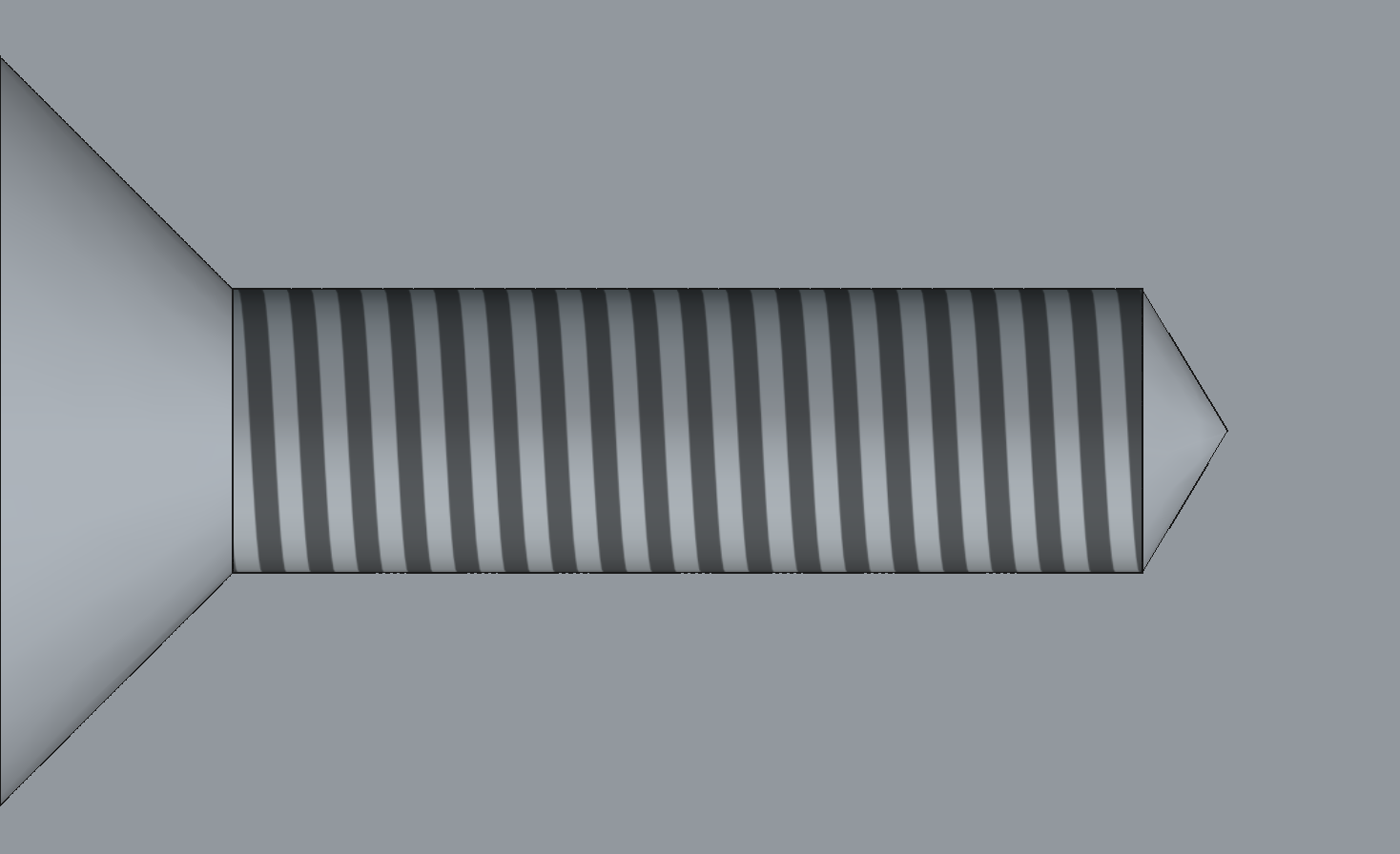
Support for cosmetic threads (thread textures) was added to the  Hole tool. They can be enabled using the Cosmetic Thread property (Threaded has to be enabled and Model Thread must be disabled). Hole tool. They can be enabled using the Cosmetic Thread property (Threaded has to be enabled and Model Thread must be disabled).
Pull request #22573 and Pull request #28570
|
Click on the image if the animation does not start.
|
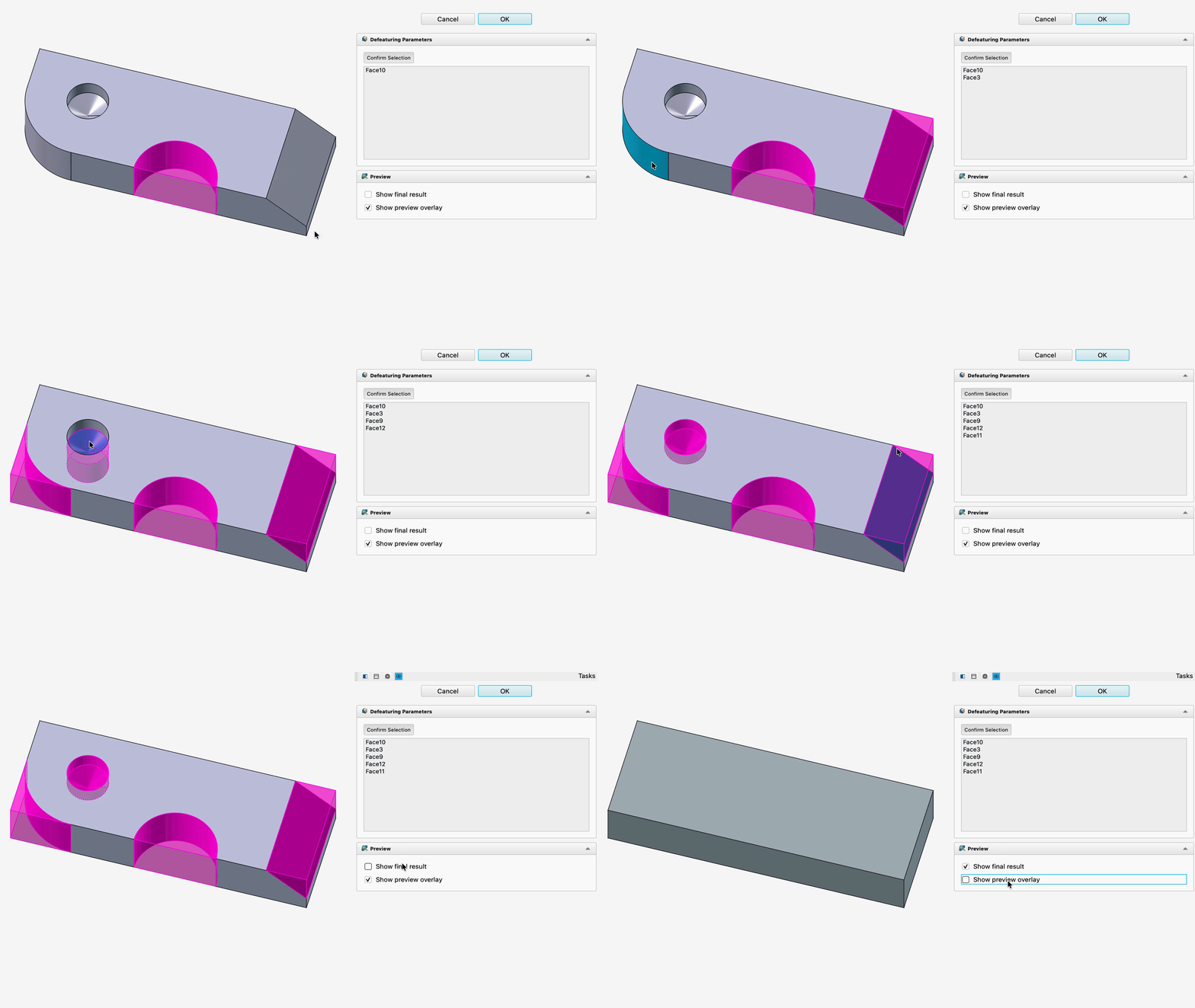
A new parametric  Defeaturing command was added, allowing selected faces of a feature to be removed and the resulting gap automatically healed or removed based on the geometry, with a live preview of the result before confirming. Defeaturing command was added, allowing selected faces of a feature to be removed and the resulting gap automatically healed or removed based on the geometry, with a live preview of the result before confirming.
Pull request #29616
|

Click on the image if the animation does not start.
|
All PartDesign pattern tools (Mirror, Linear, Polar, and the new Circular, Path, and Point patterns) now support suppressing individual instances, including the original, directly from the 3D View.
Pull request #30840
|
Click on the image if the animation does not start.
|
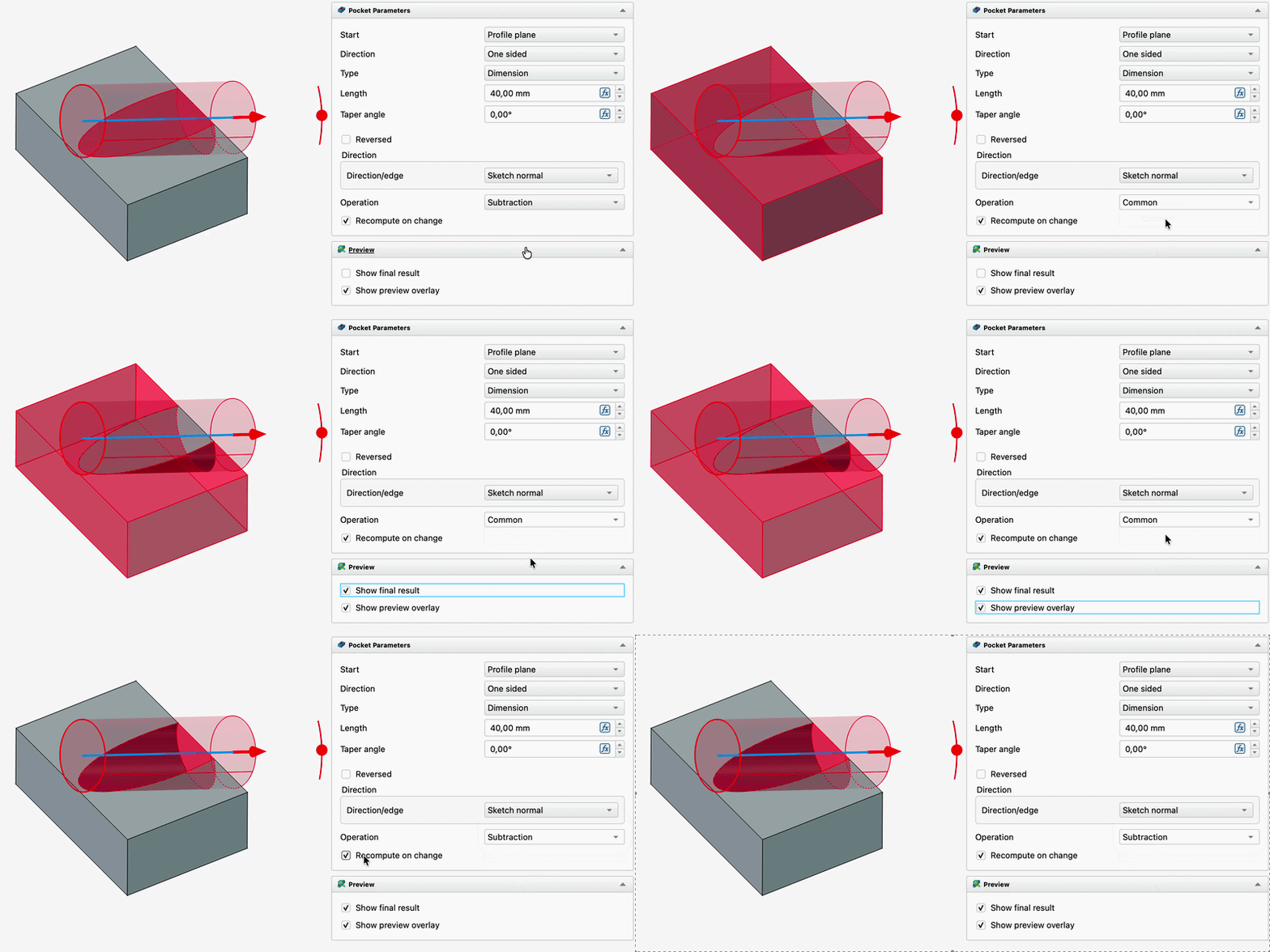
Subtractive PartDesign features (Pocket, Groove, Subtractive Loft, Subtractive Pipe, Subtractive Helix and primitives) now support a boolean Common operation in addition to the default Subtraction, keeping only the material shared between the feature and the base body instead of removing it. A dedicated Operation dropdown was added to each affected task panel, with matching preview highlighting, so the mode no longer has to be set through the property editor.
Pull request #29650 and Pull request #32387
|
Click on the image if the animation does not start.
|
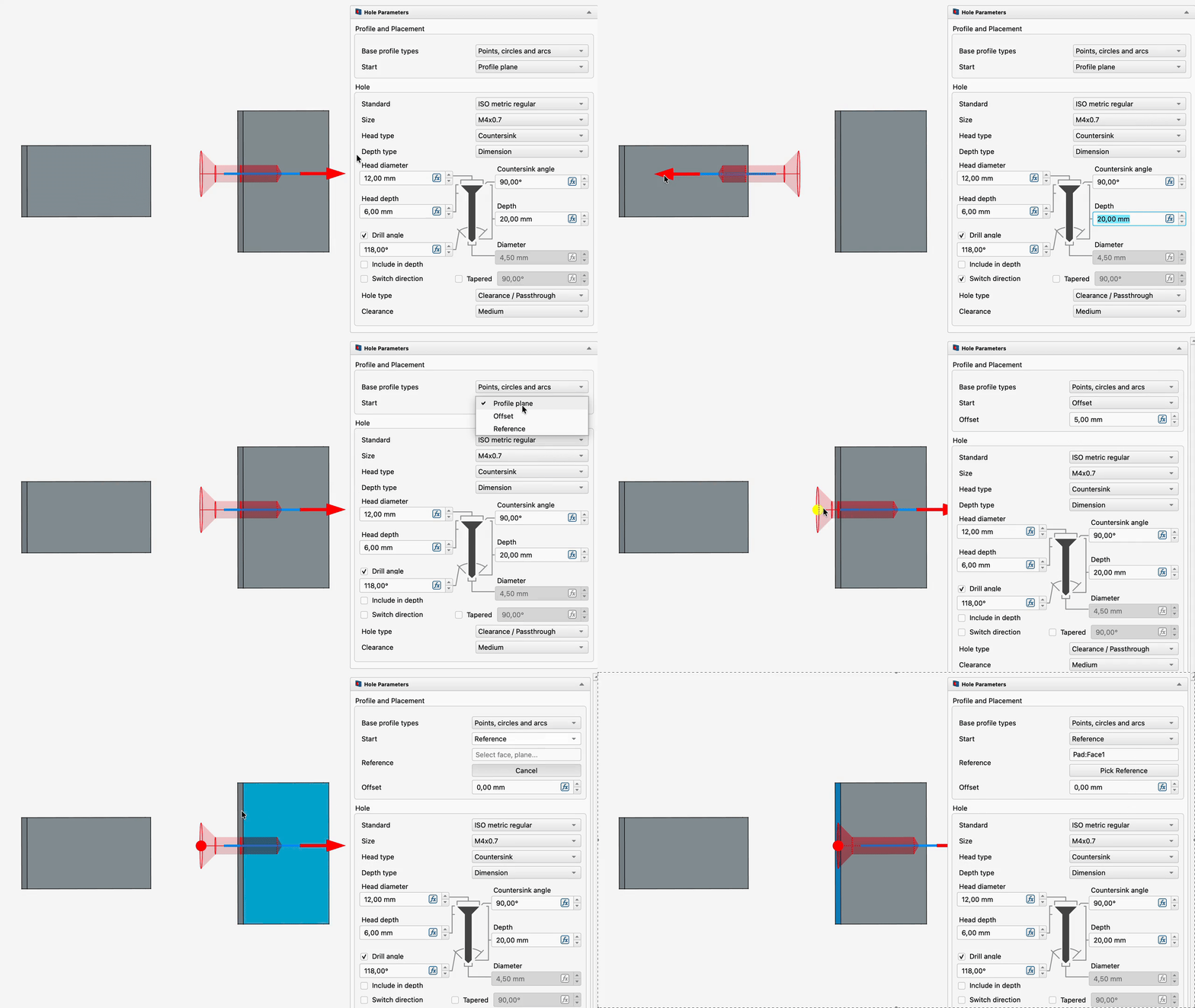
The Hole tool now supports the same Start Type controls (Profile plane, Offset, Reference), letting a hole begin at a distance or reference away from its profile (circular edge, point or sketch). The task panel was aligned with Pad and Pocket for consistency, and an offset dragger with click-to-reverse direction was added.
Pull request #31852
|
|
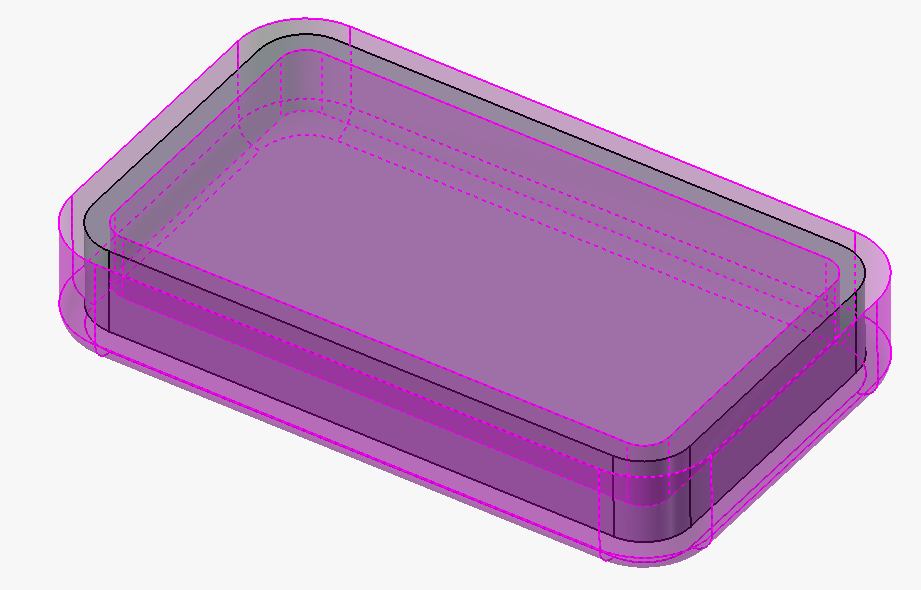
The  Thickness tool's Recto Verso mode is now implemented, applying half the entered thickness to each side of the selected faces and fusing the results, instead of silently falling back to Skin mode. The non-functional Pipe mode has been hidden from the mode selector. Thickness tool's Recto Verso mode is now implemented, applying half the entered thickness to each side of the selected faces and fusing the results, instead of silently falling back to Skin mode. The non-functional Pipe mode has been hidden from the mode selector.
Pull request #32333
|
Click on the image if the animation does not start.
|
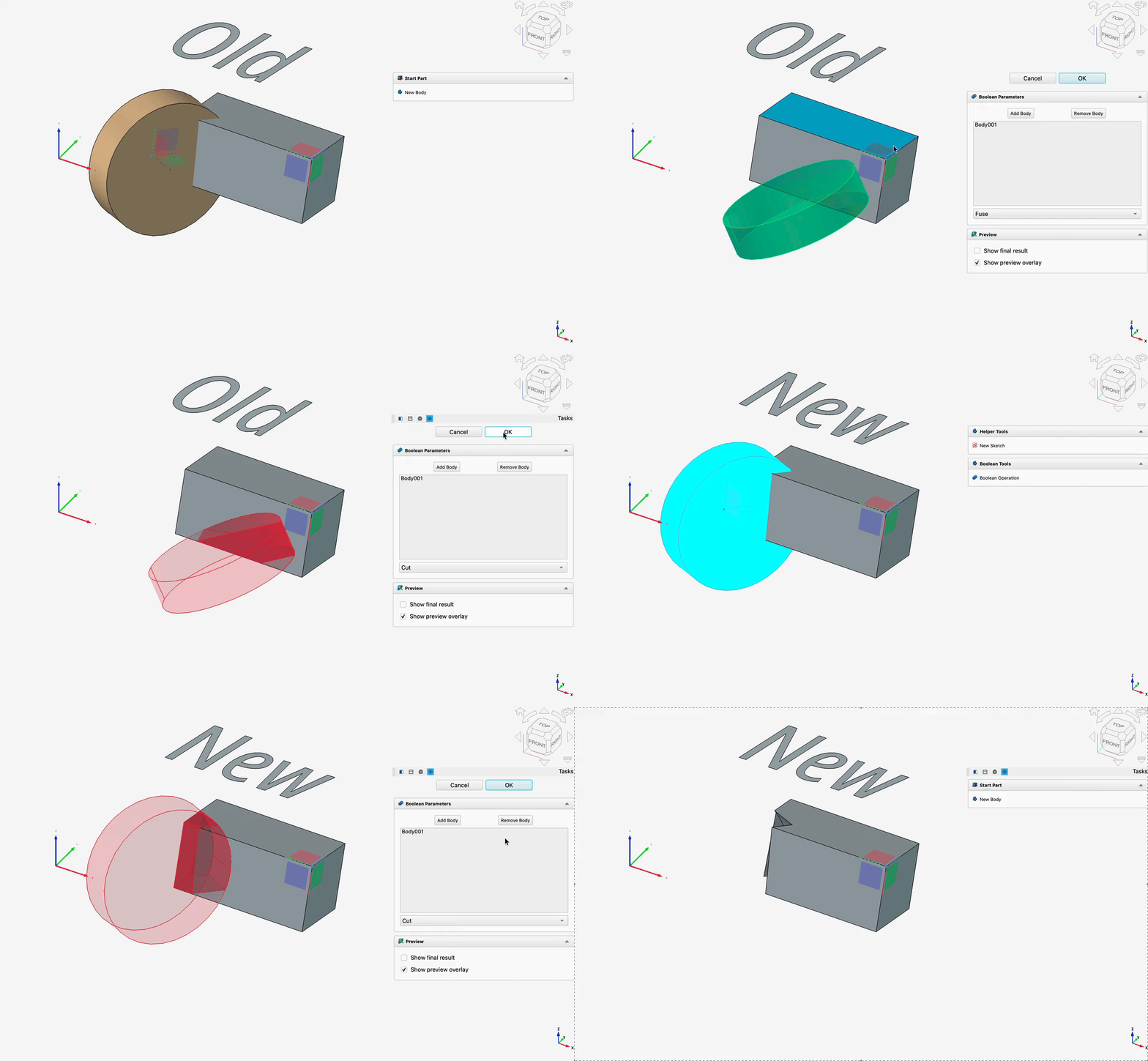
 PartDesign Boolean "tool bodies" are no longer required to share the active Body's local origin: tool body and Part container placements are now correctly respected during the boolean operation instead of needing to be reset to the origin beforehand. PartDesign Boolean "tool bodies" are no longer required to share the active Body's local origin: tool body and Part container placements are now correctly respected during the boolean operation instead of needing to be reset to the origin beforehand.
Pull request #30575
|
Further Part Design improvements
- Interactive draggers now support configurable coarse snapping, allowing larger steps by default with a modifier key (e.g. Shift) for fine movement; the snap step sizes and modifier key are configurable in the preferences. Pull request #28384
- Interactive draggers were added to the Sphere, Box and Cylinder (additive and subtractive) primitive tools. Pull request #23700
- An interactive dragger was added to the
 Draft tool. Pull request #27111
- Multi-selection is now supported for the Additive and Subtractive Pipe path edges list. Pull request #27962
- Errors from Part Design dress-up features such as chamfers and fillets are now shown in the notification area and Report view instead of a popup dialog, allowing users to stay in the task panel. Pull request #28131
- Now unhiding a Body with no visible features also unhides its tip. Pull request #24887
- Changing a Pad to the Up To Face type no longer crashes if the feature is not inside a Body; an error is reported instead. Pull request #30022
- Pressing Space on an element selected from the 3D view (e.g. from selecting a face) now toggles the visibility of the entire PartDesign Body instead of the last feature, making it easier to show or hide bodies in assemblies or files with multiple bodies. Selection in the Tree view still toggles the selected object. Pull request #29110 and Pull request #30231
- Input hints were implemented for the interactive control draggers. Pull request #29631
- SubShapeBinder now uses the BuildFace face maker to handle overlapping geometry. Pull request #29249
- A Fuzzy Tolerance property was added to override the default fuzziness/tolerance for boolean operations determined from the size of the input shapes. Pull request #29984
- Suppressing a feature now doesn't result in unnecessary recomputes and thus works instantly. Pull request #29219
- Strikethrough was added to labels of suppressed features. Pull request #27808
- Transformation tools now have better error handling for empty features. Pull request #26565
- The Helix tool has better error handling for multiple solids cases now. Pull request #29339
 Part Design Bodies used inside a boolean feature are now temporarily made visible when activated for editing, and hidden again when deactivated, removing the need to manually toggle result visibility or use a SubShapeBinder workaround. Pull request #30002
- PartDesign Body and
 Clone Base Feature placement is now correctly preserved when the Body is inside a Part container that is not at the origin, and when a clone's Base Feature is changed, fixing incorrect displayed geometry and placement in these cases. As a side effect, positioning the object to be cloned at a specific location before cloning can now be used to control the shape's placement relative to the resulting Clone Body's origin. Pull request #31235
- Creating a PartDesign Body with a Base Feature now preserves the source object's appearance, including per-face colors. Pull request #31767
- Updating a Base Feature now automatically triggers recompute. Pull request #31406
- Creating a PartDesign Body with a Base Feature no longer requires the source object to belong to the same Part container as the new Body, removing a restriction that was especially limiting for nested files and assemblies. Pull request #31763
 Revolution and
  Groove now have working To first and Up to face modes, as well as a Two sided direction like Pad. Pull request #31044
- Linked objects are now shown when opening a sketch from the Tree View. Pull request #30004
- Revolution and Groove now support the same angular Start controls (Profile plane, Offset, Reference) introduced for Pad and Pocket, letting the revolved feature begin at an angular offset from its sketch plane, with a matching reference picker and an angular offset dragger. Clicking either visible angle arrow now also toggles Reversed, consistent with Pad and Pocket. Pull request #32121
 SubShapeBinders are not added to single deactivated Bodies anymore. Pull request #30931
Click on the image if the animation does not start.
|
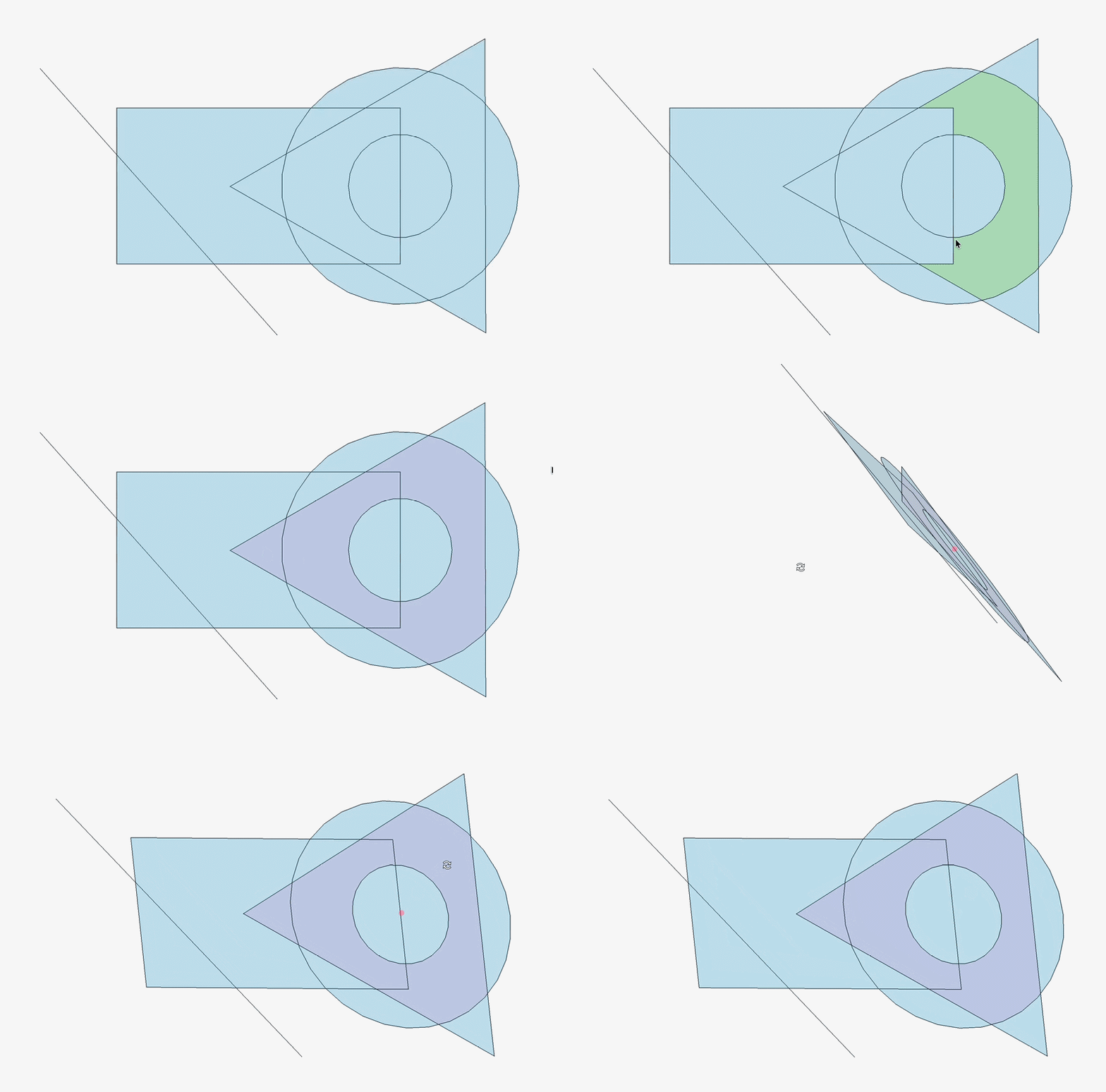
Internal face generation now correctly handles complex overlapping geometry such as three or more intersecting circles, where previously some face regions were not generated at all.
Pull request #28648
|
Click on the image if the animation does not start.
|
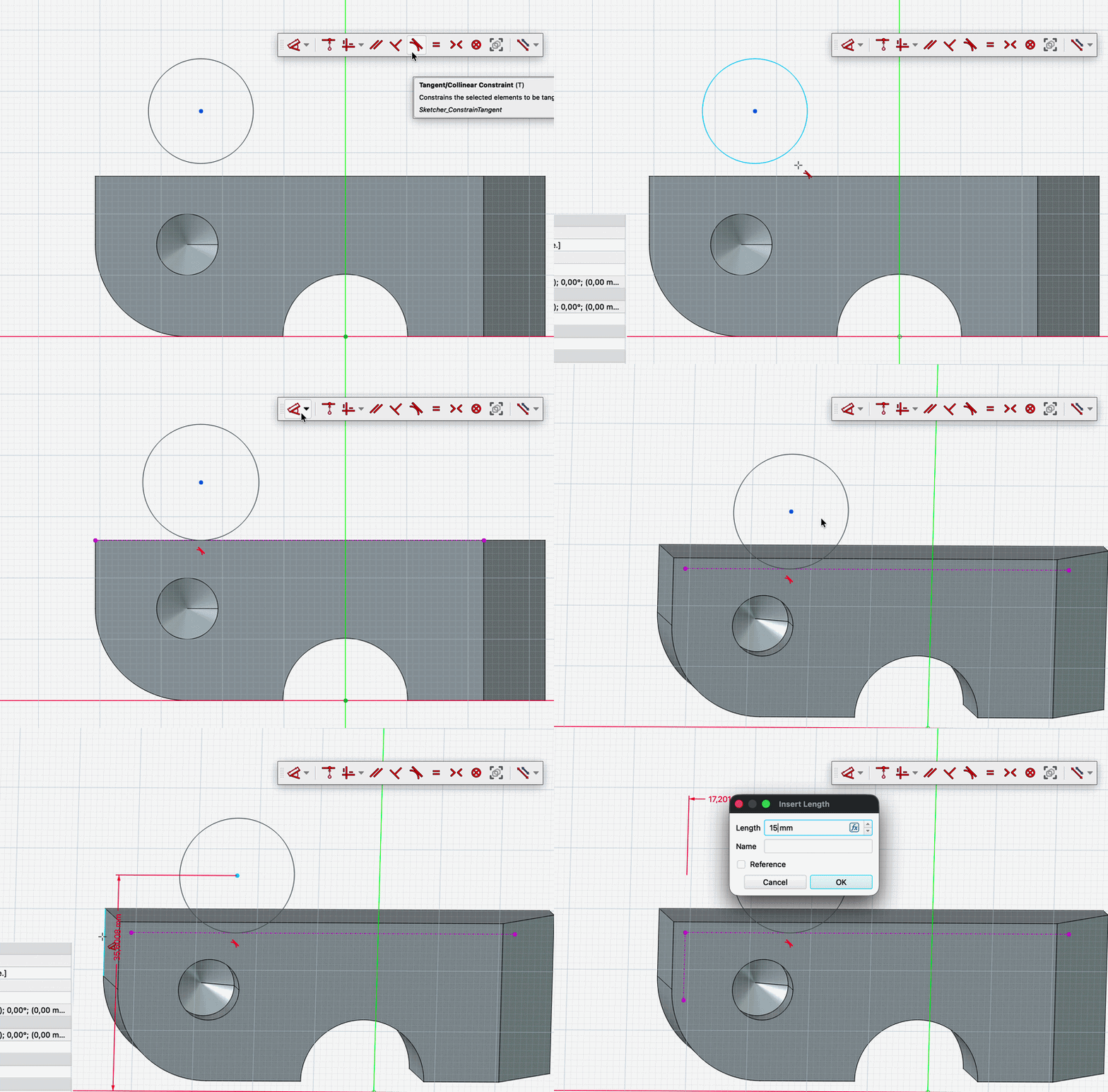
Dimension and constraint tools in the Sketcher can now directly select model edges and vertices outside the sketch while editing. Clicking a valid external edge or vertex automatically creates the projected external geometry reference and uses it as the dimension or constraint operand, removing the need to manually add external construction geometry first.
Pull request #31916
|
Click on the image if the animation does not start.
|
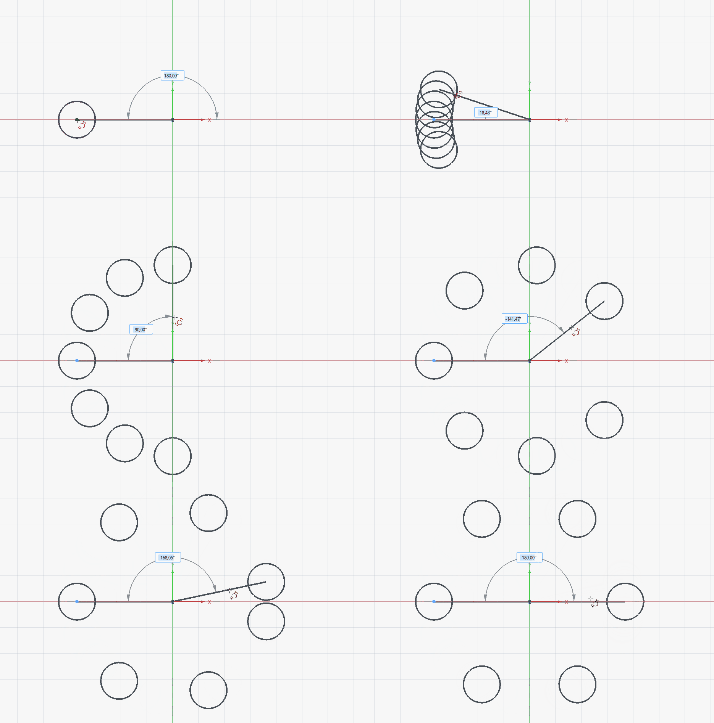
The  Rotate pattern tool in Sketcher now specifies the total number of elements (including the original) instead of the number of additional copies, making full 360-degree patterns intuitive to enter, and a Symmetric option was added to distribute elements evenly on both sides of the original. The same Symmetric option was also added to the Translate pattern tool. Rotate pattern tool in Sketcher now specifies the total number of elements (including the original) instead of the number of additional copies, making full 360-degree patterns intuitive to enter, and a Symmetric option was added to distribute elements evenly on both sides of the original. The same Symmetric option was also added to the Translate pattern tool.
Pull request #30747
|
Click on the image if the animation does not start.
|
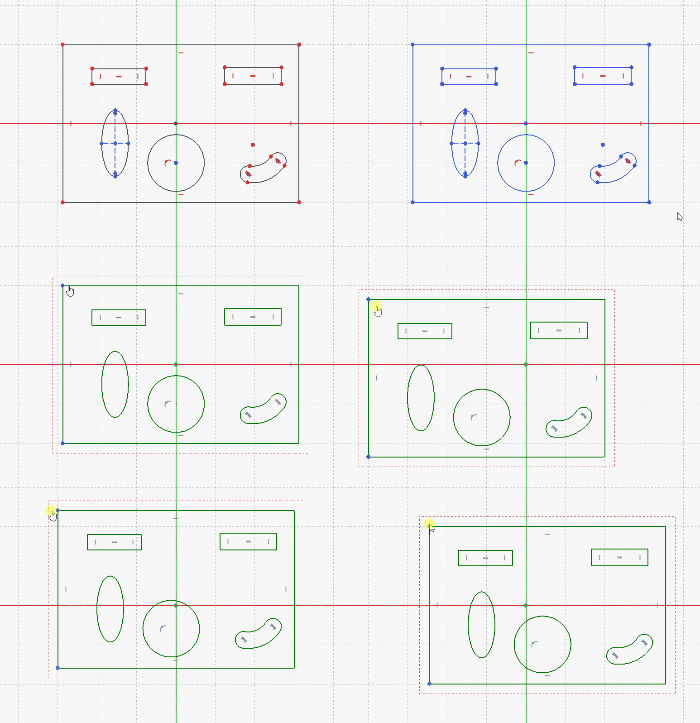
Thanks to AstoCAD, a development preview  Group constraint was added to Sketcher, allowing the geometries to be grouped and moved or constrained together. By default it is hidden and can be activated by creating a parameter in BaseApp/Preferences/General: ShowDevelopmentPreviewFeatures set to true. Group constraint was added to Sketcher, allowing the geometries to be grouped and moved or constrained together. By default it is hidden and can be activated by creating a parameter in BaseApp/Preferences/General: ShowDevelopmentPreviewFeatures set to true.
Pull request #22217
|
Click on the image if the animation does not start.
|
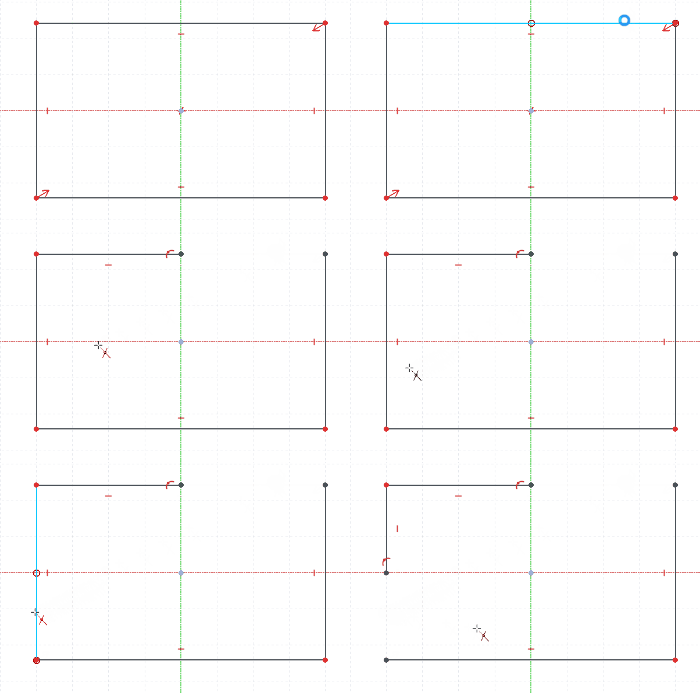
The  Trim tool now can use the Sketcher axes when the Include axes (U) checkbox is enabled. Trim tool now can use the Sketcher axes when the Include axes (U) checkbox is enabled.
Pull request #30798
|
Click on the image if the animation does not start.
|
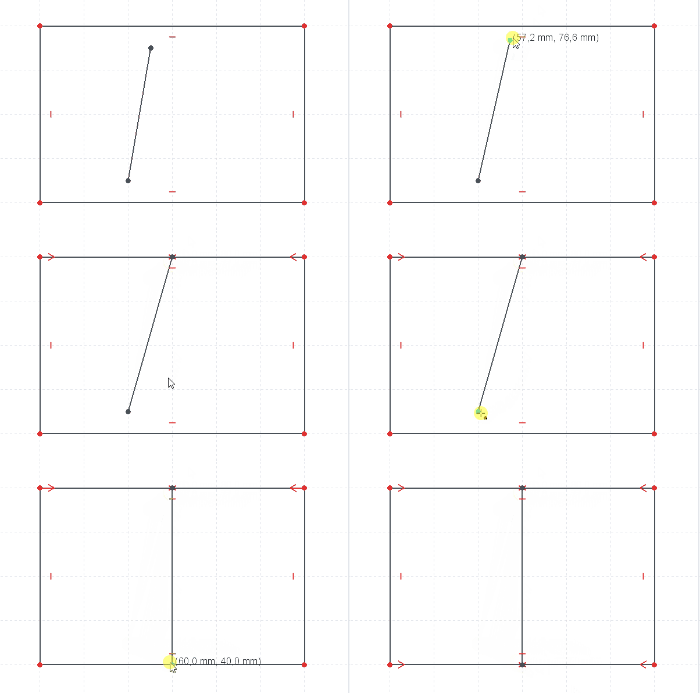
Autoconstraints now work not only when creating geometries, but also when dragging and hovering over existing elements. You can manually set the delay of how long you need to hover suitable elements to avoid accidental constraints by adding and changing a user parameter DragAutoConstraintDelay in the Sketcher/General group (default 400ms).
Pull request #29771
|
Further Sketcher improvements
- It is now possible to import Bézier and Offset curves as
 External geometry. Pull request #25144
- The Merge Sketches command now imports external geometry when possible, remaps constraints that reference external geometry, and creates the merged sketch inside the shared Body when all source sketches belong to one. Pull request #29497
- Copy, cut and paste now support text geometry and Group constraints. Pull request #28728
- When creating or editing circular dimensions, it is now possible to switch between the radius and diameter type. Pull request #26794
- The constraint list now displays the type of the constraint in the name. Pull request #26797
- A new selection mode was added to
 Symmetric constraint. Now it is also possible to select an element (line, arc, or open B-spline) and a symmetry line. Pull request #25525
- Internal faces are now visible from both sides of the sketch plane, and multi-selection highlighting with Ctrl+click now correctly highlights all selected faces. Pull request #28655 and Pull request #28651
- Internal face generation now handles self-intersecting B-splines and dangling edges, while keeping stable mapped names for split edge fragments. Pull request #28964
- Double-clicking a geometric constraint now triggers its rename. Pull request #27678
- Double-clicking selection now also works with external geometry. Pull request #28105
- The Grid and Make Internals properties are now enabled by default for new sketches, and a grid transparency preference has been added. Pull request #28771 and Pull request #28791
- Sketcher now avoids unnecessary solves when dragging constraints, deleting sketch elements, and leaving dimension tools, improving responsiveness in these workflows. Pull request #28652
- The Sketcher AutoColor property now immediately applies preference colors to existing sketches when enabled, without requiring the document to be saved and reopened. Pull request #30185
- Selected distance constraints (point-line, circle-circle, and circle-line) now use orientation to prevent flipping. Pull request #26518
- Line-circle and line-arc tangent constraints now use computed orientation, keeping tangent-constrained geometry on the intended side while solving. Pull request #29015
- The Create symmetry constraints option of the
 Symmetry tool was improved to avoid overconstraints. It is now also enabled by default. Pull request #28118 and Pull request #28319
- Copying Sketcher geometry as Python code now keeps more coordinate precision, reducing broken closed profiles after copy and paste. Pull request #29211
- There is now a Cancel button, making it possible to discard modifications in a sketch. Pull request #29337
 Horizontal Dimension,
 Vertical Dimension, and
  Distance Dimension are now positioned better by default to avoid overlap with the lines being constrained. Pull request #29538
- Sketcher box selection now takes into account the selection filters. Pull request #28982
- Arc length dimensions are now positioned better for larger arc spans. Pull request #29594
- Dimension labels are now oriented based on the view rotation so that they won't get displayed upside down anymore. Pull request #29569
- OVP keyboard handling was improved: entering numbers, punctuation, deletion keys or pasted values switches directly to value editing, while holding Alt temporarily restores camera controls. Pull request #29477
- While entering OVPs for rectangles, lines, and slots, Sketcher now keeps the captured cursor direction after a length or angle value is set, preventing the preview geometry from flipping as the mouse moves. Pull request #24904
- The
 Text tool now stores only the font name in the document instead of an absolute local font path, improving file portability between systems. Pull request #28418
- A new preference was added to control the font type (in addition to font size) for labels. Pull request #26600
- Sketcher geometry now updates correctly after removing part of a constraint from a fully constrained sketch. Pull request #29812
 Angle dimension lines are now positioned better. Pull request #29630
- Arcs can now be selected directly while the Angle dimension tool is active, making it possible to create arc angle dimensions without first preselecting the arc. Pull request #29679
- The Sketcher Dialog has two new commands - to delete all constraints and to delete filtered constraints. Pull request #29993
- The Dimension tool now uses input hints. Pull request #30630
- OVPs were added for arc of ellipse, hyperbola and parabola. Pull request #29318
- Input hints were added for B-spline tools. Pull request #30628
- Selection filters now support internal sketch faces. Pull request #30259
- The
 geometry creation mode state is now remembered per sketch instead of per FreeCAD session. Pull request #30761
- Icons of external geometries in the Elements panel now have a construction variant. Pull request #28507
- Geometry now has selection priority over constraint icons, labels and dimension lines. Pull request #30792
- Sketch internal faces now have a different color with better contrast. Pull request #31369
- Input hints were added to pattern tools. Pull request #31536
 Point-on-object constraints are now automatically created when dragging curves (arcs and circles). Pull request #31295
- Dimensional constraint lines in the Sketcher now have configurable line width and pattern preferences, allowing users and theme authors to tone down visually dominant dimension lines. Pull request #31405
- Handling of negative dimension constraint values was improved. Pull request #30587
- There is now a preference to change the pattern and width of Sketcher axes. Pull request #31679
 Polygon now has an OVP for the angle. Pull request #31180
- The Preserve corner option of the
 fillet tool now also works for geometries other than lines. Pull request #31746
- Double-clicking on the active sketch now triggers the
 Align View to Sketch command. Pull request #32468
- Broken/missing external geometry is now reported in the tree (including a tooltip). Pull request #32478
Further Spreadsheet improvements
- The color picker was redesigned and has two buttons - for custom colors and for resetting. Pull request #28698
- Feedback for conflicting aliases was improved significantly. Pull request #27584
|
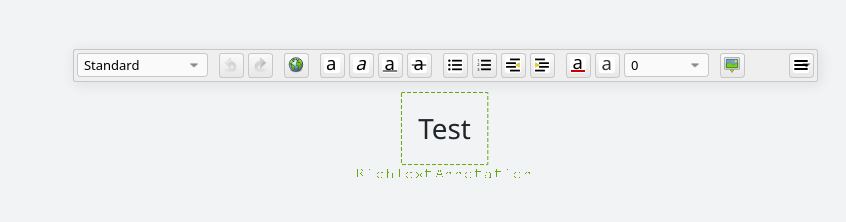
Annotation tools have been reworked with improved rich-text annotation editing. Pull request #24624
|
Click on the image if the animation does not start.
|
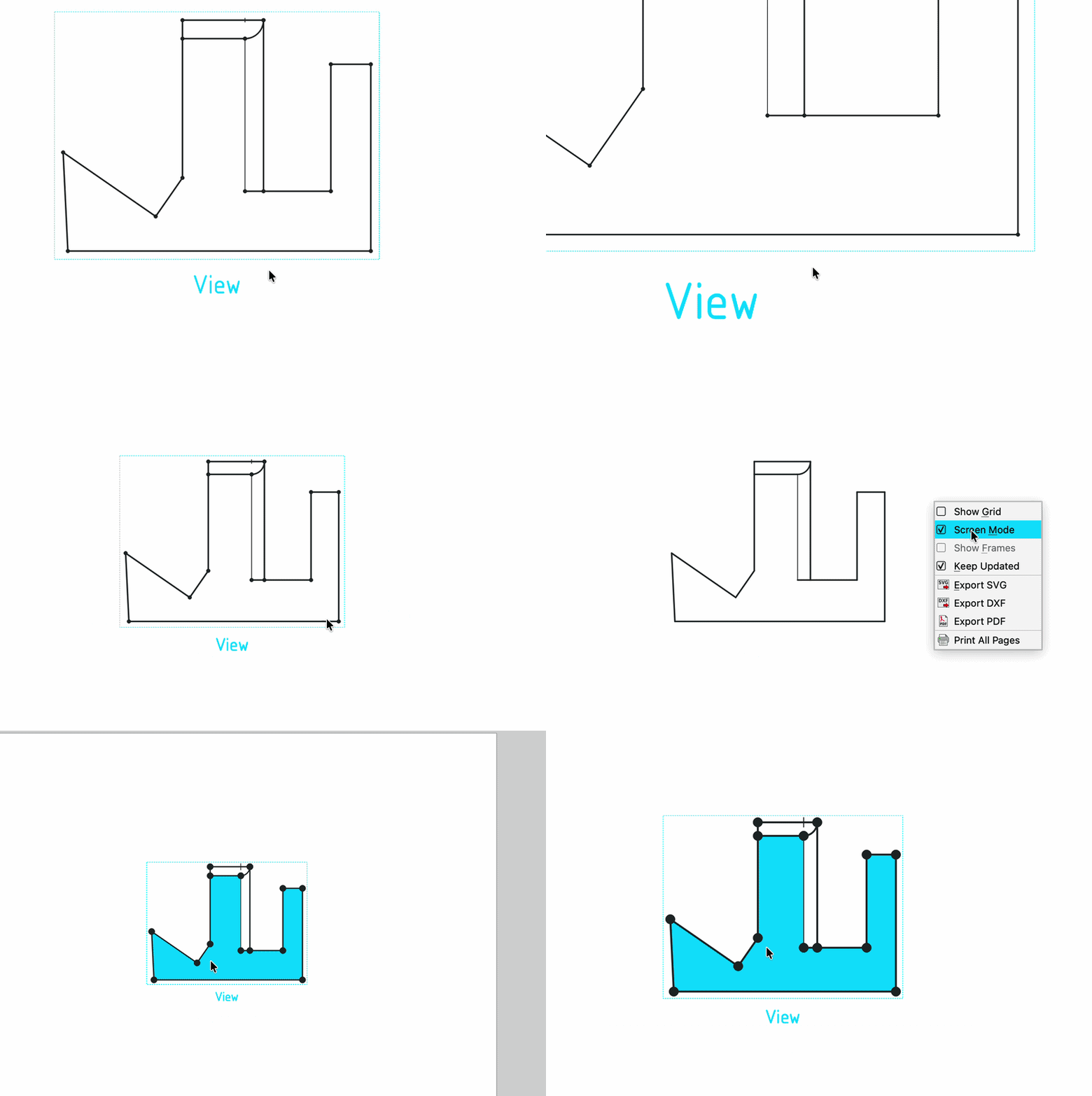
TechDraw now has a Screen Mode, enabled by default, that keeps vertices and edges at a constant on-screen size regardless of zoom level, preventing them from growing large enough to obscure nearby geometry when zoomed in. It can be toggled per page from the page's context menu, and configured via new preferences.
Pull request #32180
|
Further TechDraw improvements
- Smooth edges in TechDraw are now rendered with a thin line as required by ISO drawing standards. Pull request #27747
- Section line font, font size, and arrow size in TechDraw Section Views are now configurable per view via view properties. Pull request #27521
- TechDraw angle dimensions now support displaying the supplementary angle (180° minus the measured angle) via a view property. Pull request #27055
- Scene drawing is now significantly faster. Pull request #25898 and Pull request #28702
- Rendered scene views now exclude viewer decorations such as the NaviCube from TechDraw scene captures. Pull request #28943
- Manual changes to TechDraw view and dimension X/Y position properties now take priority over snapping, and dimension snapping parameters are configurable in the preferences. Pull request #30154
- The Insert Active View task panel has been redesigned with improved spacing, a combobox for background style selection, and grouped crop settings that disable automatically when not in use. Pull request #28085
- There is now a context menu option to toggle grid for the active page. Pull request #29083
- Projected views of tori and similar concentric-arc shapes now preserve legitimate outline arcs instead of deleting them during duplicate-edge cleanup. Pull request #29637
- The default TechDraw page color in the FreeCAD Light preference pack is now white, avoiding gray page backgrounds when printing. Pull request #30129
- The task panel of the Balloon Annotation tool was polished. Pull request #28101
- The ASME ANSIB TechDraw template now has a transparent background, matching the other drawing templates. Pull request #30025
- Expressions can now be attached to any TechDraw template fields. Pull request #27117
- UI improvements were applied to 8 task panels as part of an ongoing effort to improve TechDraw's UI. Pull request #29807 and Pull request #29362
- It is now possible to set the section line color. Pull request #31386
- Double-clicking on a view on the page now opens its editor. Pull request #30797
- Selection of Leader Lines now uses the actual geometry of the line instead of the group's bounding box. Pull request #30986
- Surface finish symbols do not automatically snap to positions within the view anymore. Pull request #31635
- Selection-dependent right-click context menus were added to TechDraw. Pull request #30892
- A preference was added to set the color of break lines in broken views. Setting the highlight color for detail views is now also possible. Pull request #29430
- Handling of empty template fields was improved. Pull request #30862
- Spreadsheet views can now be created directly as a view type. Pull request #31595
- TechDraw view labels have been moved to the top-left corner, freeing up the caption position below the view for a new, editable caption. Section and Detail views now get an automatic caption on creation, with
<SCALE> and <REF> placeholder tags available to insert the view's scale or section/detail letter. Captions can be dragged and snap to any side of the view, and are edited directly from the page. Pull request #32216
- The Face color and Transparent faces preferences were separated for clarity. Pull request #33224
Import and export
- Importing STEP, IGES and glTF files now shows progress feedback during the transfer. Pull request #27849
- XHTML/X3D export now uses more descriptive
DEF attribute names. Pull request #29980
- On Windows, DXF import now works when the file is in a folder whose path contains non-English characters. Pull request #30125


 Annotation Label to the last picked point in the 3D view was added.

 Mass Properties command has been added to calculate volume, mass, surface area, center of gravity, center of volume, and inertia for parts and assemblies, with support for custom reference frames and material-aware calculations.

 Core Datums now use the Show Placement property, making attachment offsets (without rotations) in local coordinates more intuitive. Pull request #29176
 Transform tool now supports a custom coordinate system mode: translation and rotation inputs are expressed relative to any object with a placement in the document (bodies, shapes, local coordinate systems, Part containers, etc.), while the dragger position and orientation remain unchanged. Rotations are applied around the current dragger origin (object origin or custom dragger position) using the axes of the custom coordinate system. Optionally, the dragger axes can be visually aligned to the custom coordinate system to also drag the object interactively in its directions. This allows moving or rotating an object at or around the current dragger relative to another object's coordinate system.


 Addon Manager
 Assembly Workbench

 Linear,
  Polar,
  Circular,
  Path, and
  Point — that insert the source object as a rigid array of links instead of copying its geometry, while still allowing joints to be added to any instance's feature or element, and suppressing individual instances or changing custom spacing via OVP.
 BIM Workbench
 Draft Trimex now also works on supported
  BIM objects (Wall, Pipe, Structure, Frame, Truss, and baseless Panel), trimming or extending the object by picking one of its end faces. Extruding a face into a new object is now a separate
  BIM Extrude Face command instead of being combined with Trimex.

 Report command has been added. It uses an SQL-like query language to select, filter, and aggregate data.

 BIM Covering command has been added. It can apply finishes like flooring, wall cladding, ceiling tiles, or façade panels to existing geometry.

 BIM Windows now include a Sliding Door preset whose opening follows the
  CAM Workbench


 Draft Workbench
 FEM Workbench
 Gmsh mesher with advanced refinements and transfinite algorithms were added. Thanks to the latter, hexahedral meshes can now be automatically created for all shapes whose subvolumes have 5 or 6 faces with 3 or 4 edges each.


 Magnetodynamic 2D equation now properly supports Joule heating calculations with
  Heat equation. There is also a new example for eddy currents heating based on and validated using an Abaqus benchmark, and the frequency for the harmonic equation can be entered directly in Hertz instead of being specified as an angular frequency.

 Z88 solver was completely refactored. It can be used with both open-source versions of Z88 - Z88OS and Z88Adria. It supports several element types (including true truss, plate, shell, plane stress and axisymmetric elements) and basic features for linear analyses. Pull request #28944

 Netgen, allowing the creation of extruded meshes, now also supports shells.

 results pipeline and filters to set the color when the displayed field is None (can be helpful e.g. when using the Glyph filter).

 CalculiX's .frd results files. They can't be accessed in FreeCAD yet, but they can be visualized in ParaView upon conversion to .vtm format.


 Inspection Workbench
 Material Workbench
 Mesh Workbench
 Part Workbench
 Midplane between faces attachment mode was added, placing the attachment origin midway between the centers of two selected planar faces. For non-parallel faces, the resulting plane is the angle bisector between the two faces.

 Part Design Workbench
 Hole tool. They can be enabled using the Cosmetic Thread property (Threaded has to be enabled and Model Thread must be disabled).

 New sketch now activates the
 Defeaturing command was added, allowing selected faces of a feature to be removed and the resulting gap automatically healed or removed based on the geometry, with a live preview of the result before confirming.

 Pad and
  Pocket now support an optional start offset, letting the profile begin at a distance from its sketch plane instead of directly on it. The offset can be entered as a direct dimension or set by referencing a face, plane, or sketch, making it easier to build multiple features from a single master sketch without needing separate offset planes. Interactive draggers now include a spherical handle for the start offset when Start Type is set to anything but Profile plane.


 Circular Pattern distributes instances evenly around one or more concentric circles,
  Path Pattern distributes instances along a selected curve or edge, and
  Point Pattern places instances at a set of selected points. All three are also available as steps within
  Multitransform.


 Thickness tool's Recto Verso mode is now implemented, applying half the entered thickness to each side of the selected faces and fusing the results, instead of silently falling back to Skin mode. The non-functional Pipe mode has been hidden from the mode selector.

 Revolution and
  Groove now offer an optional Project axis checkbox for planar profiles, projecting the selected axis onto the profile plane instead of requiring the axis to already lie in that plane. This makes it possible to revolve around an axis from elsewhere in the model (e.g. a reference edge or another feature's axis) without first constructing a coplanar helper line.

 PartDesign Boolean "tool bodies" are no longer required to share the active Body's local origin: tool body and Part container placements are now correctly respected during the boolean operation instead of needing to be reset to the origin beforehand.


 Sketcher Workbench
 text tool was added to Sketcher, making it possible to create text geometries controlled by a special Text constraint.


 polyline tool was added with support for OVPs.


 Rotate pattern tool in Sketcher now specifies the total number of elements (including the original) instead of the number of additional copies, making full 360-degree patterns intuitive to enter, and a Symmetric option was added to distribute elements evenly on both sides of the original. The same Symmetric option was also added to the Translate pattern tool.

 Group constraint was added to Sketcher, allowing the geometries to be grouped and moved or constrained together. By default it is hidden and can be activated by creating a parameter in BaseApp/Preferences/General: ShowDevelopmentPreviewFeatures set to true.

 Trim tool now can use the Sketcher axes when the Include axes (U) checkbox is enabled.


 Spreadsheet Workbench
 TechDraw Workbench
